



When scanner for Volvo XC40 — use an OBD2 scanner for any new warning light, before long trips, and after repairs. Best overall: iCarsoft VOL II (reads Volvo-specific modules); budget: Bluetooth ELM327 (engine only); advanced: Autel MK808 (live data, service resets, some calibrations).
A dash message, ABS/SRS light, or a rough idle on an XC40 is your cue to scan. A proper Volvo-capable tool sees far more than a universal reader — especially on modules like CEM, SRS, and ABS.
Below you’ll find what a scanner actually does on a Volvo, the differences between generic and Volvo-specific tools, XC40 model-year compatibility, step-by-step use, and the best picks by budget. For related context, you may also want to read OBD scanner for Volvo XC40.
- Main point: A Volvo-specific scanner reads XC40 modules (ABS, SRS, CEM, TCM) that generic OBD2 tools can’t see.
- Best first step: Scan and save codes as a PDF before clearing anything — it speeds up accurate fixes.
- Cost or value: Expect $120–$180 for a solid Volvo-capable handheld; pro tablets run $350–$900.
- Who it suits: XC40 owners who want to verify faults at home and avoid unnecessary dealer visits.
- When to get help: Airbag (SRS) or immobilizer faults often need a Volvo specialist after initial scans.
You want quick answers when a light pops up and to clear service reminders after oil changes.
You handle basic maintenance and need live data and module access to confirm repairs.
You service late-model Volvos and need broad module coverage without dealer software.
What an OBD2 Scanner Does for a Volvo XC40 and How It Works
An XC40’s OBD2 port sits under the dash and exposes standardized engine/emissions data — plus Volvo-specific networks for other modules. A capable scanner reads fault codes, live sensor values, freeze frames, and performs service resets. This connects closely with is scanner for Volvo XC60 if you want to compare the topic in more detail.

Generic ELM327 readers usually see only the engine (ECM). Volvo-focused tools speak additional protocols to access SRS, ABS, TCM, and the Central Electronics Module (CEM) — exactly where many Volvo faults live.
Many Volvo modules store historic “intermittent” faults even after a light turns off. Scanning within 1–2 drive cycles captures freeze-frame data that can pinpoint a failing sensor before it strands you.
OBD2 vs Volvo-Specific Scanners: Why It Matters on an XC40
The fast distinction: generic OBD2 = engine only; Volvo-specific = engine plus safety, chassis, body, and network modules. On an XC40, that difference decides whether you see an SRS seat-occupancy sensor code — or nothing at all.
Owners often buy a $30 dongle, fail to connect to ABS/SRS, and assume the car is fine. It isn’t. The fault is just invisible to basic tools, forcing a second purchase or a dealer visit.
XC40s (CMA platform, 2019+) and the EC40/EX40 (renamed XC40 Recharge) use newer UDS/DoIP protocols. Confirm your scanner’s firmware specifically lists 2019+ XC40 and 2024+ EX/EC models before buying.
Here is a summary of what each tool tier can and cannot see on a Volvo XC40.
Volvo-capable scanners unlock module-level diagnostics and functions the $30 dongles simply miss — that’s the value difference, not brand hype.
| Capability | Generic OBD2 Reader | Volvo-Specific Scanner |
|---|---|---|
| Engine/Emissions (ECM) | Yes | Yes |
| ABS/ESC faults | No | Yes |
| Airbag/SRS | No | Yes (read/clear post-repair) |
| Transmission (TCM) | Rare/basic | Yes (codes + live data) |
| Central Electronics (CEM) | No | Yes |
| Service reminder reset | Sometimes | Yes (model-specific) |
| Live data across modules | Limited engine only | Broad (ABS, SRS, TCM, BCM) |
What a Volvo Scanner Can Diagnose on the XC40
A proper Volvo-capable tool covers the systems most likely to trigger messages in an XC40: ABS/ESC, SRS/airbag, Transmission, CEM/body electronics, TPMS (via the CEM), and climate (IHU/CCM) alongside the engine ECU.

Beyond reading and clearing codes, many mid-tier tools display live data (e.g., wheel-speed sensors) and perform service tasks such as steering angle sensor or EPB service modes after brake work.
- Check Engine (ECM): Misfires, O2/AF sensors, EVAP leaks with freeze frames and live trims.
- ABS/ESC: Wheel-speed sensors, yaw/acceleration sensors, pump faults, calibration data.
- SRS/Airbag: Seat occupancy sensors, impact sensors, clock spring faults — read/clear only after repair.
- Transmission (TCM): Gear selector, solenoids, temperature, adaptation counters.
- CEM/Body: Door modules, lighting, wipers, immobilizer handshake hints.
- Service: Oil/service reset, EPB service mode, tire size/TPMS relearns (tool-dependent).
Will Volvo OBD2 Scanners Work on All Models, Including XC40?
Most modern Volvo-focused scanners cover 2004–2014 P1/P3 cars well and add support for 2015+ SPA/CMA cars, including the 2019+ XC40. Coverage for 2024+ EX40/EC40 EVs varies by brand and firmware maturity.
Pre-2004 models need explicit legacy support. Always check the brand’s coverage list by model year and platform, not just “Volvo compatible.”
For XC40-focused buying tips, see our dedicated OBD2 scanner for Volvo XC40 guide and this deeper Volvo XC40 OBD2 scanner walkthrough.
Best Types of Scanner for Volvo Cars (Which Fits the XC40)
Pick a type based on what you’ll actually do. Basic code readers are fine for emissions checks. XC40 owners who want to diagnose ABS/SRS need a Volvo-focused handheld. Shops benefit from pro tablets.
- Basic code reader ($25–$50): Engine-only. Great for quick CEL checks, not for Volvo modules.
- Bluetooth app dongle ($30–$70): Engine-only live data with apps (OBD Fusion/Torque). Good for monitoring.
- Volvo-focused handheld ($120–$200): iCarsoft VOL II, Foxwell NT530 — reads most Volvo modules.
- Pro tablets ($350–$900): Autel MK808/MP808, Launch X431 — broader resets, better live data, faster workflow.
Best Scanner Brands for Volvo — Comparison Table
These brands repeatedly come up with strong Volvo support. Use the table to match budget with capability, especially for XC40 module access and future EX/EC coverage.
| Brand/Model | Price | Volvo Modules Covered | Bluetooth/App | Verdict |
|---|---|---|---|---|
| iCarsoft VOL II | $130–$170 | ECM/TCM/ABS/SRS/CEM (most) | Handheld (USB updates) | Best value for Volvo-specific use |
| Foxwell NT530 (Volvo software) | $160–$220 | Similar to iCarsoft; good ABS/SRS | Handheld | Solid mid-tier alternative |
| Autel MaxiCOM MK808 | $450–$700 | Broad coverage + special functions | WiFi (Android tablet) | Top pick for advanced DIY/shops |
| Launch X431 (various) | $600–$1,200 | Wide brand coverage + resets | WiFi | Professional breadth, higher cost |
| ANcel/basic ELM327 | $25–$60 | ECM only | Bluetooth to app | Budget-only; limited for Volvos |
| YOUCANIC UCAN-II | $250–$350 | Good Volvo module reach | Handheld (updates) | Subscription-based updates; check terms |
Clone/counterfeit scanners are common. Prices far below MSRP and unverified Amazon/eBay sellers are red flags. Clones often fail to connect to Volvo modules or corrupt updates — buy from official stores or authorized sellers only.
Volvo Model-Based Scanner Guide (With XC40 Focus)
XC40 owners (2019+) should target a scanner explicitly listing “CMA/2019+ XC40” in coverage notes. For EX40/EC40 (Recharge), verify UDS/EV support — many tools handle basic reads but lack complete EV module access yet.
- XC40 (2019–present): iCarsoft VOL II or Foxwell NT530 minimum; Autel MK808 for faster full scans.
- XC60/XC90 (2015+ SPA): Same picks as XC40; ensure frequent firmware updates.
- Pre-2014 models (P1/P3): iCarsoft or Foxwell list strong support; confirm your exact year.
- EX40/EC40/EX90: Check for UDS/DoIP claims and recent firmware release notes before purchase.
For cross-model coverage and limitations, read our explainer on whether scanners work with all Volvo models.
Are Volvo Scanners Worth It, Reliable, and Safe to Use?
Yes — a Volvo-capable scanner quickly pays for itself by confirming faults before a shop visit. Reading data is safe; writing changes and adaptations demands care and clear instructions.
The only real “risk” is clearing SRS/airbag codes without repairing the cause — the warning may return and a system could remain disabled. Use the scan to find the cause first.
Can a Volvo Scanner Work with iPhone — And on Other Cars?
Bluetooth dongles and many pro tablets pair with iOS/Android via brand apps or OBD apps. Handhelds (iCarsoft/Foxwell) don’t rely on phones and update via USB or WiFi.
Cross-brand use is common: mid-tier and pro tools cover dozens of makes. Volvo-only handhelds still read basic OBD2 on other cars, but advanced functions remain brand-specific.
See our deep dives on Volvo scanner iPhone compatibility and using one tool across brands in can a scanner for Volvo be used on other cars.
How to Use a Scanner on a Volvo XC40 (Step-by-Step)
This 5-minute process ensures you capture useful data the first time. Park safely, keep battery voltage healthy (12.4V+), and record codes before clearing anything so you can compare post-repair.
- Locate the OBD2 port: Under the XC40’s driver-side dash near the pedals.
- Power the car correctly: Press Start without brake to ignition ON; engine off, dash alive.
- Connect and select: Plug in the scanner, choose Volvo → XC40 → correct model year.
- Run a full scan: Read all modules, then save/export the report (PDF/photo).
- Review live data: Open relevant PIDs (e.g., wheel speeds for ABS) to confirm sensor behavior before clearing.
- Scan within 1–2 trips of a warning — freeze-frame data is freshest.
- Keep a jump pack handy; low voltage can cause false network codes.
- Name saved reports with date/mileage; it speeds future troubleshooting.
- Update scanner firmware first; many fixes are coverage updates.
Why a Volvo Scanner May Not Work (XC40 Troubleshooting)
Most no-connection issues trace to app pairing or firmware gaps. The rest are simple electrical gremlins — like a blown OBD port fuse or a weak 12V battery dropping below 12.0V with ignition on.
- Wrong mode: Car not in ignition ON; press Start without brake.
- App/device pairing: Bluetooth linked to the wrong dongle or phone setting blocked.
- OBD fuse: Check cabin fuse for the OBD/12V circuit if the scanner won’t power.
- Firmware: Update tool databases for 2019+ XC40 coverage.
- Clone device: Counterfeits often fail module scans entirely.
Buying Guide: Which Scanner Should XC40 Owners Choose?
Match the tool to your tasks. For engine-only checks, a budget dongle suffices. For real-world Volvo ownership — ABS, SRS, TCM, service resets — step up to a Volvo-focused handheld or a pro tablet.
- Basic owner (check engine only): Bluetooth ELM327 + OBD Fusion (iOS) — lowest cost.
- XC40 DIYer (module access): iCarsoft VOL II — best price-to-coverage for most owners.
- Advanced DIY/shop: Autel MK808 — faster full scans, better live data, broader resets.
- Legacy + modern mix: Foxwell NT530 with Volvo software — strong value across years.
Want an XC40-specific shortlist with screenshots? Jump to our dedicated XC40 OBD2 scanner picks and setup.
Common Scanner Mistakes to Avoid — And When to See a Mechanic
Avoid clearing codes first, buying clones, or assuming generic tools can see Volvo modules. If SRS faults persist after part replacement, or immobilizer/key errors appear, book a Volvo-experienced shop.
- Don’t clear first: Save code + freeze frame; otherwise you lose diagnostic breadcrumbs.
- Don’t buy clones: Too-cheap tools waste time and money.
- Check coverage lists: Ensure 2019+ XC40 is listed; confirm EX/EC support if needed.
- Know limits: Key programming/ECU flashing require factory-level tools.
Volvo official resources help with specifics by year. Keep the owner’s manual handy via Volvo Cars Support and consult standards background at SAE J1979 OBD-II when comparing data PIDs across tools.
Before wrapping up, one practical note from the garage.
💡 Evans Torres Tip: On my XC40, the ABS light came up after a wheel-bearing job. Instead of heading straight back to the shop, I scanned with an iCarsoft VOL II and saw the right-rear wheel-speed signal was flatlined. That confirmed a nicked sensor harness during the repair. The shop replaced it free — the scanner paid for itself in one visit.
Frequently Asked Questions
XC40 owners ask a few recurring questions before buying or using a scanner. These answers zero in on what works on 2019+ CMA-platform cars, what an app dongle can and can’t do, and how to avoid common connection and safety pitfalls.
What’s the best all-around scanner for a Volvo XC40?
For most owners, the iCarsoft VOL II balances price and Volvo-specific coverage, reading ABS, SRS, TCM, and CEM alongside the engine. If you want faster full-vehicle scans and deeper data, the Autel MK808 is a strong step up. Generic ELM327 dongles are engine-only.
When should I plug in a scanner on my XC40?
Scan any time a new warning light appears, after a repair to confirm the fix, and before long trips to catch stored or pending faults. It also helps when buying used — a full-module scan can reveal hidden history you won’t see on a test drive.
Will a Bluetooth OBD2 dongle work with my iPhone?
Yes for engine-only tasks using apps like OBD Fusion or Car Scanner. For Volvo modules (ABS/SRS/TCM/CEM), you need a Volvo-focused handheld or a pro tablet; those do not rely on iPhone apps and typically update via USB or WiFi instead.
Can I read and clear airbag (SRS) faults on the XC40?
Reading is straightforward with a Volvo-capable tool. Clearing is safe only after fixing the physical fault (e.g., seat sensor, connector). Clearing without repair risks a non-functional system — the light will usually return and the SRS may remain disabled.
Why won’t my scanner connect to my XC40?
Common causes include not being in ignition ON (dash lit, engine off), a blown OBD port fuse, outdated scanner firmware that lacks 2019+ XC40 coverage, or a cloned tool. Update the scanner, check the fuse, and confirm you purchased from an authorized seller.
Can I use the same scanner on other cars in my household?
Yes. Volvo-specific handhelds still read basic OBD2 engine data on other makes, while mid-tier pro tablets (Autel/Launch) support many brands at module level. Expect Volvo-focused functions to be strongest on Volvos and more limited on other makes.
Can a scanner reset the service reminder on an XC40?
Most Volvo-capable handhelds and pro tablets can reset the service reminder. Some app-based dongles claim this, but success varies by model year. When in doubt, use the scanner’s Volvo-specific service menu or have a shop reset it after the oil change.
How much should I budget for a good Volvo-capable scanner?
Plan $120–$200 for a solid Volvo-focused handheld (iCarsoft VOL II or Foxwell NT530). Pro tablets with broader features typically cost $450–$900. Expect to update firmware periodically — reputable brands provide updates for new model years and fixes.
Final Verdict
For an XC40, a Volvo-capable scanner is the difference between guessing and knowing. Start with a tool that reads ABS, SRS, TCM, and CEM — the iCarsoft VOL II suits most owners; Autel MK808 suits advanced users.
Scan early, save reports, update firmware, and only clear codes after repairs. For persistent SRS or immobilizer issues, hand the findings to a Volvo-experienced technician and move straight to a proper fix.
My Top Picks at a Glance
Here are the three when scanner options I would check first if you want a faster buying decision.
These picks highlight the strongest overall choice, the best value option, and the premium-style pick for practical Volvo ownership.
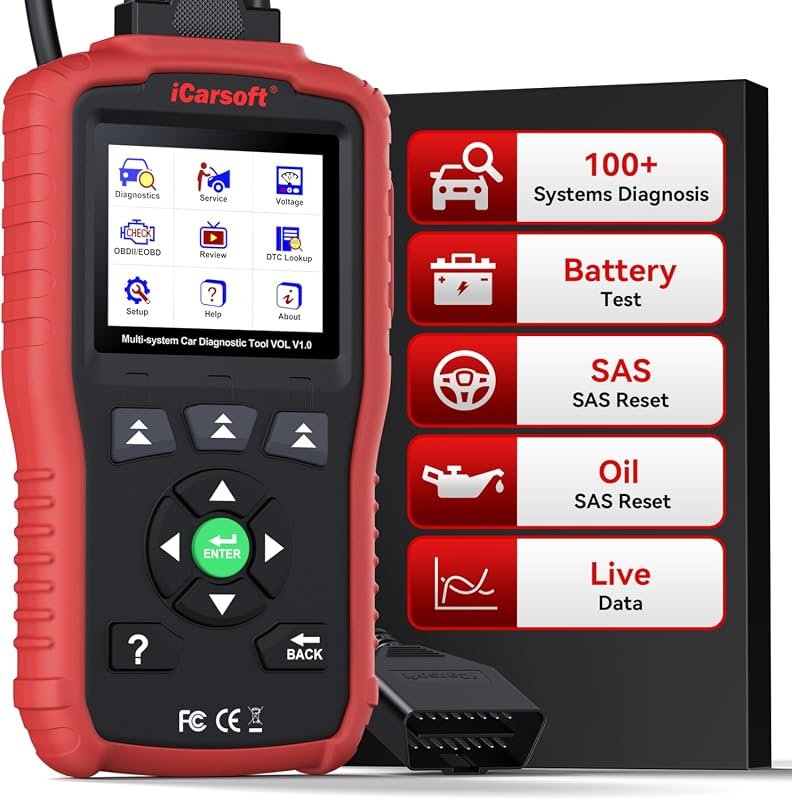 Best Overall
iCarsoft VOL V1.0 OBD2 Scanner for Volvo Saab, all-systems diagnostics, oil/SAS reset, live data, CAN-FD, lifetime updates
It offers the strongest all-around mix of fit, value, and practical daily use for Volvo owners.
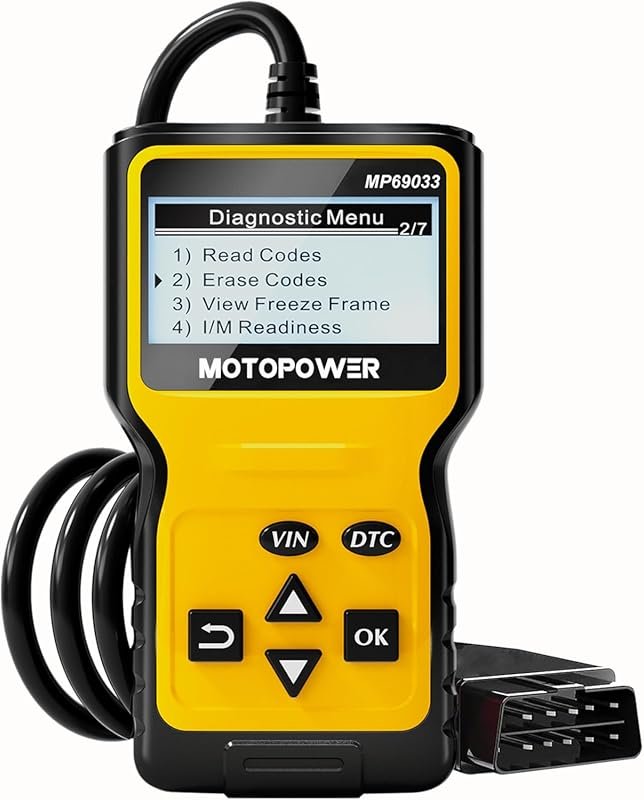 Best Value
MOTOPOWER MP69033 OBD2 Code Reader, engine fault scanner for all OBDII cars since 1996, CAN
It makes sense for owners who want a useful upgrade without paying more than necessary.
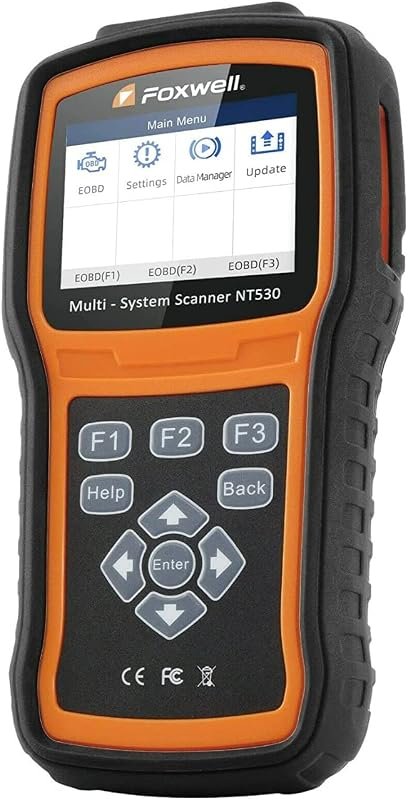 Best Premium Option
FOXWELL NT530 OBD2 Scanner for Volvo, bidirectional all-systems diagnostics, ABS bleed, SRS, EPB, oil reset
It is the pick I would compare first if build quality, features, and long-term ownership value matter most.
Author

Author

Evans Torres
I’m Evans Torres, an automotive engineer who loves Volvo cars. I graduated in Automotive Engineering from USC. I have worked in the car industry for years and now share my knowledge on The Volvo Life. I started this blog to connect with other Volvo fans. I offer tips, news, and advice to help you care for your car. My goal is to help you keep your Volvo in great shape and find all the best things about it. Join me as we discover everything Volvo has to offer!