



When scanner for Volvo is not working, the cause is usually connectivity or compatibility. Put ignition in ON (Position II), pair the right app/device, select the exact Volvo model-year, and update the scanner’s firmware. Generic ELM327 tools read engine only; Volvo modules need a Volvo-capable scanner.
Plugging in and seeing “no connection” or a blank module list happens a lot on Volvos. Most failures trace to Bluetooth pairing quirks, the wrong app, or using an engine-only reader on a Volvo that needs brand-specific access.
This guide shows how Volvo scanners connect, which models they cover, what functions need calibration, and which modules each tier can read. You’ll also get a quick step-by-step to recover a failed connection safely.
- Main point: Connection failures are usually app/pairing or model-year compatibility — not a broken Volvo OBD port.
- Best first step: Ignition ON (Position II), update scanner firmware, and pick the exact Volvo profile before scanning.
- Cost or value: $30 ELM327 reads engine only; $120–$250 Volvo-capable tools read ABS/SRS/TCM/CEM.
- Who it suits: DIY owners and tech-savvy drivers who want module-level Volvo diagnostics.
- When to get help: If multiple tools fail, check the OBD port fuse via your Volvo owner’s manual and consider a shop scan.
Connectivity Options: Bluetooth, Wi‑Fi, and USB — What Works Best on Volvos
Bluetooth, Wi‑Fi, and USB all work — but each has trade-offs. Bluetooth is convenient and stable on Android, while iPhone blocks classic SPP Bluetooth unless the adapter/app supports BLE or MFi. Wi‑Fi adapters work on iOS but require switching Wi‑Fi networks.

Handheld Volvo scanners (iCarsoft VOL II, Foxwell NT530) bypass phones entirely. Tablet-based tools (Autel MK808, Launch) use their own wired or wireless link and generally connect more reliably to Volvo modules.
For iPhone users, Bluetooth Low Energy (BLE) or Wi‑Fi adapters pair easiest with generic engine apps; brand-specific Volvo tools use their own app or device. Android users get the broadest Bluetooth support, but still need a Volvo-capable app/device for non-engine modules.
Below is a quick look at common options and phone support. Remember: phone compatibility doesn’t equal Volvo module access — that depends on the tool’s Volvo coverage.
Pick hardware based on both phone support and Volvo module access. If you need SRS/ABS/TCM, a Volvo-capable handheld or pro tablet is the safer bet.
| Scanner/Adapter | iOS app support | Android app support | Works offline? |
|---|---|---|---|
| iCarsoft VOL II (handheld) | N/A (no phone) | N/A (no phone) | Yes |
| Foxwell NT530 (handheld) | N/A (no phone) | N/A (no phone) | Yes |
| Autel MK808 (tablet) | N/A (built-in) | N/A (built-in) | Yes |
| YOUCANIC UCAN-II (BT) | YOUCANIC iOS app | YOUCANIC Android | Yes (most functions) |
| OBDLink MX+ (BT) | OBDLink, OBD Fusion | OBDLink, Torque | Yes (engine-level) |
| Generic ELM327 (BT/Wi‑Fi) | Some (Wi‑Fi/BLE only) | Many | Yes (engine-level) |
- Put ignition in ON (Position II). On push-button Volvos, press Start twice without the brake to wake all modules.
- Pair inside the app the tool requires. Many brand tools ignore phone-level pairing.
- Select the exact Volvo model-year. “Auto-detect” can miss CEM/ABS on some years.
- Update firmware and vehicle databases before scanning new EX/EC models.
Generic ELM327 readers and apps like Torque/OBD Fusion typically access engine data only. Reading Volvo ABS, SRS, TCM, CEM, and other modules requires a Volvo-capable scanner such as iCarsoft VOL II, Foxwell NT530, or a pro tablet like Autel MK808.
Volvo Model Compatibility: Which Scanners Actually Work by Year and Platform
Compatibility changes across eras. Pre-2004 Volvos use older K-line protocols that many modern readers don’t fully support for modules. 2004–2014 models mix CAN and legacy buses; mid-tier handhelds do well here.
2015+ SPA/CMA cars (XC90, XC60, S/V90, S/V60, XC40) use UDS on CAN; most recent Volvo-capable scanners read them, but advanced functions vary by brand. New EX30/EX40/EC40/EX90 EVs add newer protocols; full coverage is still catching up in consumer tools. This connects closely with is scanner for Volvo XC60 if you want to compare the topic in more detail.
Here is a summary of which tools are known to work well across Volvo eras and models.
If your tool shows only engine data on a newer Volvo, it’s likely not Volvo-capable for modules — not a bad OBD port. Choose a scanner with confirmed coverage for your exact year.
| Scanner | XC90 | XC60 | XC40 | S60/V60 | V90/S90 | EX30/EX40/EC40/EX90 | Pre‑2004 |
|---|---|---|---|---|---|---|---|
| iCarsoft VOL II | Full 2003–2022+ | Full 2009–2022+ | Full 2018–2022+ | Full 2001–2022+ | Full 2017–2022+ | Basic/limited (check updates) | Partial (engine+some) |
| Foxwell NT530 (Volvo) | Full 2003–2022+ | Full 2009–2022+ | Full 2018–2022+ | Full 2001–2022+ | Full 2017–2022+ | Basic/limited (updates needed) | Partial |
| Autel MK808 | Full 2003–2023+ | Full 2009–2023+ | Full 2018–2023+ | Full 2001–2023+ | Full 2017–2023+ | Improving; verify by VIN | Partial |
| YOUCANIC UCAN-II | Good (modules) | Good (modules) | Good (modules) | Good (modules) | Good (modules) | Basic/limited | Engine-level |
| OBDLink MX+ / ELM327 | Engine-level | Engine-level | Engine-level | Engine-level | Engine-level | Engine-level | Engine-level |
Wants ABS/SRS/TCM data on an XC90/XC60 at home, without paying a dealer scan each time.
Prefers Bluetooth/iPhone/Android but needs to confirm true Volvo module coverage before buying.
Needs multi-brand coverage with strong Volvo support to avoid no-connection callbacks.
Can a Volvo Scanner Be Used on Other Cars?
Yes — but capability changes by tier. Mid/pro tools like Autel MK808 support 40+ brands with deep access. iCarsoft VOL II focuses on Volvo/Saab at module level and offers basic OBD2 on other makes.

Bluetooth adapters (OBDLink MX+, ELM327) work across many brands for engine/OBD2 data. They won’t unlock Volvo-only modules, and they won’t unlock brand-only modules on other cars either.
Most “scanner won’t connect” complaints vanish once the Volvo is in ON (Position II). On push‑button cars, press Start twice without the brake — that wakes up the CEM and CAN bus so modules respond.
Cross-brand use is handy for families with multiple cars. Just remember: a tool that’s perfect for your Volvo may be basic on another make unless it’s a true multi-brand diagnostic platform.
For more on brand coverage across Volvo years, see our guide on whether scanners work with all Volvo models.
Does a Volvo Scanner Need Programming or Calibration?
No programming is needed to use a scanner. Plug in, update firmware, select the right model-year, and scan. Some service functions ask for calibrations afterward — steering angle sensor (SAS) reset, throttle adaptation, or TPMS relearn.
Updates matter. Newer EX/EC/SPA models receive protocol additions frequently. Many scanners update over Wi‑Fi or via PC/Mac. Autel continues working without a subscription, but updates require one after the first year. iCarsoft offers periodic free updates for supported lines.
If your tool struggles after an update, re-install the Volvo database or check the vendor’s update notes. We cover auto-update behavior here: do Volvo scanners update automatically.
Never perform coding or write/adaptation functions with a weak vehicle battery. Voltage dips can corrupt module data. Use a stable power source, and do not clear SRS/airbag faults unless the physical fault has been confirmed and repaired.
Some functions will ask for a post-repair calibration. We explain when and why here: does a Volvo scanner need calibration.
What Modules Can a Volvo-Capable Scanner Access?
Engine-only readers see just ECM. Volvo-capable tools reach critical systems like ABS, SRS, TCM, CEM, BCM, SAS, TPMS, and climate. Advanced tablets add service resets and limited adaptations on many models.
Use the table below to match the scanner tier to the modules you need to read. “Budget” = ELM327/OBDLink-level engine tools, “Mid-range” = iCarsoft VOL II/Foxwell NT530, “Advanced” = Autel MK808/Launch X431 class.
| Module | What it does | Budget | Mid‑range | Advanced |
|---|---|---|---|---|
| ECM (Engine) | Misfires, fuel trims, sensors | Yes | Yes | Yes |
| TCM (Transmission) | Shift logic, solenoids, temp | No | Yes | Yes |
| ABS/DTSC | Wheel speed, pump/valves | No | Yes | Yes |
| SRS/Airbag | Crash data, seat sensors | No | Yes (read/clear after fix) | Yes |
| CEM/BCM | Body electronics, lighting | No | Yes | Yes |
| SAS (Steering) | Angle sensor, calibration | No | Some resets | Resets + adaptations |
| TPMS | Tire sensors, relearn | No | Some relearns | Full relearn/service |
| Climate/IAM | HVAC, infotainment faults | No | Yes (varies) | Yes |
Reading codes is safe. Clearing SRS/airbag or ABS codes without fixing the root cause can mask a real safety fault. If an airbag light returns immediately, stop driving and get a qualified Volvo diagnosis.
How To Get a Non‑Working Volvo Scanner Connected
Most “not working” cases come down to ignition state, the wrong app/device combo, or outdated firmware. Work through these quick checks before assuming the OBD port or scanner is faulty. You’ll confirm power, pairing, profile selection, and software currency in minutes.
- Put the Volvo in ON (Position II): Key cars: turn to II. Push‑button cars: press Start twice without the brake. This wakes modules on the CAN bus.
- Connect the right way: Handhelds need no phone pairing. Bluetooth adapters should be paired inside their companion app; Wi‑Fi adapters require joining the adapter’s Wi‑Fi first.
- Select exact model-year: Pick your Volvo and year manually. Avoid “auto-detect” for first scans, then run a full-module scan.
- Update firmware/databases: Use the vendor updater or Wi‑Fi update. Reboot the tool and the app afterward, then retry the scan.
- Check basics: Verify vehicle battery ≥12.4V, inspect the OBD plug for bent pins, and check the OBD fuse in your Volvo owner’s manual (Volvo Support manuals).
Beware clone/counterfeit scanners — they often pair but fail to talk to Volvo modules. Buy from official stores only. If updates fail or the tool can’t read any modules on multiple cars, return it as defective.
iPhone users needing wireless engine-level data can use OBDLink MX+ or Wi‑Fi ELM with OBD Fusion, but for Volvo modules confirm iOS support here: scanners that work with iPhone. For broader Volvo coverage across years, see our explainer on working with all Volvo models and how auto-updates affect support.
💡 Evans Torres Tip: When a Volvo won’t talk to my scanner, I don’t chase the app first — I reselect the exact model-year and put the car in ON (Position II). On my XC90, that single step lights up ABS and CEM every time. If a tool still reads only the engine, it’s the wrong scanner tier — not a bad OBD port.
Frequently Asked Questions
This section clears up the most common sticking points behind “scanner not working” on Volvos — from Bluetooth pairing and iPhone quirks to model-year coverage, clones, and safe code clearing. Use it to double‑check the details that often get missed during setup.
Why won’t my Volvo scanner connect over Bluetooth?
iPhone blocks classic SPP Bluetooth, so your adapter must use BLE or Wi‑Fi with an iOS‑compatible app. Pair inside the scanner’s own app, not just in phone settings. Put the Volvo in ON (Position II), update firmware, and manually pick the model-year before scanning.
Which Volvo scanners work with iPhone?
iCarsoft VOL II and Foxwell NT530 are handheld (no phone needed). For wireless, tools like YOUCANIC’s adapter support iOS with their app. OBDLink MX+ works well for engine-level data on iPhone. For full Volvo modules, confirm iOS support with the specific brand/app first.
Can a Volvo-capable scanner read all modules on 2015+ SPA cars?
Many can, including Autel MK808/Launch and updated iCarsoft/Foxwell units. Coverage varies by function, so advanced adaptations may be limited. Keep the tool updated and always select the precise SPA model-year profile for the best results.
Do I need to program a new scanner before I can use it?
No programming is required to use a scanner. You may need a firmware/database update and to select your Volvo model-year. Some post-repair service functions require calibrations afterward (e.g., SAS reset), which the tool will guide you through.
Will my Volvo scanner work on other brands?
Pro tablets (Autel MK808/Launch) often support 40+ brands with deep access. iCarsoft VOL II focuses on Volvo/Saab and offers basic OBD2 elsewhere. Bluetooth ELM/OBDLink adapters provide engine-level data on most cars but not brand‑specific modules.
How can I tell if my scanner is a counterfeit?
Prices far below retail, poor packaging, missing serials, and update servers that reject your device are red flags. If the tool pairs but never reads Volvo modules — and fails on multiple cars — return it and buy from an authorized seller.
Where is the OBD2 port on my Volvo?
Typically under the driver-side dash near the knee area, sometimes behind a small panel. Exact location and fuse references appear in the owner’s manual. Check Volvo’s online manuals for your year and model to confirm placement and related fuses.
Is it safe to clear codes after I scan my Volvo?
Yes for non-safety systems once the fault is fixed. Do not clear SRS/airbag or ABS codes unless the physical issue is resolved; those lights can indicate safety‑critical conditions. If a code returns immediately, seek a qualified Volvo diagnosis.
Final Verdict
Most “scanner not working” issues on Volvos come down to the basics: ignition not in Position II, the wrong app/pairing path, or a tool that doesn’t actually speak to Volvo modules. Fix those first.
Choose a scanner tier that matches your needs. Engine-only ELMs are fine for quick checks; Volvo-capable handhelds and pro tablets unlock ABS, SRS, TCM, and CEM. Keep firmware up to date, select the exact model-year, and only clear safety codes after repairs.
My Top Picks at a Glance
Here are the three when scanner not working options I would check first if you want a faster buying decision.
These picks highlight the strongest overall choice, the best value option, and the premium-style pick for practical Volvo ownership.
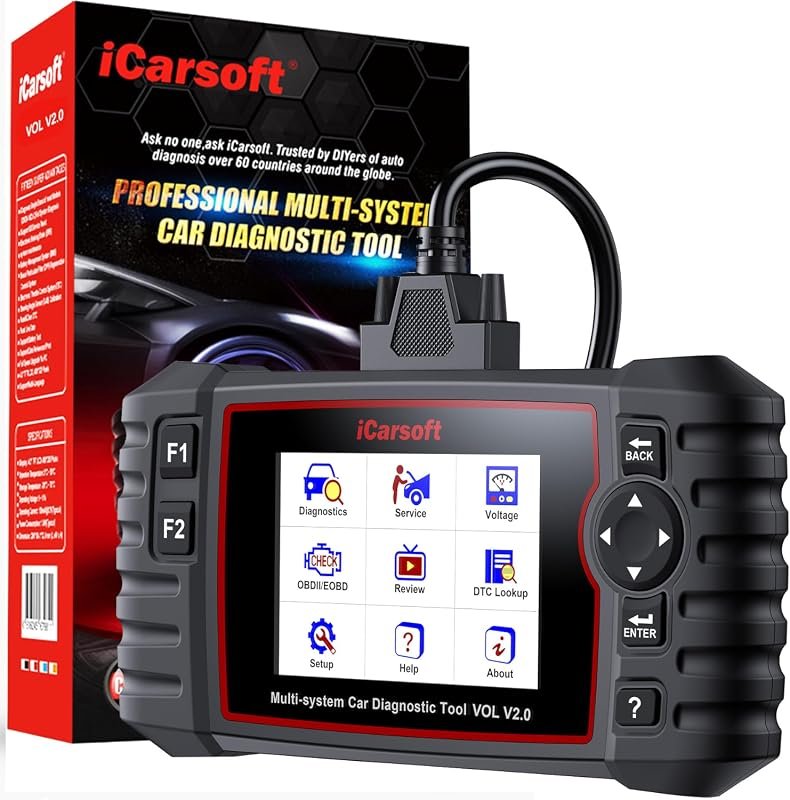 Best Overall
iCarsoft VOL V2.0 OBD2 Scanner for Volvo/Saab, full-system diagnostics, oil reset, ABS bleed, injector coding, Auto VIN.
It offers the strongest all-around mix of fit, value, and practical daily use for Volvo owners.
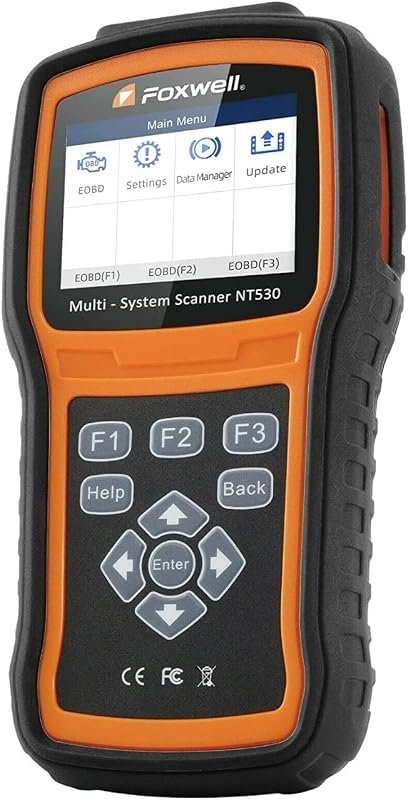 Best Value
FOXWELL NT530 for Volvo, bidirectional OBD2 scanner with all-system diagnostics, ABS bleed, SRS airbag, EPB, oil reset.
It makes sense for owners who want a useful upgrade without paying more than necessary.
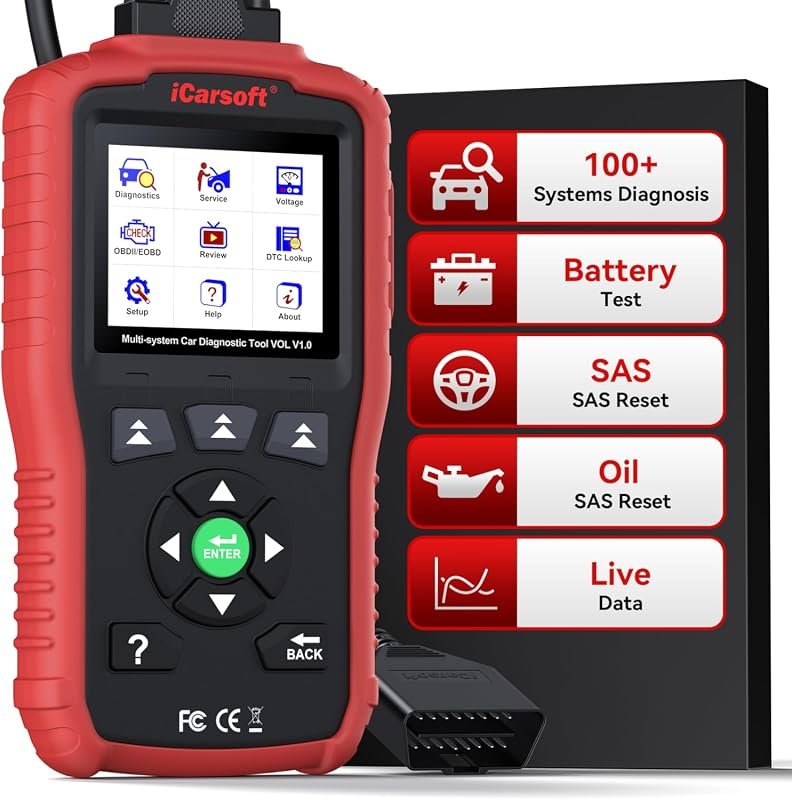 Best Premium Option
iCarsoft VOL V1.0 OBD2 Scanner for Volvo/Saab, full-system diagnostics with live data, oil/SAS reset, CAN-FD, lifetime updates.
It is the pick I would compare first if build quality, features, and long-term ownership value matter most.
Author

Author

Evans Torres
I’m Evans Torres, an automotive engineer who loves Volvo cars. I graduated in Automotive Engineering from USC. I have worked in the car industry for years and now share my knowledge on The Volvo Life. I started this blog to connect with other Volvo fans. I offer tips, news, and advice to help you care for your car. My goal is to help you keep your Volvo in great shape and find all the best things about it. Join me as we discover everything Volvo has to offer!