



Did scanner for Volvo need calibration? No—the scanner itself doesn’t require calibration. What does need calibrating are certain Volvo systems after parts or alignment work (e.g., steering angle sensor, TPMS). Keep your scanner’s firmware/software updated and follow each procedure’s on-screen preconditions.
A Volvo-focused scanner doesn’t need “calibration” to work; it either connects and reads modules or it doesn’t. What confuses many owners is that the scanner can command the car to perform calibrations after repairs—like a steering angle sensor reset after alignment, a TPMS relearn after tire rotation, or an electronic parking brake (EPB) service mode. This guide explains which scanners support those functions, which Volvo models and years they cover, what works with iPhone and Android, and how to safely run post-repair resets without bricking anything. You’ll also see where a mid-range handheld tool (iCarsoft/Foxwell) is enough and when advanced ADAS camera/radar calibration belongs at a shop with targets and Volvo software. This connects closely with can scanner for Volvo XC90 if you want to compare the topic in more detail.
- Main point: The scanner itself doesn’t need calibration; certain Volvo modules do after repairs (SAS, TPMS, EPB, throttle adaption).
- Best first step: Update scanner firmware and vehicle coverage, then verify model-year support before attempting any reset.
- Cost or value: Mid-range Volvo-capable tools ($120–$250) handle most resets; ADAS camera/radar requires pro equipment.
- Who it suits: DIY owners wanting service-light resets, SAS/EPB functions, and live data without a dealer visit.
- When to get help: Any radar/camera alignment, ride-height or complex transmission adaptations—use a Volvo-experienced shop.
Wants Bluetooth or handheld capability and plans to run SAS/EPB resets at home.
Needs a scanner that reads Volvo modules but can still pull basic OBD2 on other brands. You can also use can scanner for Volvo XC60 as a helpful next guide on the same ownership topic.
Just replaced pads, tires, or a sensor and needs guided calibrations without a dealer appointment.
Connectivity Options for Volvo Scanners: Bluetooth, WiFi, or USB
Bluetooth dongles pair with a phone app and are convenient for quick checks or logging. Handheld USB/standalone units are more reliable for Volvo-specific functions like EPB/SAS resets because they don’t depend on a phone. WiFi adapters offer stable throughput, helpful for long scans on newer SPA/CMA and EX/EC models. iPhone users should verify the app supports iOS before buying.

Bluetooth remains the easiest for casual use; a handheld tool is the safest pick for guided resets. Tablet-style advanced tools (e.g., Autel MK808) run their own software and skip phone pairing issues entirely, which can save time during a calibration session.
iOS blocks some low-cost BLE adapters from using advanced profiles. Confirm the exact scanner’s iOS app support before purchase. For details on phone pairing, see our guide on scanners that work with iPhone.
Here’s a quick view of common connectivity/app support by scanner type and whether you can run it without an internet connection.
| Scanner | iOS app | Android app | Works offline? |
|---|---|---|---|
| OBDLink MX+ (Bluetooth) | OBDLink / OBD Fusion | OBDLink / Torque Pro | Yes (most functions) |
| Generic ELM327 (Bluetooth) | OBD Fusion (check adapter list) | Torque Pro | Yes (basic only) |
| iCarsoft VOL II (handheld) | N/A (built-in) | N/A (built-in) | Yes (module scans/resets) |
| Foxwell NT530 (handheld) | N/A (built-in) | N/A (built-in) | Yes (module scans/resets) |
| Autel MaxiCOM MK808 (tablet) | N/A (built-in) | N/A (built-in) | Yes (updates need WiFi) |
Volvo Model Compatibility: Which Scanners Cover Which Years
Volvo protocol coverage differs by era. Pre-2004 models may require special coverage to read beyond engine codes. 2004–2014 (P1/P2/P3) cars generally work well with mid-tier Volvo-capable handhelds. 2015+ SPA/CMA cars (XC90 2015+, XC60 2018+, S/V60 2019+, XC40 2018+) add newer UDS protocols and many modules; advanced or updated mid-tier tools perform best. EX30/EX40/EC40/EX90 use newer EV architectures—confirm UDS support and the specific EV model listing in the tool’s changelog.
Use the table below as a high-level guide and still check the exact firmware’s supported list by VIN/year before buying.
| Scanner | Pre-2004 | 2004–2014 | 2015+ SPA/CMA | EX30/EX40/EC40/EX90 |
|---|---|---|---|---|
| OBDLink MX+ (Bluetooth) | Engine codes only | Engine codes only | Engine codes only | Engine codes only |
| Generic ELM327 | Engine codes only | Engine codes only | Engine codes only | Engine codes only |
| iCarsoft VOL II | Limited/varies | Good module access | Good (update first) | Partial/verify |
| Foxwell NT530 | Limited/varies | Good module access | Good (update first) | Partial/verify |
| Autel MaxiCOM MK808 | Better w/ make pack | Excellent | Excellent (UDS) | Growing support—verify |
Many owners assume any OBD2 tool reads everything. On Volvos, generic readers only see engine codes. Airbag, ABS, EPB, TPMS, CEM, and ADAS live in other modules that require Volvo-capable software to access.
Can a Volvo Scanner Be Used on Other Cars?
Yes—most Volvo-capable scanners can read generic OBD2 on virtually any modern car for engine and emissions codes. Mid-range and advanced tools often include multi-make software packs that unlock deeper module access on dozens of brands. Brand-specific handhelds (like iCarsoft VOL II for Volvo/Saab) still provide basic OBD2 on other makes but may not offer brand-level resets outside Volvo.

If your goal is one tool for multiple family cars, pick a multi-make unit or confirm add-on software availability. If your priority is Volvo-only depth at a lower cost, a Volvo-targeted handheld is usually the best value. For cross-brand scenarios, we compare trade-offs here: can a Volvo scanner be used on other cars.
Even multi-make tools vary by model-year depth. Always check the supported function list (SAS reset, EPB, TPMS relearn) for each brand you intend to service.
Here is a summary of realistic cross-brand expectations so you can match the tool to your garage and avoid surprises at repair time.
Volvo-focused handhelds excel on Volvos but are basic on other brands; multi-make tablets cost more but repay you if you service multiple vehicles annually.
| Scanner Type | On other brands | Volvo depth | Best use case |
|---|---|---|---|
| Generic Bluetooth dongle | Engine codes/live data | Shallow | Check-engine basics on any car |
| Volvo-specific handheld | Basic OBD2 | Strong | Volvo-first DIY with resets |
| Multi-make handheld | Moderate modules | Strong | Two or more brands, light resets |
| Pro tablet (Autel/Launch) | Deep modules | Excellent | Household fleet or enthusiast |
Does It Need Programming or Calibration? What Volvos Actually Require
The scanner itself requires no “calibration.” What you’ll perform are vehicle module calibrations or adaptations after specific repairs. Common Volvo examples: For related context, you may also want to read are scanner for Volvo V60.
- Steering Angle Sensor (SAS) reset: Needed after alignment, steering rack, or clock spring work; car must sit on level ground with wheels straight.
- EPB service mode: For rear pad/rotor replacement; retracts motors safely and resets position afterward.
- TPMS ID relearn: After swapping wheels/sensors; some models auto-learn during a drive cycle, others need a scanner routine.
- Throttle body/idle adaptation: After throttle or intake work; resets learned values for stable idle.
- Transmission adaptation reset (select models): Requires strict temperature and drive-cycle steps—best done by experienced users.
- ADAS camera/radar calibration: Requires targets, precise spacing, and level floors—this is professional equipment territory.
Before any calibration, update the scanner’s firmware and Volvo software pack, verify your model-year function list, and follow the on-screen preconditions exactly. Power stability matters—connect a smart charger if the procedure takes more than a few minutes.
Never clear SRS (airbag) faults or run ADAS calibrations unless the physical issue (wiring, sensor, bracket) is confirmed fixed. Incorrectly calibrated safety systems may not protect you in a crash.
Avoid clone/counterfeit scanners. Firmware updates often fail on clones and can corrupt module sessions mid-procedure. Buy from the brand’s authorized channels only.
- Use a 10A+ battery maintainer during lengthy calibrations to keep voltage in the 12.4–13.0V window.
- Park on level ground with wheels centered for SAS; doors closed, hood latched, and parking brake set.
- Record existing values before adaptations; take screenshots or save a full vehicle scan.
- Read the post-procedure drive-cycle (if any) and complete it in one outing.
Scanner “programming” of ECUs is not the same as running resets. Full ECU programming/coding typically requires Volvo VIDA/PTT and OEM-grade interfaces—not consumer scanners.
What Modules Can a Volvo-Capable Scanner Access?
Module access depends on tool tier. Budget Bluetooth adapters typically reach only the ECM (engine). Mid-range handhelds expand into ABS, SRS, EPB, TCM, CEM, BCM, and sometimes TPMS. Advanced tablets cover most or all body/chassis modules and offer guided functions. Use the table to set expectations before purchase.
| Module | What it does | Budget scanner | Mid-range | Advanced |
|---|---|---|---|---|
| ECM (Engine) | Check engine, emissions | Yes | Yes + live data | Yes + advanced PIDs |
| TCM (Transmission) | Shift logic, adaptations | No | Usually | Yes |
| ABS/BCM | Braking, wheel speeds | No | Yes | Yes + bleeds |
| SRS (Airbag) | Airbag/pretensioners | No | Yes | Yes |
| EPB | Electronic parking brake | No | Yes (service mode) | Yes |
| CEM/BCM | Central/body electronics | No | Often | Yes |
| TPMS | Tire pressure system | No | Basic relearn | Advanced functions |
| Climate/HVAC | Blend doors, sensors | No | Often | Yes |
How To Run a Basic Volvo Calibration (SAS Reset Example)
Steering angle sensor (SAS) resets are among the most common Volvo calibrations after wheel alignment or steering work. The process takes only a few minutes but has non-negotiable preconditions: level ground, wheels straight, stable battery voltage, and a model-year-supported scanner routine. Always save a full vehicle scan first.
- Prepare the car: Park on a level surface, center the steering wheel, engage the parking brake, shut doors/hood, and connect a 10A battery maintainer.
- Update and connect: Update your scanner’s Volvo software, plug into the OBD2 port, set ignition to ON (engine off) as instructed.
- Select the routine: Choose Volvo → your exact model/year → Chassis/ABS → Steering Angle Sensor → Reset/Calibrate.
- Follow prompts: Keep wheels straight, don’t touch pedals/steering unless asked. Confirm each step. Wait until the scanner shows success.
- Validate: Cycle ignition, clear associated DTCs if directed, and road-test with a short, straight drive. Re-scan to confirm no SAS/ABS faults return.
Before you choose a scanner or attempt a calibration, it helps to know how well these tools actually perform across models. For a real-world perspective on brand reliability and feature success rates, see our overview on whether scanners for Volvo are reliable.
💡 Evans Torres Tip: I keep a mid-range handheld (Foxwell NT530) in the garage mainly for EPB service and SAS resets on SPA-platform cars. The one time I skipped a battery maintainer during a long scan, voltage sagged and the routine aborted. Now I always clip on a smart charger first—zero hiccups since.
Frequently Asked Questions
These quick answers focus on calibration confusion, model coverage, and what’s safe to do at home. They complement the main guide with specifics on iPhone compatibility, EV support, update frequency, and when a professional shop with Volvo software is the smarter move.
Do Volvo scanners themselves need calibration before use?
No. Consumer scanners don’t need calibration. They either connect and read modules or they don’t. The “calibration” people mention refers to vehicle procedures (SAS reset, TPMS relearn, EPB service) performed through the scanner after repairs. Keep firmware up to date and verify your model-year support first.
Which calibrations can a DIY-friendly scanner perform on Volvos?
Typical routines include SAS reset, EPB service/relearn, throttle/idle adaptation, TPMS ID relearn, and service reminder reset. Some tools also offer brake bleed or transmission adaptation resets on select models. ADAS camera/radar calibration generally requires targets and a pro shop—don’t attempt that at home.
Can I run SAS or EPB routines with an iPhone and a Bluetooth adapter?
Sometimes, but verify app support. Many Bluetooth dongles with iPhone apps only handle engine codes. SAS/EPB resets usually need a Volvo-capable handheld or a pro-grade tablet. For platform-specific pairing advice, see our iOS guidance on scanners that work with iPhone.
Will a wrong calibration damage my Volvo?
Improper EPB or transmission routines can create faults; wrong ADAS calibrations risk safety. Reading data is safe; writing/adapting needs caution. Follow on-screen preconditions, maintain stable voltage, and don’t attempt ADAS calibrations without the proper equipment and environment.
Do these scanners work on EX30, EX40/EC40, and EX90?
Support is expanding. Many mid-range and advanced tools now include UDS coverage for EX/EC models, but depth varies (especially TPMS/EPB/ADAS). Always check the latest coverage notes for your exact EV model and software version before purchasing.
How often should I update my scanner?
Quarterly is a good rule for active DIY owners, or before any repair job. Updates add new model-year support and fix known bugs. Some brands include free updates for 1–3 years; after that, a paid plan may be required for ongoing coverage.
Why does my tool say “function not supported” on my Volvo?
Common reasons are outdated firmware, unsupported model/year, or a lower-tier tool limited to engine codes. Update the software, reselect the exact model-year, and confirm the function list. If still blocked, you may need a higher-tier scanner or a Volvo-capable handheld instead of a generic dongle.
Are scanners for Volvo actually effective and reliable?
Yes—when you pick the right tier. Volvo-focused handhelds and pro tablets are widely used by independent shops. Generic $30 adapters are fine for engine codes but won’t run Volvo resets. For owner feedback and brand impressions, review our take on whether scanners for Volvo work well.
Final Verdict
The scanner itself never needs calibration; your Volvo sometimes does after specific repairs. A Volvo-capable handheld or pro tablet handles common resets like SAS, EPB service, throttle adaptation, and TPMS ID relearns. Keep firmware current, stabilize battery voltage, and follow the on-screen preconditions. For camera/radar (ADAS) and complex adaptations, book a Volvo-experienced shop—those procedures require targets and exacting setups. Choose the scanner tier that matches your needs: Volvo-first handheld for affordable depth on one brand, or a multi-make tablet if you service multiple cars annually. Update first, confirm model-year support, and you’ll complete routine Volvo calibrations confidently at home.
My Top Picks at a Glance
Here are the three did scanner calibration options I would check first if you want a faster buying decision.
These picks highlight the strongest overall choice, the best value option, and the premium-style pick for practical Volvo ownership.
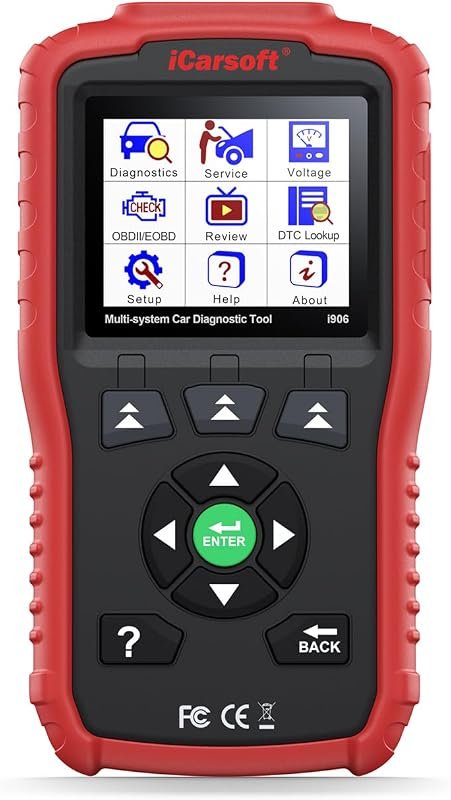 Best Overall
iCarsoft i906 OBD2 scanner for Volvo and Saab, reads engine, ABS, SRS, multi-system diagnostics
It offers the strongest all-around mix of fit, value, and practical daily use for Volvo owners.
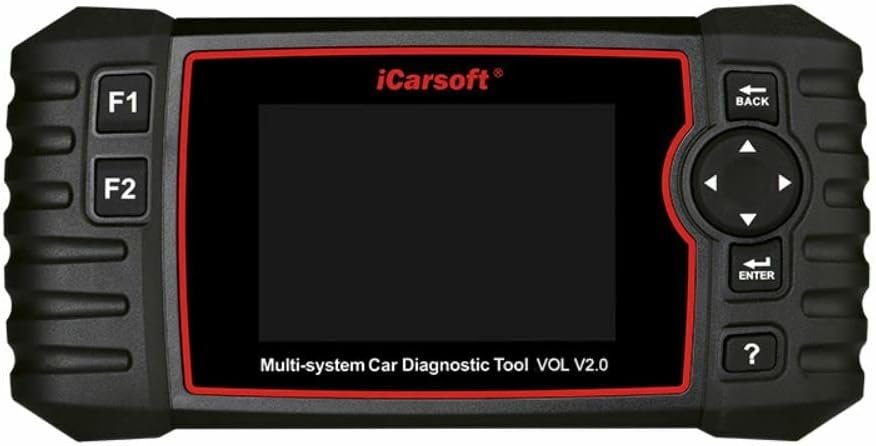 Best Value
iCarsoft VOL V2.0 diagnostic scanner for Volvo and Saab with ABS bleeding, oil reset, injector coding
It makes sense for owners who want a useful upgrade without paying more than necessary.
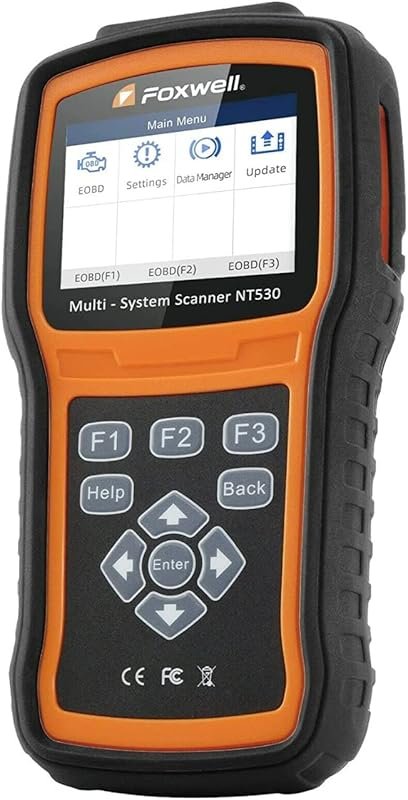 Best Premium Option
FOXWELL NT530 bidirectional OBD2 scanner for Volvo vehicles, all systems, ABS bleeding, SRS, SAS, EPB, oil reset
It is the pick I would compare first if build quality, features, and long-term ownership value matter most.
Author

Author

Evans Torres
I’m Evans Torres, an automotive engineer who loves Volvo cars. I graduated in Automotive Engineering from USC. I have worked in the car industry for years and now share my knowledge on The Volvo Life. I started this blog to connect with other Volvo fans. I offer tips, news, and advice to help you care for your car. My goal is to help you keep your Volvo in great shape and find all the best things about it. Join me as we discover everything Volvo has to offer!