



are scanner for volvo v60 — the best value pick for most V60 owners is the iCarsoft VOL II (reads Volvo-specific modules like ABS, SRS, and CEM). Foxwell NT530 is a strong alternative, while Autel MK808 suits advanced DIYers needing deeper data and special functions. Generic $20–$40 OBD2 dongles only read engine codes, so they miss many Volvo faults. Choose based on your V60’s model year (2011–2018 P3 vs 2019+ SPA) to ensure full compatibility.
A flashing airbag light, a stubborn “Time for Regular Service” reminder, or a transmission warning on a Volvo V60 is far easier to solve with the right scanner. The trick is picking a tool that talks to Volvo modules beyond the engine. That’s where Volvo-capable scanners (iCarsoft, Foxwell, Autel) beat generic readers. Model-year matters too: early V60s (2011–2018, P3 platform) and newer 2019+ SPA cars use different protocols. Below, you’ll find clear picks, compatibility notes, and step-by-step usage tailored to the V60. For another practical angle, see which scanner icarsoft for Volvo S80 2002.
- Main point: A Volvo-capable scanner (not a generic reader) is needed to access ABS, SRS, TCM, CEM, and reset service lights on a V60.
- Best first step: Match your V60’s platform: 2011–2018 (P3) or 2019+ (SPA), then choose iCarsoft VOL II or Foxwell NT530 for broad module coverage.
- Cost or value: $120–$200 buys all-module access; advanced tablets (Autel MK808) run $350–$600 but add special tests and better live data.
- Who it suits: DIY owners who want to diagnose and clear non-engine faults without paying a dealer diagnostic fee each time.
- When to get help: Programming, key coding, and software updates require VIDA/DiCE or dealer tools — book a Volvo specialist for those.
Wants to read all modules, interpret codes, and clear service reminders at home.
Prefers Bluetooth/app tools and live data to monitor battery, turbo boost, and fuel trims.
Needs a reliable, updatable scanner for common Volvo platforms without dealer software.
What an OBD2 Scanner for the Volvo V60 Does and How It Works
An OBD2 scanner connects to the V60’s diagnostic port (under the dash, driver side) to read fault codes, view live data, and reset certain reminders. All readers can access engine emissions codes (P0xxx) by federal mandate. The difference that matters: Volvo-capable scanners also talk to the rest of the car — ABS, SRS (airbag), transmission, climate, CEM, BCM, SAS, and more.

V60 owners benefit most from a tool that can scan every module. That’s because many Volvo warnings don’t trigger a check engine light. A general ELM327 dongle may show “no codes,” while a Volvo-aware tool reveals the real ABS or SRS fault causing the dash message.
The airbag (SRS) system stores faults separately from the engine. A generic reader won’t even see them — which is why many “no codes found” results still leave warning lights on in a Volvo.
OBD2 Scanner vs Volvo‑Specific Diagnostic Scanner: Why It Matters on a V60
Generic OBD2 tools only speak to the engine ECU. Volvo-specific scanners add manufacturer protocols that unlock modules like ABS, SRS, TCM (transmission), CEM (central electronics), BCM (brakes), SAS (steering angle), and others. On a V60, that’s the difference between guessing and knowing.
Real-world example: a “DSTC/ABS Service Required” message won’t appear in an engine-only scan. A Volvo-capable tool will pinpoint the wheel speed sensor, tone ring, or module fault. The same is true for parking brake warnings, climate blend-door issues, or lost key transponder sync (immobilizer).
Before buying, confirm the scanner’s Volvo coverage list includes your V60’s year and platform. P3 (2011–2018) and SPA (2019+) use different network protocols; newer SPA cars rely more on UDS messaging that not every budget tool handles well.
What a Volvo V60‑Capable Scanner Can Diagnose
The V60’s networked modules each manage a system — and each logs its own fault codes. A Volvo-capable tool lets you scan all modules in one session, save a report, and narrow down the fix efficiently. Expect access to live sensor data (like wheel speeds, fuel trims, ECT, boost), service-reset menus, and guided resets for items such as steering angle or TPMS on some scanners.

Owners often use this to clear a service reminder after an oil change, confirm a weak 12V battery is behind multiple random warnings, or verify an ABS sensor repair by watching live wheel-speed data on a test drive.
Here’s a quick reference that maps V60 systems to what you can see and whether you can reset it with typical scanner tiers. Use this to match your needs to the right tool and avoid overbuying features you won’t use.
Budget readers only cover the engine. Mid-range handhelds usually handle all modules and service resets. Advanced tablets add deeper data and special tests that save diagnostic time.
| System | What it detects | Reset possible? | Scanner tier needed |
|---|---|---|---|
| Engine (ECM) | Misfires, O2/AFR, EVAP, sensors | Yes (after repair) | Any (basic OK) |
| Transmission (TCM) | Shift faults, solenoids, temp | Clear codes only | Mid-range+ |
| ABS/DSTC | Wheel sensors, module faults | Yes (after repair) | Mid-range+ |
| SRS/Airbag | Seat, clock spring, module | Yes (after repair) | Mid-range+ |
| CEM/BCM | Lighting, locks, electrical | Clear codes | Mid-range+ |
| TPMS | Sensor IDs, low battery | Some relearns | Mid-range+/Advanced |
| Service reminder | Oil/maintenance counter | Yes (reset) | Mid-range+ |
| Battery/Charging | Voltage, alternator data | N/A | Any (better on advanced) |
Do Volvo OBD2 Scanners Work on All Volvo Models? V60 Year-by‑Year Notes
Coverage is excellent if you match the scanner to the car’s era. The V60 launched globally in 2011 on the P3 platform (U.S. 2015.5–2018), then moved to the SPA platform in 2019+. Most mid-range Volvo scanners handle both, but very cheap tools can struggle on SPA cars or miss certain resets.
For a 2011–2018 V60, iCarsoft VOL II and Foxwell NT530 are proven. For a 2019+ V60, aim for a scanner confirmed to support UDS and newer SPA modules; Autel MK808 and updated Foxwell/iCarsoft firmware typically do well. Fully electric EX/EC models use newer messaging; choose a scanner that explicitly supports them if you also service those cars. This connects closely with are scanner for Volvo worth it 2 if you want to compare the topic in more detail.
- Check the scanner’s latest firmware release notes for your exact V60 year before buying.
- Search Volvo forums for “[scanner model] + [your year V60]” to confirm real-world success.
- Update the scanner’s software the day you receive it — many ship with older firmware.
- Keep your V60’s 12V battery above 12.4V during scans to prevent communication drops.
The Best Types of Scanner for Volvo V60 Owners
Choosing the right form factor saves money and time. Basic code readers are inexpensive but engine-only. Bluetooth dongles plus a good app add live data and logging on your phone. Handheld Volvo-specific scanners deliver the best blend of all-module access and portability. Tablet-style units (Autel/Launch) add bigger screens, richer data, and special tests that speed diagnosis.
- Basic code reader: Cheap, engine-only. Good for quick emissions checks, not for Volvo warnings.
- Bluetooth/app (e.g., OBDLink MX+): Great live data and graphs. Limited on Volvo modules unless paired with a brand app that supports them.
- Handheld Volvo-capable (iCarsoft VOL II, Foxwell NT530): Reads/clears most Volvo modules, resets service/EPB on many models.
- Advanced tablet (Autel MK808/Launch X431): Deeper data, special tests, wider cross-brand coverage. Costs more.
Clone/counterfeit scanners are common. They often fail to connect to Volvo modules even though the menus look correct. Avoid “too-cheap” listings and buy from brand-authorized sellers only.
Best Scanner Brands for Volvo — Comparison Table
Brand reputation and update support matter as much as features. The table below compares popular models that V60 owners use successfully. Prices reflect typical U.S. street pricing and can vary with promotions. Check the maker’s coverage list for your exact year and trim, especially on 2019+ SPA cars where UDS support is required for full module access.
| Brand/model | Price | Volvo modules covered | Bluetooth/App | Verdict |
|---|---|---|---|---|
| iCarsoft VOL II | $150–$190 | ECM/TCM/ABS/SRS/CEM/BCM | No handheld app | Best value for V60 all-module reads |
| Foxwell NT530 (Volvo pkg) | $180–$230 | Wide Volvo module coverage | No handheld app | Solid mid-range, frequent updates |
| Autel MaxiCOM MK808 | $400–$600 | Extensive Volvo + 40+ brands | WiFi tablet | Advanced data/special tests |
| Topdon ArtiDiag | $250–$400 | Good coverage on newer Volvos | WiFi tablet | Strong features per dollar |
| Ancel VOD700 | $70–$120 | Engine + limited Volvo modules | No | Budget pick with real limits |
| YOUCANIC (UCAN-II) | $250–$350 | Multi-brand, decent Volvo reach | App-based platform | Subscription model; check Volvo depth |
Mid-range handhelds cover most V60 needs at the lowest cost. If you also work on other brands or want richer data, an Autel tablet is worth the jump. Budget tools can clear basic faults but may miss SRS/ABS on some years.
Volvo Model‑Based Scanner Guide (V60 Focus, Plus Common Cross‑Shops)
Picking by model-year is the cleanest path. For a V60 on the P3 platform (2011–2018), iCarsoft VOL II and Foxwell NT530 are dependable, affordable choices. For a 2019+ SPA V60, confirm UDS coverage — Autel MK808 or updated Foxwell/iCarsoft firmware usually deliver. V60 Recharge (T8 PHEV) owners should ensure the tool lists hybrid/BCM/BMS modules explicitly.
Cross-shopping scanners for an XC60 in the garage too? Our dedicated guide to a scanner for Volvo XC60 outlines the same P3 vs SPA split and recommended tools.
Are Volvo V60 Scanners Worth It, Reliable, and Safe to Use?
Yes — a Volvo-capable scanner typically pays for itself after one or two avoided diagnostic visits. Reliability is strong with reputable brands (iCarsoft, Foxwell, Autel) when bought from authorized sellers. Reading codes is safe; clearing SRS or ABS without confirming the repair is the only real risk. Avoid writing/coding functions unless you know the procedure.
Still on the fence? See our deeper value breakdown in are scanners for Volvo worth it for real-world savings scenarios.
iPhone Compatibility and Using Your Volvo Scanner on Other Cars
Bluetooth dongles (e.g., OBDLink MX+) pair well with iPhone via apps like OBD Fusion, but may not access Volvo-only modules. Handheld iCarsoft/Foxwell units don’t need a phone. Autel tablets run Android and update over WiFi. Most scanners provide basic OBD2 functions on non-Volvo cars; advanced manufacturer functions vary by brand and software license.
Before purchasing for iOS, confirm the exact app supports your dongle and Volvo functions you need. App store reviews often mention Volvo compatibility by year.
How to Use a Scanner on a Volvo V60 (Step‑by‑Step)
Getting accurate data depends on a stable connection and the right menu path. Set aside 10–20 minutes and ensure a healthy 12V battery. Start with a full vehicle scan and save the report before clearing anything. After a repair, re-scan and clear codes, then run the car and recheck to confirm the fix held. The steps below work with popular handhelds and tablets.
- Park and power: Park safely, switch ignition to ON (engine off) or accessory mode. Keep voltage above 12.4V.
- Plug in: Locate the OBD2 port under the driver side dash and connect the scanner firmly.
- Select car: Choose Volvo → V60 → correct model year/platform. Update software if prompted.
- Run full scan: Perform “Auto Scan/Health Check” to read all modules. Save the report.
- Analyze live data: Open relevant modules (e.g., ABS) and view sensor data to confirm faults.
- Repair, then clear: Fix the issue, re-scan, and clear codes only after confirming normal readings.
- Reset services: Use the Service menu to reset the oil/service reminder after maintenance.
Never clear SRS (airbag) faults until the physical issue is resolved. A cleared code won’t make a faulty airbag work in a crash. When uncertain, consult a Volvo specialist.
Why Your Volvo Scanner Isn’t Connecting (Quick Fixes)
Connection issues usually boil down to power, pairing, or software. Confirm the car’s 12V battery is healthy, ignition is ON, and the correct model-year is selected. For Bluetooth, remove old pairings and re-pair inside the app. Check the OBD port fuse if there’s no power. Finally, update the scanner’s firmware — many connection bugs are fixed in updates. You can also use OBD scanner for Volvo as a helpful next guide on the same ownership topic.
- Wrong app or license: Some dongles require the brand’s own app or an in-app Volvo add-on.
- Clone hardware: Look-alikes often fail on Volvo modules — return and buy authorized.
- Low voltage: Charge the car battery; below ~12.2V, comms become unstable.
Buying Guide: Which Scanner Should Volvo V60 Owners Choose?
Match features to your V60 and your repair style. For 2011–2018 cars, iCarsoft VOL II or Foxwell NT530 hit the sweet spot. For 2019+ SPA, confirm UDS support and consider Autel MK808 for its stronger data and broader brand coverage. Hybrid V60 Recharge owners should verify BMS/hybrid module support on the brand’s coverage list.
- Basic owner: OBDLink MX+ + OBD Fusion for engine data and emissions checks.
- DIY V60 (2011–2018): iCarsoft VOL II or Foxwell NT530 for all-module access and service resets.
- DIY V60 (2019+): Updated Foxwell/iCarsoft or Autel MK808 for robust SPA/UDS support.
- Advanced user/multi-brand: Autel MK808/MK906 or Launch X431 tablet.
For a broader perspective across Volvo models, see our main OBD2 scanner for Volvo overview.
Common Mistakes to Avoid — And When to See a Mechanic
Several pitfalls waste time and money. Skipping model-year confirmation leads to missing modules. Clearing codes before saving a report deletes valuable breadcrumbs. Buying clone tools creates phantom “no connection” problems. And chasing immobilizer or software updates with a consumer scanner isn’t realistic — that’s dealer/VIDA territory.
- Don’t clear first: Save a full report, then clear after the fix.
- Don’t ignore battery health: Low voltage spawns multiple false warnings.
- Don’t expect coding/programming: Use VIDA/DiCE or a dealer for those tasks.
- Stop and seek help if: You see repeated SRS, brake, or immobilizer faults after repair — book a Volvo specialist.
If you plan to work across several Volvo platforms regularly, our walkthrough on how to use a professional car scanner for Volvo covers pro-level workflows.
💡 Evans Torres Tip: I keep an iCarsoft VOL II in my V60 and always run a full “Auto Scan” before touching anything. I save the report, take a photo of any physical faults I find (like a cracked ABS sensor cable), then clear codes only after the repair. That habit has saved me from chasing ghosts and helped me spot a weak 12V battery before winter.
Frequently Asked Questions
This FAQ answers the most common Volvo V60 scanner questions: the best tool for your exact year, whether generic readers work at all, iPhone/Bluetooth compatibility, service light resets, safety when clearing codes, connection troubleshooting, and where to buy to avoid counterfeits. If you’re deciding between mid-range handhelds and advanced tablets, these answers help match features and budget to your V60’s platform and your DIY skill level.
What’s the best scanner for a Volvo V60?
For 2011–2018 V60s, iCarsoft VOL II or Foxwell NT530 offer strong all-module coverage at a fair price. For 2019+ SPA V60s, confirm UDS support — Autel MK808 is a great advanced option, while updated Foxwell/iCarsoft units also work well. If you only need engine/emissions checks, a Bluetooth dongle like OBDLink MX+ is fine, but it won’t read many Volvo-specific modules.
Will a generic OBD2 reader work on a V60?
Yes, but only for engine/emissions codes. A basic reader won’t see ABS, SRS, transmission, or CEM faults that commonly trigger V60 warnings. That’s why many owners “find no codes” yet still have messages on the dash. A Volvo-capable scanner is the right choice if you want to diagnose the whole car.
Does iCarsoft VOL II work on 2019+ V60 models?
Often yes, but ensure the unit’s software is updated and explicitly supports your exact year. SPA cars use more UDS-based communication, so updated firmware is essential. If in doubt, consider an Autel tablet (MK808) that clearly lists SPA coverage for all major modules on 2019+ V60s.
Can I use an iPhone with these scanners?
Bluetooth dongles like OBDLink MX+ pair with iPhone via apps such as OBD Fusion, but their Volvo module access is limited. Handheld iCarsoft/Foxwell units don’t require a phone. Autel tablets are standalone Android devices that update over WiFi. Always confirm iOS app compatibility before purchasing a Bluetooth scanner.
Can a scanner reset the Volvo V60 service reminder?
Most Volvo-capable scanners can reset the oil/service reminder on V60 models. Look for a “Service” or “Maintenance Reset” function in the Volvo menu. Reset only after completing the maintenance. If the reset fails, verify the correct model-year is selected and that the scanner’s software is current.
Is it safe to clear SRS or ABS codes with a scanner?
Clearing is safe after the physical fault is resolved. Never clear SRS or ABS codes just to hide a warning — those systems may not function properly in an emergency. Use the scanner to identify the faulty sensor/module, fix it, then clear and verify with a test drive and a second scan.
My scanner won’t connect to the V60 — what should I check?
Turn ignition ON, ensure 12.4V+ battery voltage, and verify the correct model-year selection. Re-pair Bluetooth devices inside the app, not the phone settings alone. Update the scanner’s firmware. If there’s still no power at the OBD port, check the OBD/fuse circuit. Finally, confirm you didn’t buy a clone scanner.
Where should I buy to avoid a counterfeit scanner?
Buy from the brand’s official store, authorized Amazon seller, or a reputable tool distributor. Be wary of listings far below normal pricing. Counterfeits often look identical, but fail to connect to Volvo modules or won’t accept firmware updates. Keep your receipt for warranty and software support.
Final Verdict
For a Volvo V60, a Volvo-capable scanner is the right tool — not a generic OBD2 reader. Match by year: iCarsoft VOL II or Foxwell NT530 work well on 2011–2018, while 2019+ SPA cars benefit from updated Foxwell/iCarsoft firmware or an Autel MK808 for broader UDS support. Start with a full scan, save the report, repair the fault, then clear codes. If you need programming, key coding, or software updates, book a Volvo specialist or dealer. Buying authorized and keeping firmware current ensures reliable module access and a fast path from warning light to confirmed fix.
My Top Picks at a Glance
Here are the three are scanner options I would check first if you want a faster buying decision.
These picks highlight the strongest overall choice, the best value option, and the premium-style pick for practical Volvo ownership.
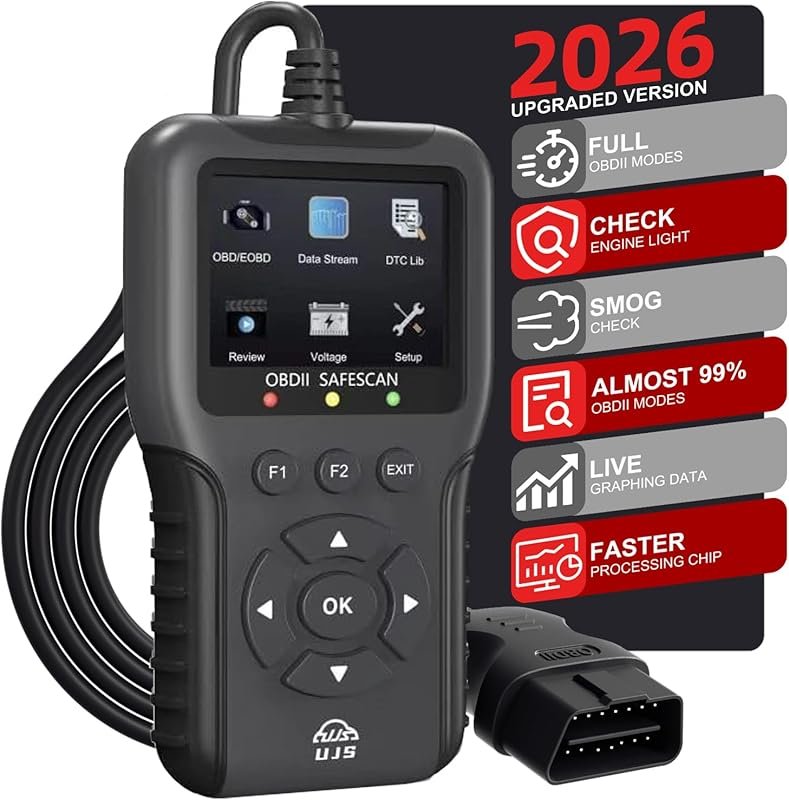 Best Overall
2026 Enhanced OBD2 Scanner with Live Data, 65,000+ Codes, I/M Readiness, Battery Voltage Test for 1996+ Vehicles
It offers the strongest all-around mix of fit, value, and practical daily use for Volvo owners.
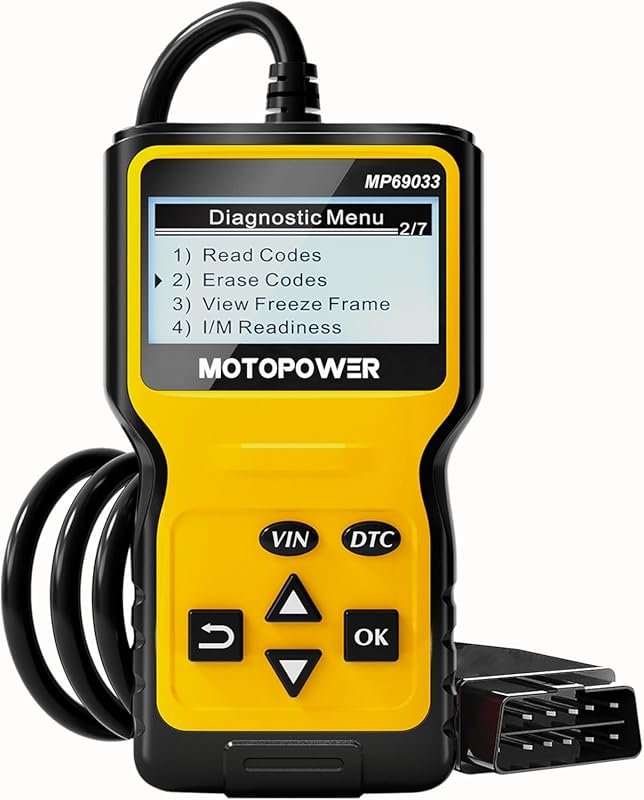 Best Value
MOTOPOWER MP69033 OBD2 Scanner reads and clears engine codes, CAN diagnostics, I/M readiness, 1996+, Yellow
It makes sense for owners who want a useful upgrade without paying more than necessary.
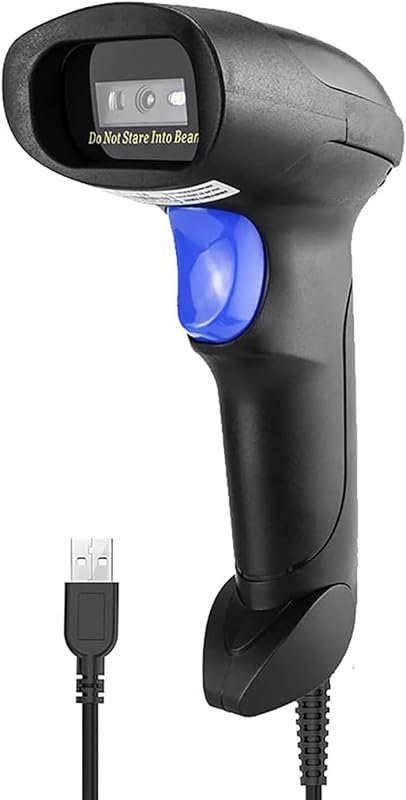 Best Premium Option
NetumScan USB 1D Barcode Scanner reads UPC from screens, handheld CCD, plug-and-play 1.8m cable
It is the pick I would compare first if build quality, features, and long-term ownership value matter most.
Author

Author

Evans Torres
I’m Evans Torres, an automotive engineer who loves Volvo cars. I graduated in Automotive Engineering from USC. I have worked in the car industry for years and now share my knowledge on The Volvo Life. I started this blog to connect with other Volvo fans. I offer tips, news, and advice to help you care for your car. My goal is to help you keep your Volvo in great shape and find all the best things about it. Join me as we discover everything Volvo has to offer!