


You’re driving. Your favorite song is on. Then—silence. No music. No navigation. No turn signal sound.
It’s like your Volvo just decided to go mute.
Annoying? Totally. But you’re not the only one. A Volvo XC60 sound not working problem can show up in older XC60s as well as newer models with Sensus or Google built-in. Sometimes only Bluetooth or navigation goes silent; other times every cabin sound disappears.
Let’s fix this together—no confusing tech talk, just a logical order that helps you rule out the easy causes before paying for parts.
QUICK ANSWERIf your Volvo XC60 has no sound, first test another audio source, confirm mute and volume settings, and restart the infotainment system that applies to your model year. If music, navigation, turn-signal/system sounds and phone audio are all dead, check the 12V electrical system and scan the vehicle for stored module faults before replacing the amplifier or speakers.
KEY TAKEAWAYS
- One source silent: start with the source, Bluetooth connection or navigation/system-volume settings.
- Everything silent: restart the infotainment display, then investigate power, fuses, amplifier communication and stored fault codes.
- 2022–2026 Google built-in XC60: the center-display restart is the first software reset to try; the connectivity-module reset is more relevant when connectivity problems occur too.
- 2018–2021 Sensus XC60: source switching, phone/Bluetooth checks and Sensus troubleshooting are more appropriate than copying newer Google-system reset instructions.
Volvo XC60 Sound Not Working? Common Causes and Fixes
If your Volvo XC60’s sound isn’t working, the fastest way to diagnose it is to identify what is silent. A Bluetooth-only problem points in a different direction than an XC60 with no music, no navigation voice and no system sounds at all.
| What You Notice | Most Useful First Check | What to Check Next |
|---|---|---|
| Bluetooth connects but music is silent | Switch to radio or another source, then reconnect the phone | Bluetooth media permissions, phone media volume and pairing |
| Navigation voice is silent but music works | Adjust navigation/guidance volume while directions are active | System-volume settings and infotainment restart |
| Music, navigation and system sounds are all silent | Restart the applicable infotainment system | 12V power, fuses, amplifier/module faults and diagnostic scan |
| Sound loss happens with internet/connectivity problems | Restart the center display first | On supported newer XC60s, restart the connectivity module while parked |
| Sound cuts out after battery warnings or low voltage | Test the 12V battery and charging system | Read stored codes and inspect power/ground connections |

Start Here: 5 Quick Checks Before Deeper Diagnosis
Restart the Infotainment System
First, try restarting the system. Like a frozen phone, infotainment software can stop responding. On newer Google built-in XC60s, Volvo documents restarting the center display by holding the home button below the display until the screen turns off and the Volvo logo appears.
Check the Active Audio Source
Make sure the system is not muted and switch from Bluetooth to radio or another available source. If one source works and another does not, the problem is more likely source-specific than a failed amplifier.
Check Bluetooth, Navigation and System Volumes Separately
A Volvo can have separate behavior for media, guidance, phone and other system sounds. If music works but navigation is silent, adjust the volume while a navigation instruction is actively playing.
Look for Battery or Electrical Symptoms
Sometimes a weak 12V battery, unstable charging voltage or a poor connection can create electronic symptoms that look like an audio failure. If you also see battery warnings, slow starting, repeated resets or dim lights, test the 12V system.
Scan Before Replacing the Amplifier
If every audio source is dead after the simple checks, read stored fault codes with a Volvo-capable scan tool. A full-system scan can give you a better direction before you spend money on an amplifier, wiring repair or other module.
MODEL-YEAR NOTEDo not use one reset procedure for every XC60 generation. Volvo’s current center-display and connectivity-module instructions apply to newer infotainment architectures, while Sensus-equipped and older XC60s have different menus and troubleshooting paths.
No Sound From Navigation in Volvo XC60
If you’re experiencing no sound specifically from the navigation system in your Volvo XC60, the issue can be isolated to guidance volume or the infotainment audio path.
Check whether navigation volume is muted or too low. Adjust the volume while the system is actively giving a direction. If music plays normally but navigation stays silent, review system-volume settings before assuming the amplifier has failed.
Volvo XC60 Bluetooth Connected but No Sound
If Bluetooth shows as connected but there is no media sound, switch to radio first. If radio works, reconnect the phone, confirm that media streaming is allowed for that device, and check the phone’s own media volume.
For Sensus-equipped XC60s, Volvo’s troubleshooting guidance also recommends temporarily switching to another media source and then switching back when the volume control appears responsive but audio behavior is wrong.
Volvo Turn Signal Sound Not Working
If the turn-signal sound disappears together with music, navigation and other cabin sounds, treat it as a broader system-audio problem rather than assuming the turn-signal mechanism itself is faulty. Restart the infotainment system and check for other electrical or module symptoms.
If only one system sound is missing while music and other alerts work, review the relevant system-volume settings and have the vehicle diagnosed if the problem continues.
Why Does the Volvo XC60 Lose Sound?
If your Volvo XC60 suddenly goes quiet, it can be frustrating. There are a few common patterns that can help narrow it down before you start replacing hardware.

MOST LIKELY CAUSES
Sometimes, the software in your car’s system glitches. It’s like when your phone freezes. A restart can clear a temporary problem. In other cases, the audio amplifier, wiring, a fuse, a power supply issue or another module can be involved.
A weak battery or loose electrical connection can also cause problems. These are trickier because several unrelated warnings or electronic glitches may appear at the same time.
Lastly, check the simple settings. Sometimes the system is muted by accident, Bluetooth is connected to the wrong source, or the phone is connected without media playback.
How to Fix Volvo XC60 Sound Not Working Step by Step
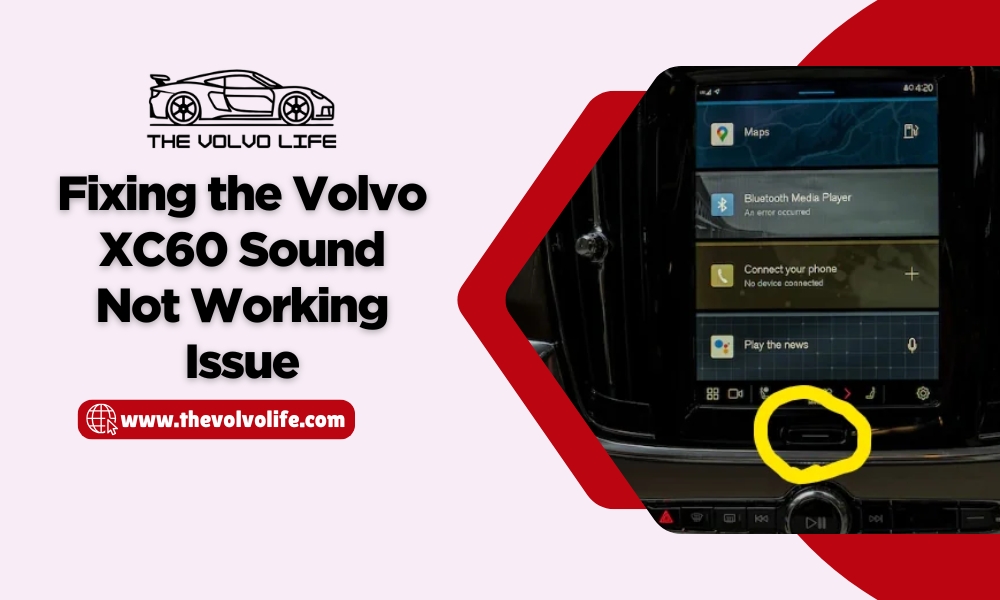

1. Restart the Center Display on Newer Google Built-In XC60s
For newer XC60s with Google built-in, Volvo’s current support guidance says to press and hold the home button below the center display until the display turns off. When the Volvo logo appears, the display is restarting.
This is the first software reset I would try when the center display freezes, apps misbehave or all audio disappears at the same time.
OFFICIAL VOLVO STEPUse the center-display restart before trying more invasive electrical resets. Read Volvo’s center-display restart instructions.
2. Troubleshoot Sensus XC60 Audio Differently
If you have a 2018–2021 XC60 with Sensus, do not assume the Google built-in troubleshooting steps are identical. Volvo’s Sensus troubleshooting guidance specifically notes that switching temporarily to another media source and then switching back can resolve some volume-control problems.
If Sensus problems continue, Volvo also documents a factory reset as a later troubleshooting option. A factory reset removes personal settings and paired phones, so use it after simpler checks rather than as the first step.
3. Use the Connectivity-Module Reset Only When It Fits the Symptoms
On supported newer XC60s, Volvo documents restarting the vehicle’s connectivity module with the max-defroster button. This procedure is aimed at connectivity problems such as loss of internet connection, so it makes the most sense when the sound problem appears together with connectivity symptoms.
SAFETY NOTEVolvo says the vehicle must be parked when restarting the connectivity module because an emergency-assistance-related automatic collision alarm is temporarily disabled during the restart. Read Volvo’s connectivity-module instructions.
4. Check for Software Updates
Modern Volvo infotainment systems depend heavily on software. If the problem keeps returning after a restart, check whether your XC60 has an available update and review any current Volvo service guidance for your model year.
For Sensus vehicles, Volvo’s support material also suggests discussing a software update with a Volvo workshop when infotainment problems continue.
5. Look for a 12V Battery or Low-Voltage Pattern
Sometimes a sound problem is only one symptom of unstable 12V power. If audio trouble appeared with a battery warning, dim lights, slow starting, random resets or other electrical issues, test the battery and charging system instead of focusing only on speakers.
For a deeper battery troubleshooting guide, read Volvo 12V Battery Critical Charging Fault: Causes and Solutions.

BATTERY DIAGNOSIS PICK
TOPDON BT200 Battery Tester
If your XC60 sound problem appears with low-voltage or charging symptoms, a battery tester is more useful than guessing. The BT200 is designed to test battery condition plus cranking and charging performance.
6. Check Fuses, Amplifier Power and Stored Fault Codes
If none of the above works and the XC60 remains completely silent, the amplifier or another audio-related module may need diagnosis. Before replacing expensive parts, inspect relevant fuses and power/ground connections and perform a full-system scan.
A generic engine-code reader may not be enough for this job. A Volvo-focused or all-system diagnostic tool is more useful because the fault may be stored outside the engine control module.

BEST FIT FOR VOLVO OWNERS
iCarsoft VOL V3.0 for Volvo/Saab
A Volvo-focused diagnostic scanner is a strong match for this problem because it can help investigate supported vehicle modules instead of only reading generic engine codes.

PREMIUM ALL-SYSTEM DIAGNOSTIC OPTION
Autel MaxiCOM MK808S
For owners who want broader multi-system diagnostics than a basic code reader, the MK808S is a more advanced option for reading supported vehicle modules, viewing live data and carrying out supported service or active-test functions.
XC60 Sound Issues by Model Year
The exact troubleshooting path depends on the infotainment generation. This is why a fix that works on a 2026 XC60 may not apply to a 2012 model.
| Model Year / System | Common Pattern | Best First Direction |
|---|---|---|
| 2012 XC60 / older audio system | Hardware, fuse, wiring, amplifier or source/settings problem | Check source/settings, fuses and power; use Volvo-capable diagnostics before replacing the amp |
| 2018–2021 XC60 / Sensus | Media source, phone/Bluetooth, volume behavior or infotainment software issue | Switch media source, check phone settings, use Sensus troubleshooting; factory reset only if needed |
| 2022–2026 XC60 / Google built-in | Center-display/software glitch; sometimes connectivity symptoms occur too | Restart center display first; use connectivity-module restart only when relevant |
| Any year with battery warnings | Low or unstable 12V power may affect multiple electronic systems | Test battery/charging system and scan stored faults |
2026 Volvo XC60 Sound Not Working
If you drive a 2026 Volvo XC60 and the sound stops, start with the center-display restart and basic source/volume checks. If the problem appears together with internet or connectivity trouble, the connectivity-module procedure may also be relevant. If audio stays completely dead, scan the vehicle before assuming the amplifier has failed.
2012 Volvo XC60 Sound Not Working
For an older 2012 XC60, prioritize the audio source, settings, fuses, wiring, amplifier power and Volvo-capable diagnostics. Do not copy newer Google built-in reset instructions to an older infotainment system.

OPTIONAL 2014–2018 XC60 INFOTAINMENT UPGRADE
Touchscreen Navigation Head Unit for Select Volvo XC60 Models
If diagnosis shows that you are dealing with an older infotainment setup and you are considering an upgrade rather than simply resetting the factory system, this touchscreen head-unit option is listed for select 2014–2018 Volvo XC60 applications.
Sound Not Working in Volvo XC90
While this guide focuses on the XC60, an XC90 can show similar symptom categories—software, source/settings, power supply, wiring or amplifier/module faults. Use the instructions written for your exact XC90 model year rather than assuming the XC60 procedure is identical.
When to Stop DIY Troubleshooting
GET PROFESSIONAL DIAGNOSIS IF
- All audio remains dead after the correct infotainment restart.
- The car has repeated low-voltage, communication or electrical warnings.
- A fuse blows again after replacement.
- You have water intrusion, burning smell, damaged wiring or an overheated component.
- A full-system scan reports amplifier or communication faults you cannot safely test.
Replacing an amplifier because “there is no sound” can be expensive guesswork. Diagnose power, ground, communication and stored codes first.
Related Volvo XC60 Guides
Video: Volvo XC60 Sound Not Working
If you prefer a visual walkthrough, the existing video on this page can stay as an additional troubleshooting reference.
💡 Evans Torres Tip: On every Volvo I have owned, I always keep a full digital service record from day one. When something goes wrong — and eventually something always does — having that history makes diagnosis faster and often saves money at the mechanic. Start your records today, even if the car is not new.
Frequently Asked Questions
How do I reset my Volvo XC60 sound system?
On newer XC60s with Google built-in, start by restarting the center display: press and hold the home button below the display until the screen turns off and the Volvo logo appears. Older Sensus-equipped and earlier XC60s use different troubleshooting paths, so match the procedure to your model year.
How do you unmute the sound on a Volvo XC60?
Turn up the volume, confirm the infotainment system is not muted, switch to another source such as radio, and check the connected phone’s media volume. If only Bluetooth is silent, disconnect and reconnect the phone.
Why did all the sound in my Volvo XC60 suddenly stop?
A sudden loss of all sound can be caused by an infotainment software glitch, low-voltage/electrical issue, amplifier or module fault, or a problem in the audio signal path. Restart the infotainment system first, then scan for stored faults if the silence continues.
Why does Bluetooth connect but play no sound in my XC60?
The phone may be connected without media playback, the wrong source may be active, or the phone’s own media volume may be too low. Test the radio first; if radio works, focus on Bluetooth settings and pairing.
Can a weak 12V battery cause Volvo XC60 infotainment problems?
Low or unstable 12V power can coincide with multiple electronic symptoms. If the sound issue appears together with battery warnings, slow starting, dim lights or repeated electronic resets, test the battery and charging system.
Should I reset the TCAM when my XC60 has no sound?
Not automatically. Volvo describes the connectivity-module restart as a troubleshooting step for connectivity problems. Use the center-display restart first for a general infotainment issue; consider the connectivity-module reset when internet or connectivity symptoms are also present, and only while parked.
Do I need a new amplifier if my Volvo XC60 has no sound?
Not necessarily. A failed amplifier is one possibility, but you should check settings, the correct infotainment reset, 12V power, fuses, wiring and stored module faults before replacing an expensive amplifier.
What diagnostic tool is useful for a Volvo XC60?
For this specific problem, a Volvo-capable full-system scanner is more useful than a basic engine-code reader because audio or communication faults may be stored in modules outside the engine ECU. Confirm coverage for your exact XC60 model year before buying.
Sources & Verification
Primary Sources Used for the Updated Troubleshooting Steps
- Volvo Support — Restarting the XC60 center display
- Volvo Support — Restarting the XC60 connectivity module
- Volvo Support — Troubleshooting the Sensus infotainment system
- Volvo Support — XC60 sound settings
- iCarsoft — VOL V3.0 specifications
- Autel — MaxiCOM MK808S specifications
- TOPDON — BT200 specifications
Final Thoughts: Let’s Get That Sound Back
A silent Volvo is no fun. The good news is that many Volvo XC60 sound not working complaints can be narrowed down without immediately replacing expensive audio parts.
Start with the symptom: is only Bluetooth silent, only navigation silent, or is every sound gone? Then use the correct troubleshooting path for your XC60 generation. On newer models, restart the center display first. On Sensus models, check the source, Bluetooth and Sensus-specific troubleshooting. If the problem survives those checks, move to 12V power, fuses and a full-system diagnostic scan.
If you’ve found a model-year-specific fix that solved your XC60 audio problem, share it in the comments. A precise year, infotainment system and symptom can help other Volvo owners troubleshoot faster.
My Top Picks at a Glance
These three tools cover different parts of XC60 sound troubleshooting. You do not need all three—choose the one that matches your symptoms and how deeply you want to diagnose the vehicle.
AFFILIATE DISCLOSUREAs an Amazon Associate, The Volvo Life may earn from qualifying purchases. Product availability, pricing and specifications can change. Always confirm compatibility with your exact Volvo XC60 model year before ordering.
View on Amazon
TOP RELATED PICK
iCarsoft VOL V3.0
Best match for a Volvo owner who wants deeper diagnostics than a basic generic OBD-II reader.
View on Amazon
PREMIUM OPTION
Autel MaxiCOM MK808S
A higher-end all-system scanner for serious DIY users, enthusiasts and multi-car households.
View on Amazon
ELECTRICAL PICK
TOPDON BT200
A focused choice when the sound problem appears alongside weak-battery, charging or cranking symptoms.
BUYER CHECKDo not promise that a scanner will “fix” the sound. The better conversion message is that it can help identify stored faults and reduce guesswork. That keeps the recommendation credible and lowers the chance of disappointing buyers.
