



Whose scanner for volvo xc40 — the iCarsoft VOL II is the best value for reading XC40-specific modules (ABS, SRS, CEM) without dealer tools. For app lovers, the Autel MK808 (tablet) offers broader features. Avoid $20 ELM327 readers — they only read engine codes.
Shopping a code reader for a Volvo XC40 raises a specific hurdle: generic OBD2 tools see engine codes only, while most XC40 faults live in other modules like SRS, ABS, and CEM. That mismatch is why many owners buy twice.
This guide compares scanner types and brands that actually talk to Volvo modules, explains model-year compatibility, and shows exactly how to use one safely on an XC40. For related context, you may also want to read is scanner for Volvo XC60.
- Main point: Choose a Volvo-capable scanner (iCarsoft VOL II, Foxwell NT530, Autel MK808) to access XC40 modules beyond the engine.
- Best first step: Verify your exact XC40 year/trim in the scanner’s compatibility list before buying.
- Cost or value: Expect $120–$230 for mid-tier handhelds; $450–$800 for pro-grade tablets with live data and special functions.
- Who it suits: DIY owners who want to read all modules and reset the service light at home.
- When to get help: For coding/programming, key work, or persistent SRS faults, use a Volvo specialist or dealer.
You want to read and clear ABS/SRS faults and reset the service reminder without booking a dealer visit.
You handle basic maintenance and want live data, battery/charging info, and module-level scans.
You need reliable Volvo module access on XC40 and other modern SPA/CMA cars, without factory tools. If you are comparing similar topics, did scanner for Volvo need calibration is also worth checking.
What an OBD2 Scanner for the Volvo XC40 Actually Does
An OBD2 scanner reads diagnostic trouble codes and data from the XC40 via the port under the dash (left of the steering column). Any tool can read emissions-related engine codes; the difference is whether it reaches Volvo modules. This connects closely with is scanner for Volvo XC90 if you want to compare the topic in more detail.

Volvo-capable scanners query networks beyond the engine, including ABS, SRS (airbag), TCM (transmission), CEM (central electronics), BCM, SAS, and climate. That’s how you find the real root cause of most XC40 warnings.
On an XC40, a generic reader may show “No codes” while the ABS or SRS light is on. That’s normal behavior for basic tools — they don’t speak the Volvo-specific protocols used by non-engine modules.
OBD2 Scanner vs Volvo-Specific Diagnostic Scanner for XC40
A basic OBD2 reader only talks to the engine (ECM) using universal PIDs. A Volvo-specific scanner speaks additional protocols and can interrogate dozens of XC40 modules through the CAN bus. You can also use do scanner for Volvo exist as a helpful next guide on the same ownership topic.
For real-world ownership, that difference decides whether you can clear an SRS fault after a repaired seat connector or just stare at a light.
Here is a quick comparison to set expectations for XC40 owners.
Volvo-capable tools reveal faults in brakes, airbags, and body electronics — where most XC40 issues appear — so they prevent misdiagnosis and repeat parts swaps.
| Capability | Generic OBD2 Reader | Volvo-Capable Scanner |
|---|---|---|
| Engine (ECM) codes/data | Yes | Yes |
| ABS/Brake module | No | Yes |
| SRS/Airbag module | No | Yes (with caution) |
| Transmission (TCM) | No | Yes |
| CEM/Body electronics | No | Yes |
| Service light reset | Usually No | Yes (model-dependent) |
| Live data across modules | Limited | Broad |
| Special functions/adaptations | No | Some (pro tools more) |
What a Volvo XC40 Scanner Can Diagnose
Module-level access lets you see faults and live values for systems that trigger most dashboard messages. Typical wins: confirming a failed wheel speed sensor, identifying a seat belt tensioner fault, or verifying low-voltage events.

Mid-tier tools handle service resets, SAS calibrations, and basic adaptations. Professional tablets expand into guided tests and more bidirectional controls.
Use the grid below to map features to the right scanner tier for your needs.
| System | What it detects | Reset possible? | Scanner tier needed |
|---|---|---|---|
| Engine/Emissions | Misfires, O2 sensors, EVAP | Yes | Any (basic OK) |
| ABS/ESC | Wheel sensors, pump, yaw rate | After repair | Mid-tier+ |
| SRS/Airbag | Seat sensors, pretensioners | After verified repair | Mid-tier+ |
| Transmission | Shift solenoids, temp, pressure | Limited adaptations | Mid-tier+ (pro better) |
| CEM/Body | Lighting, locks, LIN bus nodes | Clear faults | Mid-tier+ |
| TPMS | Sensor IDs/battery (varies) | Relearn on some | Mid-tier+ (tool-specific) |
| Service reminder | Mileage/time counters | Yes | Mid-tier+ |
| Battery/Charging | Voltage, SOC events | No coding | Mid-tier+ |
Do Volvo OBD2 Scanners Work on All XC40 Models?
XC40 (2019+) uses Volvo’s CMA platform with CAN/UDS protocols. Most modern Volvo-capable scanners support it, but always check your exact year and powertrain.
XC40 Recharge (full EV) and C40/EC40 use additional EV modules. Some scanners read only basic data on these — confirm UDS/EV coverage before you buy.
Volvo’s newer EX/EC/Recharge models rely heavily on UDS services for diagnostics. Many older “Volvo-compatible” tools work on 2010–2018 cars, but require a software update to fully support the XC40 Recharge and EC40. For another practical angle, see do scanner for Volvo work with all models.
Best Types of Scanner for Volvo XC40 Owners
Four categories fit different owners. A basic code reader is fine for emissions checks only. XC40 owners who want to diagnose ABS/SRS should skip straight to a Volvo-capable handheld or a pro tablet.
App-based dongles are convenient, but choose those with a Volvo-focused app or proven module coverage.
- Basic code reader: Cheapest. Engine-only. Not recommended for XC40 diagnostics.
- Bluetooth dongle + app: Convenient. Choose a Volvo-aware app; coverage varies.
- Handheld Volvo-capable: Best DIY value. Reads most modules and resets service.
- Pro tablet scanner: Faster, wider functions, frequent updates. Costs more.
Best Scanner Brands for Volvo — XC40-Focused Comparison
Brands below are commonly used by Volvo owners and independent shops. The verdict column reflects XC40 module access, speed, and update support in the USA.
| Brand/Model | Price | Volvo modules covered | Bluetooth/App | Verdict |
|---|---|---|---|---|
| iCarsoft VOL II | $140–$180 | ABS, SRS, TCM, CEM, more | Handheld (USB update) | Best value for DIY XC40 |
| Foxwell NT530 (Volvo pkg) | $170–$230 | Broad Volvo coverage | Handheld (USB update) | Strong mid-tier alternative |
| Autel MaxiCOM MK808 | $500–$800 | Very broad + special funcs | Android tablet (Wi‑Fi) | Pro features, faster UI |
| TOPDON ArtiDiag series | $250–$500 | Good across modules | Tablet (Wi‑Fi) | Good value pro-lite |
| YOUCANIC UCAN-II | $250–$400 | Broad, subscription model | App-linked | Feature-rich, app-first |
| Generic ELM327 | $15–$35 | Engine only | Bluetooth/Wi‑Fi | Skip for XC40 diagnostics |
Clone/counterfeit scanners mimic brand packaging but fail on Volvo modules or lose updates. Buy from the manufacturer’s store or an authorized Amazon seller — not from unknown marketplace listings.
Volvo Model-Based Scanner Guide (With XC40 Prioritized)
XC40 owners benefit most from a Volvo-capable handheld or a pro tablet. Older models (pre-2014) need scanners with legacy protocol support; EX/EC electric models require confirmed UDS/EV coverage.
For deeper, XC40-only picks and steps, see our dedicated guides on an OBD scanner for Volvo XC40, the best OBD2 scanner for Volvo XC40, and our quick list of XC40-ready OBD2 tools.
- XC40 (2019+, gas/PHEV): iCarsoft VOL II or Foxwell NT530 for DIY; Autel MK808 for faster pro-grade scans.
- XC40 Recharge/C40/EC40 (EV): Confirm EV module support. Autel/Topdon pros usually fare better.
- XC60/XC90 (2016+ SPA): Same recommendations as XC40 — verify model year in coverage list.
- Older Volvos (pre-2014): Ensure the tool lists your exact year; some newer tools drop legacy support.
Are Volvo XC40 Scanners Worth It, Reliable, and Safe?
Yes. A proper Volvo-capable scanner pays for itself by replacing one dealer diagnostic visit and speeding correct repairs. Reading codes is safe; misuse only happens when clearing faults without fixing the cause.
Reliability is strongest from brands that ship frequent updates and document Volvo coverage by year.
Never clear SRS/airbag faults until the physical issue is verified and corrected. Clearing codes does not restore airbag function — it only hides the warning temporarily.
Can a Volvo XC40 Scanner Work with iPhone and Other Cars?
Most modern scanners pair with iOS or Android, but handhelds like iCarsoft/Foxwell don’t need a phone at all. App-based dongles require a compatible app; check iOS support before buying.
Cross-brand use is common: even Volvo-focused tools read basic engine codes on other makes. Pro tablets add broad, brand-level coverage.
How to Use a Scanner on a Volvo XC40 (Step-by-Step)
A short, consistent workflow gives cleaner results. Running a full-auto scan, saving codes first, and only clearing after repair ensures you don’t lose helpful freeze-frame data mid-diagnosis.
- Park and power: Park safely, set parking brake, switch ignition to ON (engine off) or press Start without brake.
- Locate the port: Find the OBD2 port under the dash, left of the steering column.
- Connect the tool: Plug in handheld/tablet, or pair your dongle in Bluetooth/Wi‑Fi settings as instructed.
- Select vehicle: Choose Volvo → XC40 → correct year/engine; update the tool if prompted.
- Run a full scan: Scan all modules, not just the engine. Save or photo the results.
- Check live data: View sensor values relevant to the fault (e.g., wheel speeds, battery voltage).
- Research and repair: Use code descriptions and live data to guide inspection or part replacement.
- Clear and rescan: Clear codes only after the repair, then run another full scan to confirm.
- Charge the XC40’s 12V battery above 12.4V before scanning — low voltage causes spurious module faults.
- Update scanner firmware/software first; many “no-communication” issues vanish after updating.
- Label screenshots by date/mileage so you can compare before/after repairs.
- For app tools, disable phone battery optimization so the app doesn’t suspend mid-scan.
Why Your Volvo XC40 Scanner Might Not Be Working
Most failures trace to power, pairing, or compatibility. Start with updates and voltage, then check the OBD port fuse and vehicle selection.
Persistent issues on EVs or very new model years often resolve after a scanner software update that adds UDS/EV coverage.
- Ignition state: Ensure ignition is ON; many modules sleep with ignition off.
- Low 12V battery: Below ~12.0V can break module communication.
- Wrong app or region: Pick the Volvo profile and correct year in the scanner menu.
- Bluetooth pairing: Forget/re-pair; connect within the app, not just the phone menu.
- OBD fuse: Check/replace if scanner won’t power up.
- Clone tool: Counterfeits often fail to connect or update.
Buying Guide: Which Scanner Should XC40 Owners Choose?
Match the tool to what you’ll actually do. Reading and clearing across modules is the minimum. If you value speed, bidirectional tests, and longer support windows, move up a tier.
- Basic owner (check lights, service reset): iCarsoft VOL II.
- DIY repairer (live data, faster scans): Foxwell NT530 (Volvo license).
- Power user/pro (special functions/adaptations): Autel MaxiCOM MK808 or TOPDON ArtiDiag tablet.
- XC40 Recharge owner: Choose a pro tablet with confirmed EV/UDS support and recent updates.
Common Scanner Mistakes to Avoid — And When to See a Mechanic
Missteps usually happen before the scan starts: dead 12V battery, skipped updates, or clearing codes too soon. If the tool flags a safety-critical module or repeated SRS/TCM codes return immediately, book a Volvo-experienced shop.
- Buying a clone: Too-cheap listings risk bricked updates and poor Volvo coverage.
- Skipping compatibility checks: Always confirm your XC40 model year and powertrain.
- Clearing blindly: Save codes and freeze-frame before repair; don’t erase evidence.
- Ignoring low voltage: Stabilize 12V power to prevent false module faults.
- Overreaching on coding: Leave programming/key work to Volvo specialists.
Tighten your process with the right expectations and reliable tools, and an XC40 becomes very DIY-diagnosable at home.
💡 Evans Torres Tip: I keep an iCarsoft VOL II in my glovebox for my XC40. It’s paid for itself by confirming a bad rear wheel speed sensor and a loose seat connector that threw an SRS light. I always snap photos of the full-scan report before touching anything — that record helps spot patterns if a code returns a month later.
Frequently Asked Questions
These quick answers cover XC40-specific scanner picks, iPhone and EV compatibility, service resets, and troubleshooting. If you’re deciding between a mid-tier handheld and a pro tablet, pay special attention to update policy and confirmed XC40 module support.
What’s the best scanner for a Volvo XC40?
For DIY value, the iCarsoft VOL II reliably reads XC40 modules (ABS, SRS, CEM) and handles service resets. If you want faster scans and broader special functions, the Autel MaxiCOM MK808 is a strong pro-grade step up, with frequent updates and wide Volvo coverage.
Will a Bluetooth dongle work on an XC40 with an iPhone?
Yes, but pick a dongle/app combination with documented Volvo module access. Many ELM327-based setups read engine data only. Handhelds like iCarsoft/Foxwell avoid phone compatibility issues entirely and still cover Volvo modules.
Can these scanners reset the XC40 service reminder?
Most Volvo-capable tools can reset the service reminder on CMA-platform XC40s. Follow the tool’s Volvo → XC40 → Maintenance/Service menu. If the reset fails, update the scanner software and verify you selected the correct model year.
Do these scanners work on the XC40 Recharge (EV)?
Some do, some don’t. Ensure the scanner explicitly supports Volvo EV/UDS modules. Pro tablets (Autel/Topdon) tend to add EV coverage sooner via updates. At minimum, they’ll handle basic OBD and selected EV systems — verify the coverage list before purchase.
Why does my scanner show no codes while lights are on?
That’s typical of generic readers, which can’t see ABS/SRS/CEM on a Volvo. Use a Volvo-capable scanner and run a full-module auto scan with ignition ON. Also confirm the XC40’s 12V battery is above 12.4V — low voltage can disrupt communication.
Where should I buy to avoid counterfeit scanners?
Buy from the brand’s official site or its authorized Amazon store. Counterfeit listings often have inconsistent branding and unusually low prices. Clones commonly fail to connect to Volvo modules and can’t install official updates later.
Can a Volvo-focused scanner be used on other cars?
Yes. Even Volvo-focused handhelds read generic OBD2 engine codes on other brands. Pro tablets add deep coverage across many marques. For non-Volvo brands, expect engine-level diagnostics at minimum unless the tool includes that brand license.
Final Verdict
For an XC40, skip engine-only readers and go straight to a Volvo-capable tool. iCarsoft VOL II or Foxwell NT530 cover the needs of most owners; Autel MK808 adds speed and special functions.
Verify your exact model year and, for Recharge, EV module coverage. Update the tool before scanning, save results first, then clear codes after the fix. That simple workflow turns XC40 diagnostics into a confident at-home task.
My Top Picks at a Glance
Here are the three whose scanner options I would check first if you want a faster buying decision.
These picks highlight the strongest overall choice, the best value option, and the premium-style pick for practical Volvo ownership.
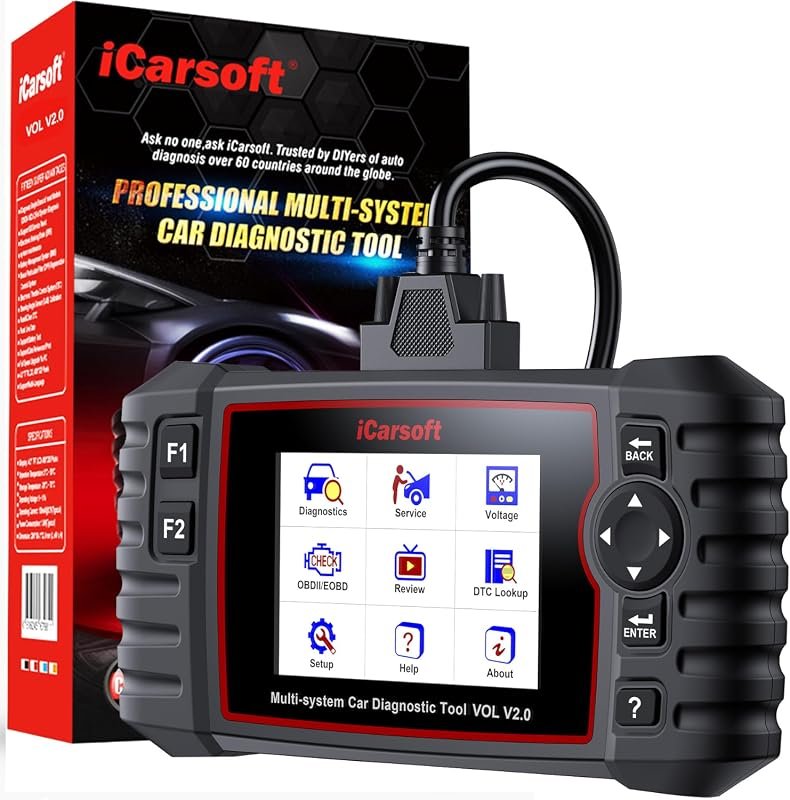 Best Overall
iCarsoft VOL V2.0 2025 OBD2 Scanner for Volvo/Saab, full-system diagnostics, oil reset, ABS bleed, Auto VIN
It offers the strongest all-around mix of fit, value, and practical daily use for Volvo owners.
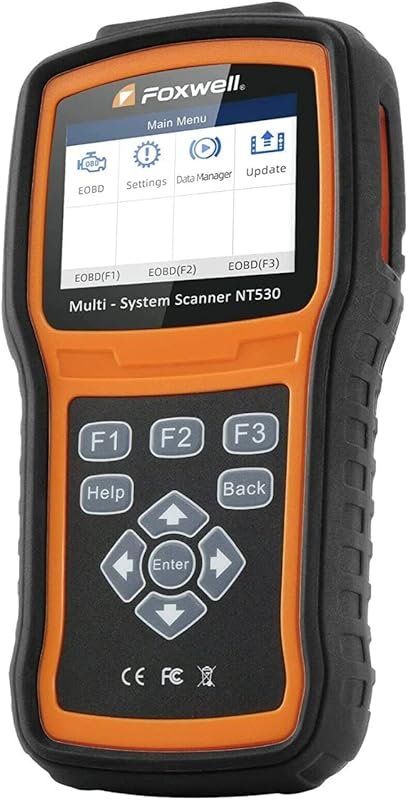 Best Value
FOXWELL NT530 OBD2 Scanner for Volvo, full-system diagnostics, bidirectional tests, ABS bleed, SRS, TPMS, oil reset
It makes sense for owners who want a useful upgrade without paying more than necessary.
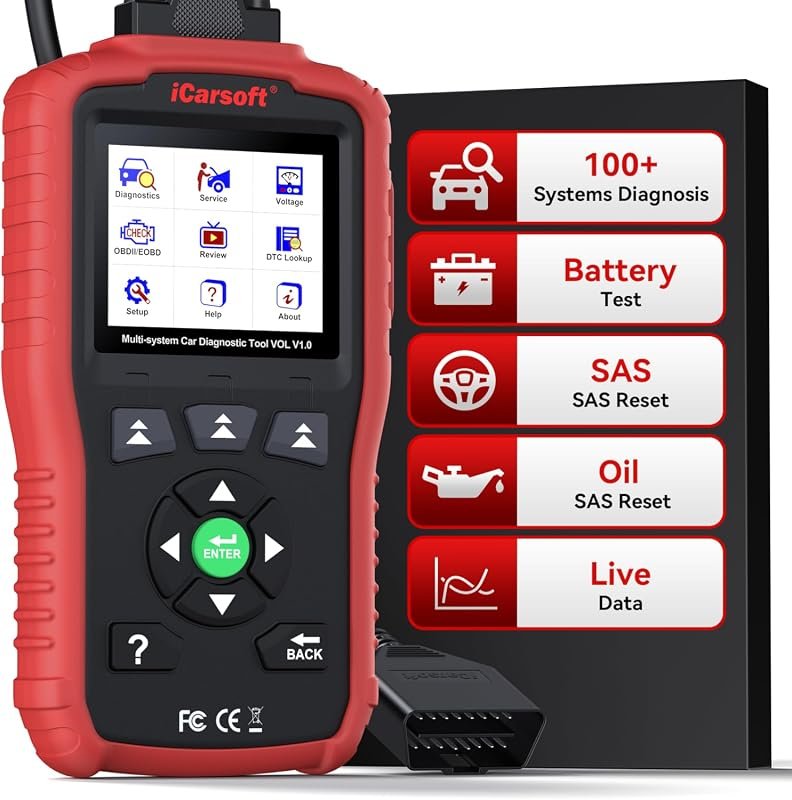 Best Premium Option
iCarsoft VOL V1.0 OBD2 Scanner for Volvo/Saab, full-system diagnostics, oil and SAS reset, live data, lifetime updates
It is the pick I would compare first if build quality, features, and long-term ownership value matter most.
Author

Author

Evans Torres
I’m Evans Torres, an automotive engineer who loves Volvo cars. I graduated in Automotive Engineering from USC. I have worked in the car industry for years and now share my knowledge on The Volvo Life. I started this blog to connect with other Volvo fans. I offer tips, news, and advice to help you care for your car. My goal is to help you keep your Volvo in great shape and find all the best things about it. Join me as we discover everything Volvo has to offer!