



what scanner for volvo obd2 — the iCarsoft VOL II is the best value for reading Volvo-specific modules (ECM, ABS, SRS, CEM) on 1996–2024 models. Budget buyers can start with Ancel VOD700, while advanced DIY owners and shops should pick the Autel MaxiCOM MK808 for deeper functions.
Picking the right OBD2 scanner for a Volvo depends on how much access you need beyond basic engine codes. Generic readers only see the engine; most Volvo faults live in ABS, SRS, transmission, CEM, and more.
This guide shows which scanners actually talk to Volvo modules, how they differ by model year, what to avoid, and the exact steps to use one correctly.
- Main point: Choose a Volvo-capable scanner (iCarsoft VOL II, Foxwell NT530, Autel MK808) — generic ELM327 tools can’t see SRS/ABS/TCM/CEM.
- Best first step: Confirm your model-year protocol support (2004–2014 vs 2015+ SPA vs new EX/EC EVs) before buying.
- Cost or value: $120–$200 gets full-module access for most Volvos; $400–$700 adds advanced tests and coding.
- Who it suits: DIY owners save dealer diagnostic fees; shops get faster triage and live data.
- When to get help: Airbag (SRS) or programming needs still require a qualified Volvo specialist.
Wants to read all Volvo modules, view live data, and reset service lights without visiting a dealer.
Needs quick, reliable Volvo coverage for ABS/SRS/TCM/CEM across 1996–2024 models.
Prefers Bluetooth/app workflows and plans to scan multiple vehicles, not only a Volvo.
What an OBD2 Scanner for Volvo Does and How It Works
An OBD2 scanner plugs into the 16‑pin port under the dash and communicates with your Volvo’s control modules. Every car sold in the USA since 1996 supports basic engine/emissions access via OBD2.

Volvo issues often sit beyond the engine module. A Volvo‑capable scanner adds access to ABS, SRS (airbag), TCM (transmission), CEM (central electronics), BCM, SAS, TPMS, and climate modules that generic tools miss. You can also use is scanner for Volvo XC60 as a helpful next guide on the same ownership topic.
Most “scanner won’t connect to my Volvo” complaints trace to generic ELM327 readers that only speak engine protocols. The car is fine — the tool simply can’t see Volvo‑specific networks like LIN and CAN sub-buses for SRS/ABS. For another practical angle, see is scanner for Volvo XC90.
OBD2 Scanner vs Volvo‑Specific Diagnostic Scanner: What’s the Difference?
A generic OBD2 reader pulls engine codes and some live data; that’s it. A Volvo‑specific scanner communicates with multiple modules, shows freeze‑frame data, runs tests, performs resets, and stores VIN‑coded reports.
That extra access is what lets you clear an ABS light after a wheel sensor repair or identify a failing seatbelt pretensioner behind an SRS warning — jobs a $30 dongle can’t handle.
Here is a concise side‑by‑side so you can decide how much capability you actually need.
The Volvo‑capable tier is the smarter buy for most owners; it prevents the common “buy twice” problem after a generic reader comes up empty on ABS/SRS.
| Feature | Generic OBD2 Reader | Volvo‑Capable Scanner | Examples |
|---|---|---|---|
| Engine/Emission codes | Yes | Yes | Any ELM327 vs iCarsoft VOL II |
| ABS & SRS access | No | Yes | Foxwell NT530, Autel MK808 |
| Transmission (TCM) | No | Often Yes | iCarsoft VOL II, Autel MK808 |
| CEM/BCM body modules | No | Often Yes | Autel MK808, YOUCANIC |
| Service light reset | Sometimes | Yes | Foxwell NT530, iCarsoft VOL II |
| Live data across modules | Limited (ECM only) | Yes | Mid‑range and above |
| Adaptations/coding | No | Limited–Advanced | Autel/Launch tiers |
| Typical price | $20–$60 | $120–$700 | Varies by tier |
What a Volvo Scanner Can Diagnose
Full‑module Volvo tools uncover far more than a check‑engine light. Expect fault details and live PIDs for ABS wheel speeds, SRS crash data storage status, transmission shift solenoid behavior, battery/charging health, TPMS IDs, steering angle values, and climate flap positions.

Most mid‑range units also handle service reminder resets, EPB service mode, TPMS relearns on supported years, and SAS calibration after an alignment or rack work.
Reset functions (SRS, EPB, SAS, TPMS) vary by model year and trim. Always check the scanner’s Volvo compatibility list for your exact year before buying.
Do Volvo OBD2 Scanners Work on All Models and Years?
Coverage splits by protocol generation. Pre‑2004 Volvos have different networks; 2004–2014 P1/P2/P3 cars use CAN with manufacturer specifics; 2015+ SPA/CMA cars add UDS/DoIP for some functions. New EX/EC electric models add more UDS depth.
Choose a scanner that explicitly lists your year and platform. Some budget tools work great on 2009–2014 cars but struggle on 2015+ SPA or can’t access newer EX/EC models yet.
- Confirm “UDS” support for 2015+ SPA/CMA and EX/EC models.
- For 1996–2003 cars, verify non‑engine module access is supported.
- Update your scanner’s Volvo software before first use.
- Keep the car’s battery above 12.4V during long scans to avoid dropouts.
Best Types of Scanner for Volvo Cars
Four form factors cover most needs. A basic code reader is cheapest but engine‑only. Bluetooth dongles pair with apps for convenience. Handheld Volvo‑capable units are the best DIY value. Professional tablets add faster processors, tests, and broader coding.
Pick the tier based on the modules and functions you expect to diagnose in the next 3–5 years, not just today’s fault light.
Best Scanner Brands for Volvo — Comparison Table
These models are commonly used by Volvo owners and independent shops in the USA. Prices vary with sales and software bundles; check for ongoing update support.
| Brand/Model | Approx. Price | Volvo Modules Covered | Bluetooth/App | Verdict |
|---|---|---|---|---|
| iCarsoft VOL II | $140–$180 | ECM/TCM/ABS/SRS/CEM (most years) | Handheld (no app) | Best value for DIY Volvo owners |
| Foxwell NT530 (Volvo software) | $170–$220 | ECM/TCM/ABS/SRS/EPB/SAS | Wired handheld | Strong mid‑tier with resets |
| Autel MaxiCOM MK808 | $450–$700 | Full‑module + adaptations on many years | Wi‑Fi updates (tablet) | Advanced diagnostics for home/shop |
| YOUCANIC Full System | $250–$350 | Multi‑module coverage; subscription updates | App/handheld varies by package | Wide brand coverage; verify Volvo year |
| Topdon ArtiDiag800 BT | $250–$350 | Full‑system reads; mixed Volvo resets | Bluetooth tablet | Good all‑rounder; confirm EV support |
| Ancel VOD700 | $100–$140 | Better than generic; limited deep functions | Wired handheld | Budget step‑up from ELM327 |
Beware counterfeit scanners. Clones look identical but fail on Volvo‑specific modules or can’t update software. Buy from official stores or authorized Amazon sellers — unusually low prices are the biggest red flag.
Volvo Model‑Based Scanner Guide
XC90 (2003–2014 P2, 2016+ SPA): Mid‑range scanners like iCarsoft VOL II and Foxwell NT530 work well; 2016+ needs UDS support for best module access. Deep coding favors Autel MK808.
For XC90‑specific picks and notes, see our focused guide: OBD2 scanner for Volvo XC90.
XC60 (2009–2017 P3, 2018+ SPA): Similar to XC90 — ensure UDS for 2018+. VOL II and NT530 cover most resets; MK808 adds adaptations on many trims.
XC40 (2019+ CMA): Choose a tool that explicitly lists 2019+. Some budget units read engine only. Start with VOL II or Autel MK808 for fuller coverage. We break it down here: OBD2 scanner for Volvo XC40.
S60/V60/V90/S90 (2015+ SPA): UDS support is mandatory for robust coverage. VOL II is the best value; Autel MK808 accelerates workflow for active tests and coding.
Classic era (850/S70/V70 early years): OBD2 engine access (1996+) is standard, but non‑engine coverage is scanner‑dependent. Our classic guide highlights quirks: OBD2 scanner for Volvo 850.
Are Volvo Scanners Worth It, Reliable, and Safe to Use?
Yes — a Volvo‑capable scanner pays for itself quickly by avoiding a $150 diagnostic visit for every basic fault. Reputable brands are reliable if kept updated and powered properly during scans.
Reading codes is safe. The main risk is clearing SRS or critical faults without fixing the cause, masking a safety issue. Use write/coding functions cautiously.
Never clear an airbag (SRS) fault and assume the system will protect you. Confirm wiring, sensors, and seatbelt pretensioners are actually repaired first.
Can a Volvo Scanner Work with iPhone — And on Other Car Brands?
Bluetooth scanners and tablet‑style tools typically support iOS and Android via brand apps; handheld units like iCarsoft/Foxwell don’t need a phone. Always confirm iOS app compatibility for your chosen dongle or tablet.
Most Volvo‑capable scanners also read basic OBD2 on other brands, and advanced tablets cover dozens of marques at full‑system level. Details here: Volvo scanners and iPhone compatibility.
How to Use a Scanner for Volvo (Step‑by‑Step)
A clean connection and the right model‑year selection are 90% of success. Charge the vehicle battery above 12.4V, update the scanner’s Volvo software, and save reports before clearing anything so you can compare pre‑ and post‑repair data.
- Locate the OBD2 port: Under the dash near the steering column on most Volvos.
- Power and connect: Plug in the handheld/tablet or pair your Bluetooth dongle with the correct app.
- Select Volvo + model/year: Choose the exact year/engine to load proper protocols.
- Run an auto‑scan: Scan all modules, not just the engine, and wait for completion.
- Save codes and freeze‑frame: Export or screenshot results before changing anything.
- Check live data: Graph key PIDs (e.g., wheel speeds, O2 trims, battery voltage) to confirm faults.
- Make the repair: Address wiring, sensors, or parts indicated by the data.
- Clear codes and re‑test: Clear only after fixing, then drive‑cycle and rescan.
Why Your Volvo Scanner Might Not Be Working
Wrong app or profile selection, a low vehicle battery, or a blown OBD2 port fuse are common culprits. Clone hardware and outdated firmware also cause random disconnects or missing modules.
Check Bluetooth pairing, verify VIN selection, and update the scanner’s Volvo package before assuming the car has a network fault.
Buying Guide: Which Scanner Should You Choose?
Best overall for DIY Volvo owners: iCarsoft VOL II — full‑module reads, resets, and strong value. It’s the easiest “first real scanner.”
Best budget step‑up from generic: Ancel VOD700 — better than ELM327, but expect limited deep functions on newer SPA/EX models.
Best advanced option: Autel MaxiCOM MK808 — faster auto‑scan, more adaptations/coding, broad brand support for multi‑car garages.
For 2015+ SPA/CMA and EX/EC EVs: Verify UDS/DoIP coverage and current Volvo software — update the tool on day one.
Common Mistakes to Avoid — and When to Visit a Mechanic
Buying a cheap ELM327 and expecting SRS/ABS access, skipping model‑year checks, and clearing codes before saving data top the mistake list. Clone tools are another dead end.
Book a Volvo specialist if you need key programming, control module coding, or if airbag faults persist after verified repairs.
💡 Evans Torres Tip: I keep an iCarsoft VOL II in my garage for our SPA‑platform Volvo. It reads every module I care about and resets the service reminder in under a minute. The one time I borrowed a friend’s generic dongle, it saw only the engine. That was the last time I tried to save $50 on a scanner.
Frequently Asked Questions
These quick answers close the gaps most Volvo owners still have after choosing a scanner — model support, iPhone pairing, service resets, safety, and connection issues. Use them to double‑check a purchase decision or to troubleshoot a tool that isn’t talking to your car yet.
What’s the single best scanner for Volvo OBD2 across most years?
For the money, iCarsoft VOL II is the best overall pick. It reads/clears faults in ECM/TCM/ABS/SRS/CEM on most 1996–2024 Volvos and handles common resets. If you want faster scans, more adaptations, and broader brand coverage, step up to the Autel MaxiCOM MK808.
Will a $30 ELM327 read my Volvo’s ABS or airbag systems?
No. Generic ELM327 readers access engine/emissions only. Volvo faults frequently live in ABS, SRS, transmission, and body modules. You need a Volvo‑capable tool like iCarsoft VOL II, Foxwell NT530, or an advanced Autel/Topdon tablet to see those systems.
Which scanners work best on 2015+ SPA/CMA models?
Pick a tool with confirmed UDS/DoIP support. iCarsoft VOL II, Foxwell NT530 (with Volvo software), and Autel MK808 are proven choices. Always update the scanner’s software first; SPA cars can add or change module behaviors with newer firmware.
Can these scanners reset the Volvo service reminder?
Yes, mid‑range and above typically support service resets. Handhelds (iCarsoft/Foxwell) perform it via on‑screen menus. Tablets (Autel/Topdon) do it through the service function list. If a reset fails, confirm the correct model/year profile and try again after a short key cycle.
Do Volvo scanners work with iPhone?
Bluetooth dongles and tablet tools usually support iOS via their brand apps, while handhelds don’t require a phone. Check the exact iOS app listing before buying. Wired handhelds like iCarsoft VOL II and Foxwell NT530 avoid phone compatibility entirely.
Why won’t my scanner connect to my Volvo?
Common causes: wrong app/profile, outdated scanner firmware, low vehicle battery, blown OBD port fuse, or a counterfeit tool. Update the software, select the exact year/engine, maintain >12.4V battery voltage, and verify you didn’t buy a clone from an unauthorized seller.
Is it safe to clear SRS (airbag) codes at home?
Only after you’ve fixed the underlying fault and verified wiring/sensors. Clearing SRS to hide a warning is unsafe. When in doubt, consult a Volvo‑experienced technician — the airbag system is critical.
Will these scanners work on other car brands too?
Yes. Most can read basic engine codes on any 1996+ car. Advanced tablets like Autel MK808 offer full‑system coverage and service functions across dozens of brands, which is ideal for multi‑car households.
Final Verdict
For most owners asking “what scanner for Volvo OBD2,” iCarsoft VOL II is the smartest first choice. It reaches the Volvo modules that matter, costs far less than a dealer visit, and avoids the engine‑only trap.
Confirm your model year, update the tool, save data before clearing, and escalate to a Volvo specialist for SRS/programming work. Buy once, buy right — and stop guessing at warning lights.
My Top Picks at a Glance
Here are the three what scanner options I would check first if you want a faster buying decision.
These picks highlight the strongest overall choice, the best value option, and the premium-style pick for practical Volvo ownership.
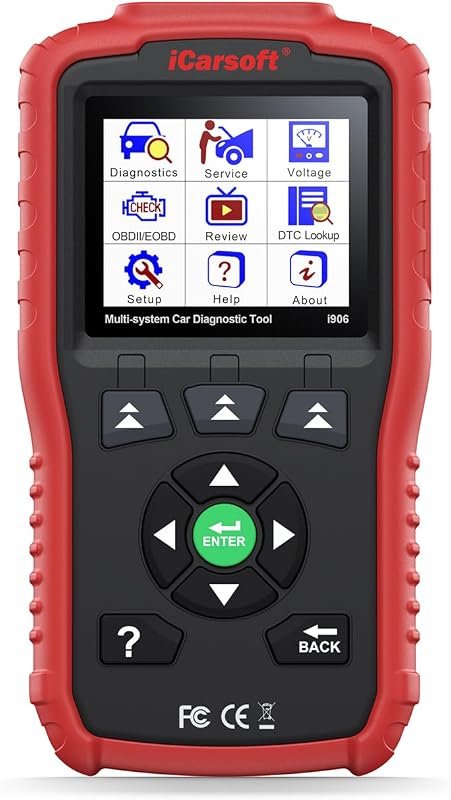 Best Overall
iCarsoft i906 OBD2 scanner for Volvo and Saab, multi-system diagnostics with engine, ABS, SRS support.
It offers the strongest all-around mix of fit, value, and practical daily use for Volvo owners.
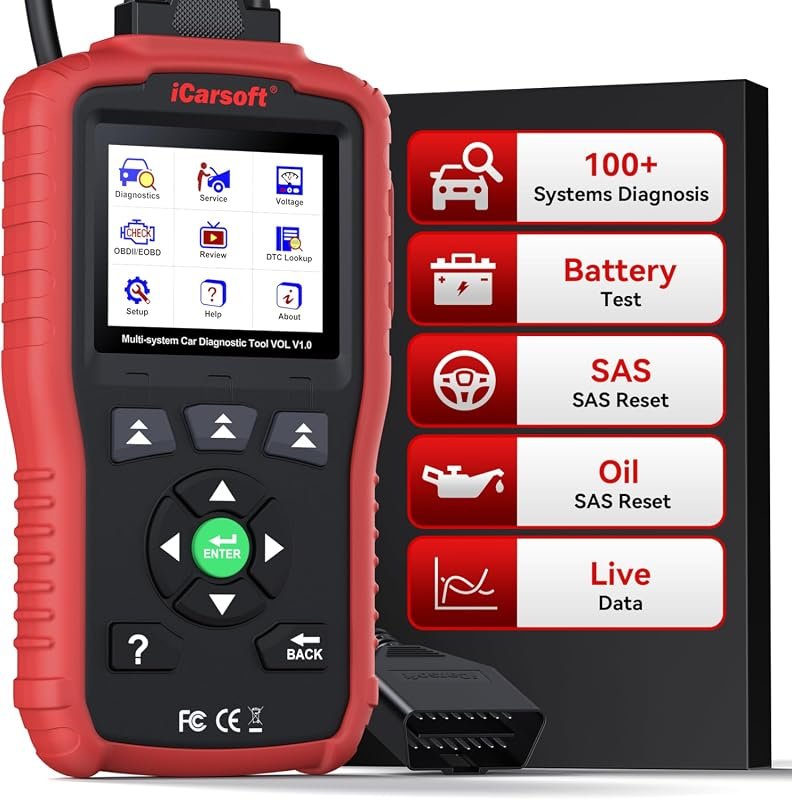 Best Value
iCarsoft VOL V1.0 OBD2 scanner for Volvo and Saab, diagnostics, oil/SAS resets, live data, CAN-FD, free updates.
It makes sense for owners who want a useful upgrade without paying more than necessary.
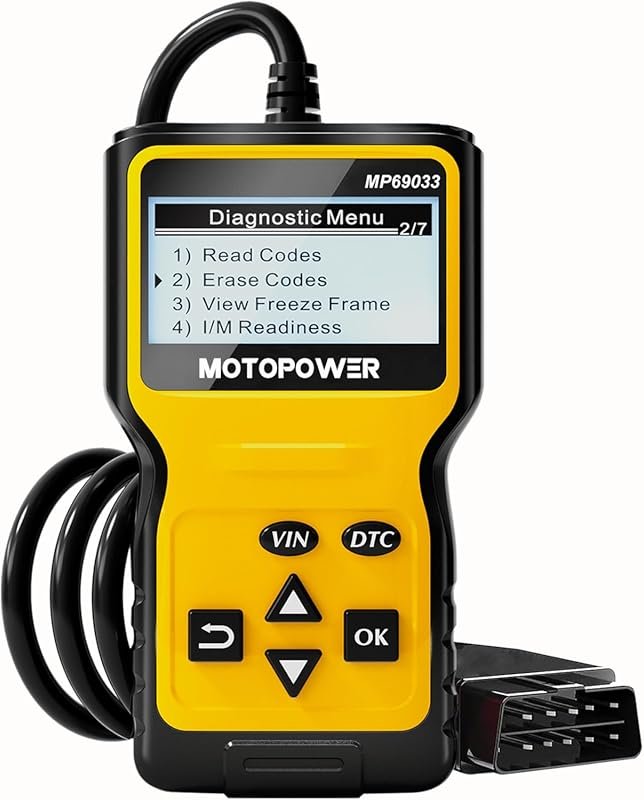 Best Premium Option
MOTOPOWER MP69033 OBD2 code reader scans engine faults, CAN compatible, supports all OBDII protocols for 1996+ cars.
It is the pick I would compare first if build quality, features, and long-term ownership value matter most.
Author

Author

Evans Torres
I’m Evans Torres, an automotive engineer who loves Volvo cars. I graduated in Automotive Engineering from USC. I have worked in the car industry for years and now share my knowledge on The Volvo Life. I started this blog to connect with other Volvo fans. I offer tips, news, and advice to help you care for your car. My goal is to help you keep your Volvo in great shape and find all the best things about it. Join me as we discover everything Volvo has to offer!