



Do scanner for Volvo how to use — plug the tool into the OBD2 port, ignition ON, pick Volvo and your model-year, run a full-system scan, save fault codes, then clear only after the repair. For full-module access, a Volvo-capable reader (e.g., iCarsoft VOL II) beats generic apps.
Most owners want two things from a scanner: read what triggered a warning, and confirm the fix. Volvos store faults across many modules beyond the engine, so the tool you choose changes what you can see. This connects closely with do scanner for Volvo exist if you want to compare the topic in more detail.
Below is a complete, step-by-step way to use a scanner on any modern Volvo, plus model-year compatibility, iPhone/Bluetooth tips, brand comparisons, and a simple buying guide. For related context, you may also want to read how to use a Volvo car jack for safe.
- Main point: Use a Volvo-capable scanner to read all modules (ABS, SRS, CEM) — not just the engine.
- Best first step: Ignition ON (engine off), run a Full Scan, save DTCs before clearing anything.
- Cost or value: $120–$200 scanners (iCarsoft VOL II, Foxwell NT530) offer the best module coverage for DIY.
- Who it suits: DIY owners diagnosing lights, independent shops, buyers inspecting a used Volvo.
- When to get help: Airbag/SRS faults, immobilizer/key coding, or software updates — use a Volvo specialist.
Wants to read all Volvo modules, view live data, and confirm a repair without a dealer visit.
Needs dependable Volvo coverage under $500 for daily diagnostics and service resets.
Prefers Bluetooth adapters and apps for quick engine data and code checks across multiple cars.
What an OBD2 Scanner for Volvo Does and How It Works
Volvo cars use a standard OBD2 port under the dash, but many faults live outside the engine computer. A true Volvo-capable scanner talks to ABS, SRS, transmission, CEM, BCM, and more.

The workflow is simple: connect, select Volvo and model-year, run a full scan, save codes, check live data, repair, then clear codes. Reading never harms the car; writing/coding is where caution is needed.
On 2015+ SPA/CMA Volvos (XC90, XC60, XC40, S60, V60, S90/V90), many modules speak UDS over CAN. Generic ELM327 readers usually can’t query these modules — they only see engine P-codes.
OBD2 Scanner vs Volvo‑Specific Diagnostic Scanner
Generic OBD2 readers see engine and emissions-related codes. Volvo-specific scanners reach dozens of body and chassis modules, perform service resets, and display Volvo‑labelled data PIDs.
That difference explains why a $30 dongle often “finds nothing” when the dash shows ABS or SRS lights — those modules sit beyond the generic OBD2 mandate.
Before buying, verify “Volvo full‑system” or explicit module coverage (ABS, SRS, CEM) for your model-year. Claims of “works on all cars” usually mean engine-only access on Volvos.
Here is a quick side‑by‑side to decide which tool tier fits your Volvo and use case — the sweet spot for most owners is the mid‑range Volvo‑capable handheld.
Pick the smallest tool that reads the modules you actually need today, with updates available for tomorrow’s model‑year quirks.
| Tool type | What it reads on a Volvo | Pros | Limitations |
|---|---|---|---|
| Generic ELM327 + app | Engine (ECM) only | Cheap, fast setup | No ABS/SRS/TCM/CEM; limited live data |
| Bluetooth dongle (OBDLink MX+) | Engine + robust live data | Reliable hardware, iOS/Android apps | Still engine‑centric on Volvos |
| Volvo‑capable handheld (iCarsoft VOL II, Foxwell NT530) | Full‑system (ABS/SRS/TCM/CEM) | Reads/clears most modules, service resets | Limited coding/adaptations |
| Advanced tablet (Autel MK808, Launch X431) | Full‑system + advanced tests | Live data graphs, some adaptations | Higher cost; learning curve |
| Factory tools (VIDA/DiCE) | Dealer‑level all modules | Programming, guided diagnostics | Subscription cost, pro setup |
What a Volvo Scanner Can Diagnose
Expect coverage for check‑engine P‑codes, ABS/traction faults, SRS/airbag, transmission/TCM, power steering, climate (CCM), central electronics (CEM), TPMS, and service reminders.

Mid‑range Volvo tools also view live data (O2 sensors, wheel speeds, battery voltage), run module self‑tests, and reset service lights after oil changes or brake fluid service.
You can learn more about safe usage boundaries here: are scanners for Volvo safe to use.
Do Volvo OBD2 Scanners Work With All Models?
Coverage depends on model-year and protocol. Pre‑2004 cars (850, S70/V70 classic) need tools that speak older K‑line protocols. 2004–2014 (P1/P3 era) use CAN with brand‑specific modules. 2015+ SPA/CMA add UDS messaging.
Electric EX30/EX40/EC40/EX90 require UDS support and frequent software updates from the scanner brand — not all mid‑range tools list them yet.
For a deeper breakdown, see our explainer: do scanners for Volvo work with all models.
The Best Types of Scanner for Volvo Cars
Basic code readers are fine for smog checks and quick engine lights. Bluetooth adapters suit data geeks logging fuel trims or boost on road trips.
Handheld Volvo‑capable readers are the best DIY value, adding ABS/SRS/TCM and service resets. Advanced tablets suit heavy DIY or shops that need bi‑directional tests.
- Basic code reader: Cheapest; engine-only; good glovebox backup.
- Bluetooth adapter + app: Flexible; great live data; Volvo module limits remain.
- Volvo‑capable handheld: Full‑system reads/clears; oil/service resets; ideal for most owners.
- Advanced tablet: More modules, tests, and graphs; higher price and complexity.
Best Scanner Brands for Volvo — Comparison Table
These options appear most often in Volvo owner forums and independent shops. Check each brand’s update policy and your exact model‑year before purchase.
| Brand / Model | Price | Volvo modules covered | Bluetooth/App | Verdict |
|---|---|---|---|---|
| iCarsoft VOL II | $140–$190 | ECM/TCM/ABS/SRS/CEM/BCM | Handheld (no phone app) | Best DIY value for full‑system |
| Foxwell NT530 (Volvo software) | $170–$220 | Full‑system on most 1999–2020s | Handheld | Solid coverage; good live data |
| Autel MaxiCOM MK808 | $400–$600 | Full‑system + some tests | Android tablet | Pro‑level features under $1k |
| TOPDON ArtiDiag | $250–$400 | Full‑system (varies by year) | Android tablet | Strong mid‑high option |
| OBDLink MX+ | $80–$140 | Engine + enhanced live data | iOS/Android apps | Best adapter; engine‑centric |
| YOUCANIC Full‑System | $200–$350 | Broad Volvo coverage | Handheld/tablet | Growing coverage; check year |
| Ancel VOD700 | $90–$140 | Engine + some modules | Handheld | Budget pick; verify modules |
Volvo Model‑Based Scanner Guide
Different model lines push different must‑haves. A 2018+ SPA XC90 needs UDS and broad module access; a 2007 S60 needs strong P2/P3 coverage and SRS reset.
Use this as a quick selector before buying.
- XC90 (2003–2014): Foxwell NT530 or iCarsoft VOL II for ABS/SRS/TCM; generic apps miss key modules.
- XC90 (2016+ SPA): iCarsoft VOL II (newer revisions) or Autel MK808 for UDS modules and service resets.
- XC60 (2009–2017): NT530/VOL II read common P3 modules; great for ABS/SRS and maintenance.
- XC60 (2018+ SPA) & XC40 (2019+ CMA): Prefer Autel MK808 or latest VOL II firmware for UDS.
- S60/V60 (2011–2018): VOL II/NT530 cover most needs, including EPB service mode.
- 850/S70/V70 classic: Ensure K‑line support; many modern tools skip full access on these.
- EX30/EX40/EC40/EX90: Confirm UDS EV support in release notes before buying.
Are Volvo Scanners Worth It, Reliable, and Safe to Use?
Yes — reading codes and live data is safe and pays for itself the first time you skip a diagnostic fee. Reliability depends on buying an authorized, updateable tool — clones are the chief failure point.
Clearing without fixing is the only practical risk; some modules suppress warnings temporarily, which can hide real faults.
Never clear SRS/airbag codes until the physical fault is resolved (e.g., seat connector, clock spring). An armed fault can prevent deployment in a crash — treat SRS like a life‑safety system.
For a deeper look at safety and proper usage boundaries, review our guide: are scanners for Volvo safe to use.
Can a Volvo Scanner Work With iPhone — And Can You Use It on Other Cars?
Most Bluetooth adapters (e.g., OBDLink MX+) support iPhone via their iOS app. Handhelds like iCarsoft/Foxwell don’t need a phone; they’re self‑contained.
Cross‑brand use is common: Volvo‑specific handhelds read basics on other makes via OBD2, while advanced tablets add deeper coverage across 30–60 brands.
iOS buyers: confirm app compatibility first — this explainer helps: can a Volvo scanner work with iPhone.
How To Use a Scanner for Volvo (Step‑by‑Step)
This process works for handhelds and Bluetooth tools. The key is saving codes first, then repairing, then clearing — that preserves a breadcrumb trail if a fault returns.
- Park and prep: Park safely, set parking brake, and switch ignition OFF. Have your VIN and model‑year handy.
- Locate the port: Find the OBD2 port under the driver’s dash near the knee panel; some right‑hand‑drive cars place it left of the steering column.
- Connect the tool: Plug in the handheld or adapter. Turn ignition to ON (engine off). For push‑button cars, press Start without the brake.
- Select vehicle: Choose Volvo, your exact model, and year. On Bluetooth, open the paired app and establish connection.
- Run a full scan: Scan all systems, not just the engine. Wait for the report to populate every module.
- Save results: Export or photograph DTCs and freeze‑frame data. This record is vital if a code returns.
- Check live data: Review key PIDs (battery voltage ~12.4–12.7V KOEO, wheel speeds, O2 trims) to pinpoint causes.
- Repair then clear: Fix the fault first. Clear codes only after the repair, then re‑scan and road‑test.
- Update tool: Periodically update scanner firmware/software to maintain coverage, especially on 2015+ cars.
- Record battery voltage before and after clearing — low voltage creates ghost codes on Volvos.
- Label screenshots by module (e.g., “CEM B11xx”) so you can search forum threads accurately later.
- On SPA/CMA cars, run a second scan after a 10‑minute key‑off sleep; some modules store delayed faults.
- Keep your scanner updated; check release notes for EX/EC models and 2020+ UDS changes.
For pro‑level functions and tablet workflows, see: how to use a professional car scanner for Volvo.
Why Your Volvo Scanner May Not Be Working
Connection issues usually trace to ignition state, app pairing, or an OBD socket fuse. Clone hardware is another top culprit — it looks right, but fails on Volvo‑specific modules.
- Ignition not ON: Modules sleep; turn ignition ON (engine off) or engine running as instructed.
- Wrong app/profile: Select the brand’s own app or Volvo profile; torque‑only apps miss modules.
- OBD fuse blown: Check the OBD/cigar lighter fuse if the tool won’t power.
- Outdated firmware: Update the scanner; EX/EC models need recent UDS files.
- Low vehicle battery: Voltage below ~12.0V causes comms drops — charge first.
- Clone/counterfeit: Replace with an authorized unit; clones often fail on SRS/ABS.
Buying Guide: Which Scanner Should You Choose?
Match the tool to your car and task. A single ABS light on a 2012 S60 needs different coverage than software resets on a 2019 XC90.
- Engine‑light only, budget: OBDLink MX+ ($80–$140) with iOS/Android for P‑codes and data.
- DIY on 2004–2018 Volvos: iCarsoft VOL II or Foxwell NT530 for full‑system reads and service resets.
- 2015+ SPA/CMA or multiple brands: Autel MK808 for deeper tests and evolving UDS support.
- Used‑car shoppers: VOL II/NT530 to check SRS/ABS history and service counters before buying.
- Shops/heavy DIY: Launch/Autel tablets; consider VIDA/DiCE for programming needs.
Clone scanners are rampant. They look identical but fail to connect to Volvo modules and may corrupt data. Buy only from the brand’s official store or an authorized Amazon seller with verifiable reviews.
Common Mistakes to Avoid — And When to Visit a Mechanic
A few habits save hours: don’t clear codes first, don’t guess modules, and don’t ignore battery voltage during scans. When immobilizer, SRS, or programming appears, professional tools pay for themselves.
- Clearing before saving: You lose diagnostic breadcrumbs — always export first.
- Wrong model-year: Picking a nearby year can hide modules; select the exact year.
- Skipping updates: Newer Volvos need current firmware — update quarterly.
- Ignoring SRS/immobilizer: These require pro diagnosis; book a Volvo specialist.
- Assuming generic coverage: Engine‑only tools won’t fix ABS/SRS complaints on Volvos.
Software update habits matter for accurate coverage — this walk‑through helps: how to update scanner software.
Before the FAQs, one practical note from the garage.
💡 Evans Torres Tip: I save every Volvo scan as “VINModuleDate” on my phone. It sounds nerdy, but when a CEM code came back six months later on an XC60, I spotted the same voltage dip in both reports. A $30 battery charge and terminal clean fixed it — no parts, no guesswork, and the warning never returned.
Frequently Asked Questions
These quick answers cover the nuts and bolts of choosing, connecting, and using a scanner on modern and older Volvos — plus what to do when things don’t connect or a warning won’t clear after repair.
What’s the best beginner scanner for most Volvos?
For DIY owners who want full‑system access without a tablet price, the iCarsoft VOL II hits the sweet spot. It reads/clears ABS, SRS, TCM, CEM, and resets service lights on most 1999–2020s Volvos. Verify your exact year in the brand’s compatibility list before buying.
Will a scanner work on a 2016+ Volvo XC90 (SPA platform)?
Yes, but choose a tool that supports UDS on SPA/CMA models. Updated iCarsoft VOL II units, Foxwell NT530 (with current Volvo software), and Autel MK808 cover SPA cars better than generic dongles. Always update the scanner firmware before the first scan.
Can I use an iPhone with a Volvo scanner?
Yes with Bluetooth adapters like OBDLink MX+ via their iOS app. Handheld tools (iCarsoft/Foxwell) are self‑contained and don’t need a phone. If you prefer apps, confirm iOS support and Volvo profiles; some Android‑only apps won’t talk to Volvo modules.
Can a scanner reset the Volvo service reminder?
Most Volvo‑capable scanners can reset the oil/service reminder after maintenance. The option typically lives under Instrument Cluster or Maintenance menus. Reset only after a completed service; otherwise, use the in‑car menu procedure specific to your model-year.
Is it safe to clear codes after reading them?
Yes, once the underlying fault is fixed. Always save/export codes first, and don’t clear SRS/airbag faults until verified physically repaired. Clearing without repair may temporarily hide a warning and complicate further diagnosis.
Why won’t my scanner connect to ABS or SRS?
Common reasons: ignition not ON, outdated scanner firmware, using a generic app that only sees the engine, a blown OBD/cigar lighter fuse, or a counterfeit tool. Update the tool, select Volvo in the menu, and verify your exact model-year coverage.
Where should I buy to avoid a clone scanner?
Buy from the brand’s official website or its authorized Amazon store. Avoid listings with inconsistent branding, too‑low pricing, or missing serial verification. Counterfeits often fail on Volvo‑specific modules and receive no software updates.
Final Verdict
Full‑system access is what separates a “Volvo‑capable” scanner from a generic dongle. Choose a tool that lists your exact model‑year, update it first, and always save codes before clearing.
For most owners, a mid‑range handheld like iCarsoft VOL II or Foxwell NT530 delivers the right mix of coverage and simplicity. When SRS, immobilizer, or software programming appears, book a Volvo‑experienced shop.
My Top Picks at a Glance
Here are the three do scanner to use options I would check first if you want a faster buying decision.
These picks highlight the strongest overall choice, the best value option, and the premium-style pick for practical Volvo ownership.
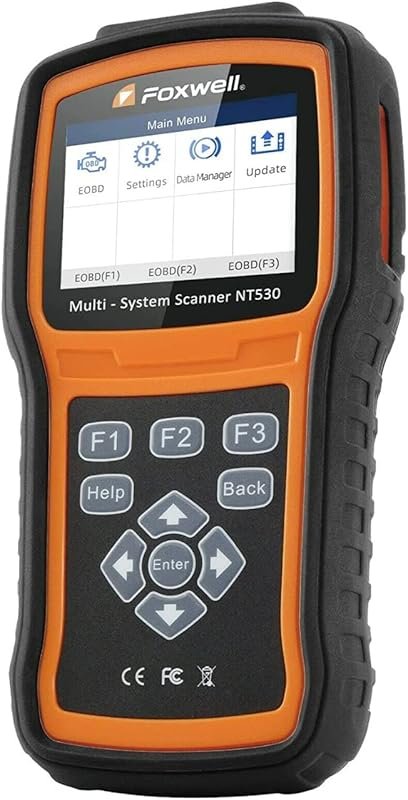 Best Overall
FOXWELL NT530 Volvo OBD2 scanner with bidirectional control, all-system diagnostics, ABS bleed, SRS, EPB, oil reset
It offers the strongest all-around mix of fit, value, and practical daily use for Volvo owners.
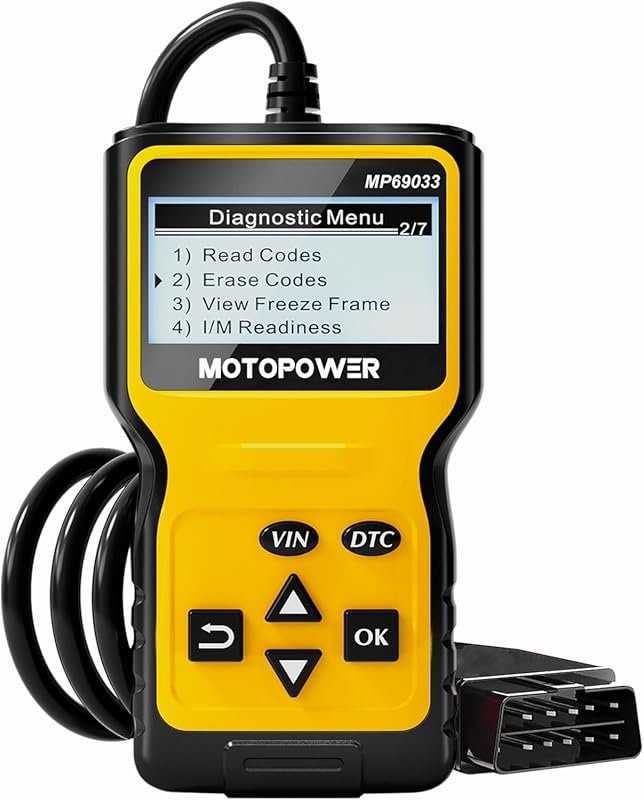 Best Value
MOTOPOWER MP69033 OBD2 code reader for 1996+ cars, reads engine faults, supports all OBDII CAN protocols
It makes sense for owners who want a useful upgrade without paying more than necessary.
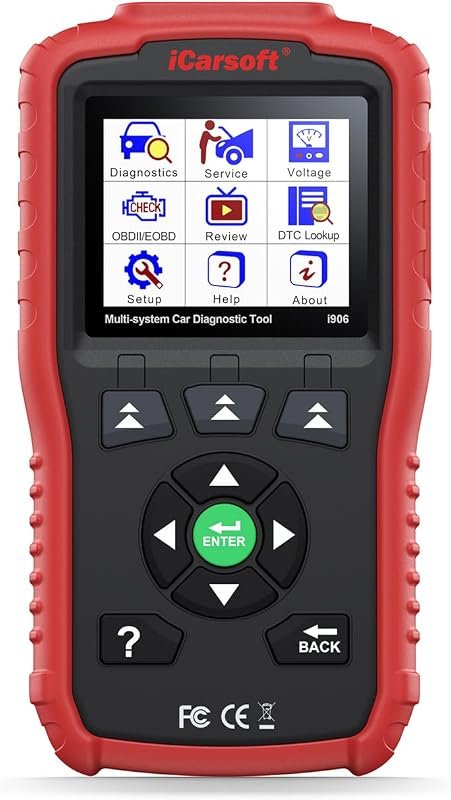 Best Premium Option
iCarsoft i906 Volvo/Saab OBD2 diagnostic scanner with multi-system coverage, reads engine, ABS, SRS faults
It is the pick I would compare first if build quality, features, and long-term ownership value matter most.
Author

Author

Evans Torres
I’m Evans Torres, an automotive engineer who loves Volvo cars. I graduated in Automotive Engineering from USC. I have worked in the car industry for years and now share my knowledge on The Volvo Life. I started this blog to connect with other Volvo fans. I offer tips, news, and advice to help you care for your car. My goal is to help you keep your Volvo in great shape and find all the best things about it. Join me as we discover everything Volvo has to offer!