



who scanner for volvo v40 — the iCarsoft VOL II is the best-value pick because it reads Volvo-specific modules (ABS, SRS, CEM) on both 1996–2004 and 2012–2019 V40 models, unlike generic ELM327 readers. For pro-level features, step up to the Autel MaxiCOM MK808.
Shopping a code reader for a V40 raises a key decision: a basic OBD2 tool that only sees the engine, or a Volvo-capable scanner that also talks to ABS, airbag, transmission, and the CEM. That choice determines whether you’ll fix the light today or guess and replace parts. For related context, you may also want to read is scanner for Volvo XC60.
This buying guide explains how Volvo-specific scanners work, the best options for each V40 generation, what they can diagnose, connectivity (including iPhone), and setup steps. A short checklist at the end helps you pick with confidence.
- Main point: A Volvo-ready scanner (iCarsoft VOL II or Foxwell NT530) sees V40 ABS/SRS/TCM/CEM data that generic readers miss.
- Best first step: Confirm your V40 year group (1996–2004 vs 2012–2019) and ensure the scanner lists that range explicitly.
- Cost or value: $25–$60 (engine-only) vs $140–$220 (Volvo-capable) vs $400+ (advanced tablet tools).
- Who it suits: DIY owners save a diagnostic visit by scanning all modules before buying parts.
- When to get help: Coding/adaptations or persistent SRS faults often need a Volvo specialist.
Wants to clear a warning light and confirm what’s actually wrong before booking a shop visit.
Plans to service brakes, sensors, and reset the V40 service light after an oil change.
Needs reliable Volvo-module access for quick, accurate diagnoses without dealer software.
What a Volvo V40 OBD2 Scanner Is and How It Works
An OBD2 scanner plugs into the V40’s diagnostic port to read fault codes, live data, and system status. Every OBD2 tool can read generic “check engine” (ECM) codes. This connects closely with is scanner for Volvo XC90 if you want to compare the topic in more detail.

Volvo-focused scanners go further. They also communicate with ABS, SRS (airbag), TCM (transmission), CEM (central electronics), BCM, SAS, and climate modules using Volvo-specific protocols.
Most V40 owners who “can’t see the fault” are using a generic reader. Volvo hides critical info in non-ECM modules like the CEM and SRS, which engine-only tools cannot access.
OBD2 Scanner vs Volvo-Specific Diagnostic Scanner for the V40
Generic OBD2 readers show engine codes, readiness monitors, and basic live data. That’s helpful for simple emissions issues, but it misses V40 faults stored in ABS, SRS, TCM, and CEM.
A Volvo-capable scanner reads and clears those non-engine modules, performs service resets, and shows live sensor data that actually explains the warning icon you see.
Match your V40 generation. A tool that lists “Volvo” broadly may still exclude early V40 (1996–2004) or newer 2012–2019 V40 models. Check the brand’s compatibility list by year before buying.
Here is a summary of the key differences V40 owners care about, so you don’t buy a second tool later.
Volvo-ready scanners cost more, but one accurate scan across all modules usually saves a single dealer diagnostic fee.
| Capability | Generic OBD2 Reader | Volvo-Capable Scanner |
|---|---|---|
| Engine (ECM) codes/live data | Yes | Yes |
| ABS/Brake module faults | No | Yes |
| Airbag/SRS faults | No | Yes (read/clear after repair) |
| Transmission (TCM) faults | No | Yes |
| CEM/Body electronics data | No | Yes |
| Service light reset | Sometimes (generic) | Yes (model-aware) |
| Live data by module | Limited | Full (ABS/SRS/TCM/CEM) |
| Guided functions/adaptations | No | Mid/Advanced models only |
What a Volvo-Capable Scanner Can Diagnose on a V40
A proper Volvo scanner pinpoints faults far beyond the check-engine lamp. Expect visibility into ABS wheel speed sensors, SRS seatbelt or clock spring circuits, TCM shift solenoids, CEM power distribution, TPMS, and climate blend doors.

Most mid-tier tools will also reset the service reminder after an oil change and show battery/charging data to confirm alternator output during idle and revs.
- ABS: Wheel speed sensor status, pump faults, yaw sensor data, and brake switch input.
- SRS/Airbag: Seat occupancy sensor, pretensioner, and clock spring circuit faults.
- Transmission (auto): Solenoid performance, fluid temp, and adaptive shift data.
- CEM/Body: Door modules, lighting, immobilizer handshake, and communication errors.
- Engine (deeper than generic): Volvo-specific subcodes and freeze-frame data.
- Service functions: Oil/service reset, SAS/TPMS resets on compatible units.
- Always run a “full system scan,” not just ECM. Save the report as PDF before clearing codes.
- Scan twice: once before any repair, once after road test. This confirms cause and fix.
- Photograph live data graphs (e.g., wheel speeds) — they’re gold when asking for forum help.
- For SRS, repair the physical fault first; then clear. Don’t clear an active safety defect.
Do Volvo OBD2 Scanners Work With All Volvo Models — and Both V40 Generations?
Coverage is strong but not universal. Early V40 (1996–2004) needs tools that explicitly list first‑gen V/S40/V40; the 2012–2019 V40 uses newer protocols that some budget tools skip.
Many mid-tier scanners support 2004–2014 Volvos very well and also handle the 2012–2019 V40. Always check the brand’s model-year chart before purchase.
For a deeper look at cross-model coverage and edge cases, see our guide: Do scanners for Volvo work with all models?
The Best Types of Scanner for Volvo Cars (Which Fits a V40)
Pick the tier that matches your V40 and how much you repair at home. A $30 dongle reads the engine only; a $150–$220 handheld sees the modules you actually need.
- Basic code reader (ELM327/Bluetooth): Cheapest way to read and clear engine codes. Not for ABS/SRS/TCM/CEM.
- Bluetooth “app” scanner (brand app): Better UX, sometimes adds service reset, but Volvo module coverage varies widely.
- Handheld Volvo-capable (best value): iCarsoft VOL II or Foxwell NT530 read most Volvo modules and reset services.
- Advanced tablet tools: Autel MaxiCOM MK808/Launch X431 add adaptations, tests, broader brand coverage.
Clone scanners are rampant. Counterfeits look identical but fail to connect to Volvo modules or lose updates. Buy from the brand’s official store or an authorized Amazon seller only.
Best Scanner Brands for Volvo — What to Expect
The short list: iCarsoft, Foxwell, Autel, Launch, TOPDON, Ancel, and YOUCANIC. Each hits a different price/feature balance for the V40.
- iCarsoft VOL II: Volvo/Saab focused. Reads/clears most Volvo modules, service reset; simple interface. Best value for V40.
- Foxwell NT530 (with Volvo software): Comparable coverage, strong live data; menu depth suits frequent DIYers.
- Autel MaxiCOM MK808: Pro-grade tablet. Adds guided functions and wider brand coverage; higher price.
- Launch X431 (various): Advanced bi-directional tests and coding on many brands; steep learning curve and cost.
- TOPDON ArtiDiag/ArtiLink: Solid mid-tier option; verify V40 year coverage on the exact model.
- Ancel VOD700: Budget-friendly; partial Volvo coverage. Good as a backup, not a main Volvo tool.
- YOUCANIC: Subscription model with guided content; check ongoing cost vs features you’ll actually use.
Volvo Model-Based Scanner Guide — Focus on the V40
V40 coverage splits by generation. Confirm yours, then match the tier.
- V40 (1996–2004): Choose Foxwell NT530 (Volvo software) or iCarsoft VOL II that explicitly lists first‑gen V/S40/V40; many budget tools skip these years.
- V40 (2012–2019): iCarsoft VOL II and Foxwell NT530 work well. For deeper functions, Autel MK808/Launch X431 are safer bets.
- Across families (XC60/XC90/S60/V60): The same mid-tier recommendations apply; verify modules year by year.
Are Volvo Scanners Worth It, Reliable, and Safe to Use?
Yes. Reading codes and live data is safe, and a mid-tier Volvo-capable tool usually pays for itself in one avoided diagnostic visit.
Reliability hinges on buying genuine hardware and keeping software updated. For an honest deep dive, read Are scanners for Volvo reliable?
Can a Volvo Scanner Work With iPhone and Be Used on Other Cars?
Most modern scanners support iPhone via a brand app or Wi‑Fi. Handheld units work independently of a phone, which many owners prefer in the garage.
Even Volvo-focused tools read basic OBD2 data on other makes; advanced functions vary by brand coverage. For specifics, see can a scanner for Volvo work with iPhone and our cross-brand tips.
How to Use a Scanner for a Volvo V40 (Step-by-Step)
A clean connection and the right menu choices make the difference between guessing and fixing. Plan to scan all systems, save the report, and only clear codes after the repair so you don’t erase valuable data.
- Prepare the car: Park safely, set the parking brake, and switch off accessories (HVAC, lights).
- Locate the OBD2 port: It’s typically under the dash near the steering column on V40 models.
- Power sequence: Ignition ON (engine off) or engine running if the tool requests live data during idle.
- Connect the scanner: Plug in the handheld or pair your Bluetooth unit per the manual.
- Select Volvo/V40: Choose make/model and the exact year; then select “Auto Scan/All Systems.”
- Save findings: Note module codes and freeze-frame; export or photograph the summary.
- Verify with live data: Graph suspect sensors (e.g., wheel speeds, O2/AFR, battery voltage).
- Repair, then clear: Fix the cause, road test, and clear codes. Re-scan to confirm no returns.
Never clear airbag (SRS) faults until you’ve corrected the physical issue. A cleared-but-active SRS fault can disable airbags. When in doubt, consult a Volvo specialist.
Why Your Volvo Scanner Might Not Be Working
Most connection failures trace to setup, power, or software quirks. Work through these quick checks before assuming the car is at fault.
- Ignition state wrong: Many tools need ignition ON, engine OFF to identify modules.
- OBD port fuse: A blown fuse kills the port; verify power with another tool or multimeter.
- Wrong app/profile: Pair the exact brand app and select Volvo → V40 → correct year.
- Outdated software: Update the scanner firmware/databases on Wi‑Fi or via PC.
- Clone hardware: Counterfeits often fail at Volvo module handshake — replace with genuine.
- Low vehicle battery: Voltage dips interrupt communication; charge or jump before scanning.
Buying Guide: Which Scanner Should a V40 Owner Choose?
Match the pick to your year and repair style to avoid buying twice.
- Quick engine light check (any V40): A quality Bluetooth ELM327 plus a good app works — but remember, engine-only.
- Best value for all V40 modules: iCarsoft VOL II or Foxwell NT530 (Volvo software).
- Frequent DIY or multi-brand household: Autel MaxiCOM MK808 for broader features and brands.
- Occasional user on a budget: Ancel VOD700 with eyes open to module limitations.
- Service light help for V40: A Volvo-capable handheld simplifies resets; see our V40-specific reset guide: How to reset Volvo V40 service light.
Prefer official references for port location and general care? Visit Volvo Cars Support for owner manual links and model guides.
Common Mistakes to Avoid — and When to See a Mechanic
A few missteps waste the most time and money. Avoid these, and you’ll diagnose faster and safer.
- Buying on price alone: A $30 dongle won’t read your ABS/SRS — you’ll still be guessing.
- Skipping model-year confirmation: First-gen vs 2012–2019 V40 coverage differs; check lists.
- Clearing codes first: Always save the report; don’t erase your best breadcrumb trail.
- Ignoring voltage: Low system voltage skews readings; measure 12.4V+ KOEO and 13.8–14.6V running.
- Mechanic time: Persistent SRS faults, immobilizer issues, or coding/adaptation requests often need a Volvo specialist with VIDA-level tools.
For a standards perspective on engine diagnostics, see SAE J1979 (generic OBD2) details at SAE.
💡 Evans Torres Tip: On my V40, the first scanner I tried read only the engine — useless for an SRS light. I switched to an iCarsoft VOL II, ran a full scan, and found a loose seatbelt pretensioner connector in minutes. I always save the report before touching anything; it’s the fastest path to a real fix.
Frequently Asked Questions
These quick answers cover the specifics V40 owners ask most: which scanner to buy, what it can read, iPhone support, model-year coverage, resets, and common connection hurdles. Use them as a shortcut before you dive into full diagnostics.
What’s the best overall scanner for a Volvo V40?
For most owners, the iCarsoft VOL II offers the best balance of Volvo-module coverage, ease of use, and price. It reads and clears ABS, SRS, TCM, CEM, and more on both V40 generations. If you want advanced tests and broader multi-brand coverage, consider the Autel MaxiCOM MK808.
Will a generic OBD2 reader see V40 ABS or SRS faults?
No. Generic readers only access the engine (ECM). Volvo stores many critical V40 faults in ABS, SRS, TCM, and CEM. You need a Volvo-capable scanner (iCarsoft VOL II, Foxwell NT530, or a pro tablet tool) to read and clear those modules accurately after repair.
Does a V40 scanner work with iPhone?
Yes, many scanners support iPhone via a dedicated app or Wi‑Fi. Handheld units don’t need a phone at all. App-based models vary by brand, so confirm iOS compatibility before purchase. We cover practical details here: can a scanner for Volvo work with iPhone.
Which years of V40 are covered by these scanners?
Coverage splits into 1996–2004 (first-gen V40) and 2012–2019 (modern V40). Mid-tier tools like iCarsoft VOL II and Foxwell NT530 commonly support both, but always check the brand’s model-year chart for your exact car before buying.
Can I use a Volvo-capable scanner on other cars?
Yes. Even brand-focused tools read basic OBD2 on most vehicles. Advanced features (ABS/SRS/TCM functions, bi-directional tests) depend on the specific tool’s brand coverage. If your household has multiple makes, an Autel MK808 or Launch X431 may be the smarter long-term buy.
Will a scanner reset the V40 service reminder?
Most Volvo-capable tools can reset the service light on a V40 after an oil change. Some app-based tools also do it, but compatibility varies. For step-by-step V40 reset instructions without a scanner, see our guide: resetting the V40 service light.
Why won’t my scanner connect to my V40?
Common causes include the wrong ignition state, a blown OBD port fuse, outdated scanner software, low vehicle battery voltage, or clone hardware. Verify ignition ON (engine OFF), update the tool, confirm power at the port, and ensure you’re using a genuine unit.
Final Verdict
A Volvo-ready scanner is the difference between guessing and knowing on a V40. Start with iCarsoft VOL II or Foxwell NT530 for full-module coverage; step up to Autel MK808 if you want advanced functions and multi-brand depth.
Confirm your V40’s year group, run a full-system scan, save the report, and repair before clearing. For airbags, immobilizer, or coding, book a Volvo-experienced specialist — accuracy and safety come first.
My Top Picks at a Glance
Here are the three who scanner options I would check first if you want a faster buying decision.
These picks highlight the strongest overall choice, the best value option, and the premium-style pick for practical Volvo ownership.
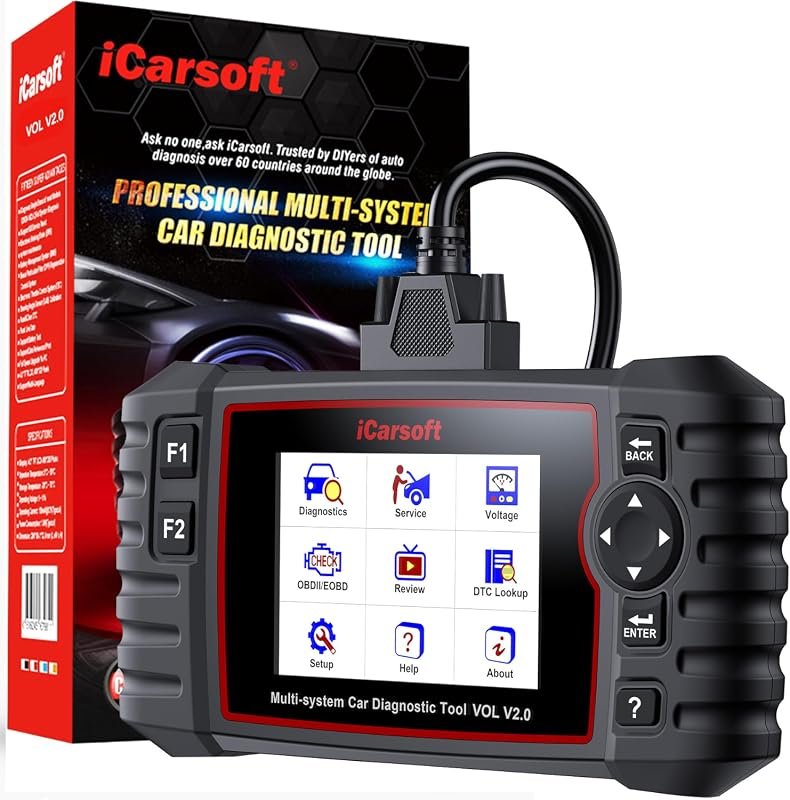 Best Overall
iCarsoft VOL V2.0 2025 OBD2 scanner for Volvo/Saab, Auto VIN, oil reset, EPB, ABS bleed, SAS, DPF
It offers the strongest all-around mix of fit, value, and practical daily use for Volvo owners.
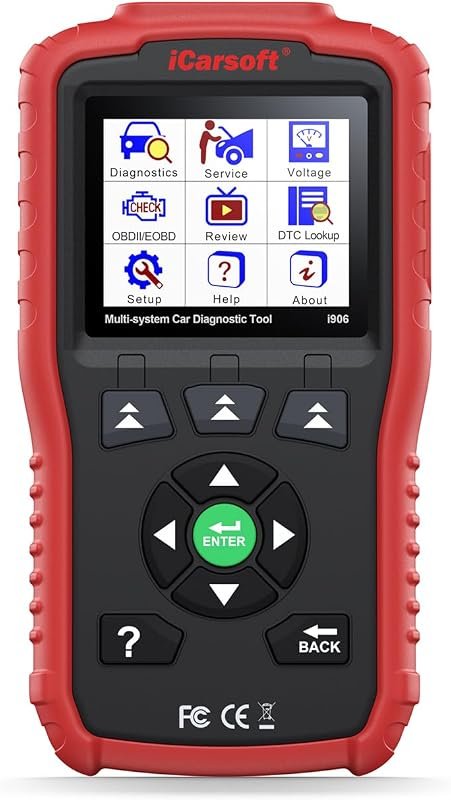 Best Value
iCarsoft i906 OBD2 diagnostic scanner for Volvo/Saab vehicles, reads engine, ABS, and SRS systems
It makes sense for owners who want a useful upgrade without paying more than necessary.
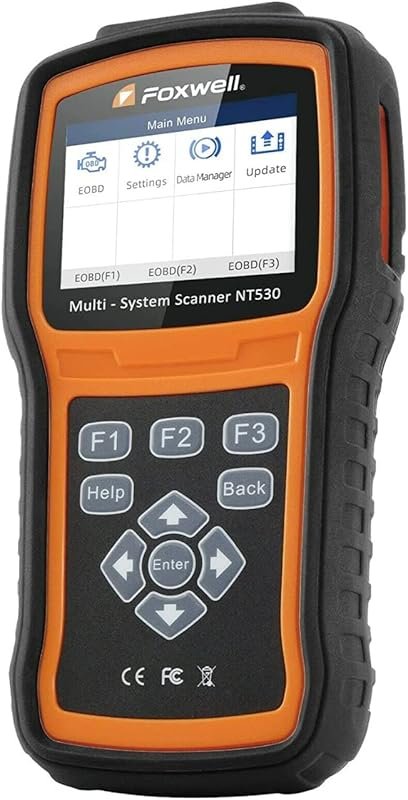 Best Premium Option
FOXWELL NT530 bidirectional OBD2 scanner for Volvo, all-system diagnostics, ABS bleed, SAS, TPMS, EPB, oil reset
It is the pick I would compare first if build quality, features, and long-term ownership value matter most.
Author

Author

Evans Torres
I’m Evans Torres, an automotive engineer who loves Volvo cars. I graduated in Automotive Engineering from USC. I have worked in the car industry for years and now share my knowledge on The Volvo Life. I started this blog to connect with other Volvo fans. I offer tips, news, and advice to help you care for your car. My goal is to help you keep your Volvo in great shape and find all the best things about it. Join me as we discover everything Volvo has to offer!