



Who scanner for Volvo V50 — the iCarsoft VOL II is the best all‑round pick for 2005–2012 V50, reading ABS, SRS, CEM and more. On a tight budget, a Bluetooth ELM327 reads engine codes only; DIYers wanting deeper data should choose a Foxwell NT530 or Autel MK808.
Shopping for a V50 code reader can be confusing because many cheap tools only read engine codes, while most real problems on this P1-platform Volvo live in ABS, SRS, CEM, or transmission modules.
This guide explains the differences, shows what each scanner tier can actually do on a V50, and recommends specific models that work in 2026 without guesswork.
- Main point: For a Volvo V50, pick a Volvo-capable handheld like iCarsoft VOL II or Foxwell NT530 to read all modules; generic readers see engine-only.
- Best first step: Confirm your V50’s model year (2005–2012) and choose a scanner that lists “Volvo P1/S40/V50” coverage explicitly.
- Cost or value: $15–$35 (engine-only) vs $140–$220 (full-module handheld) vs $350–$600 (advanced tablet).
- Who it suits: Casual owners = Bluetooth dongle; DIY repair = VOL II/NT530; deep diagnostics = Autel MK808.
- When to get help: Airbag (SRS) faults that persist after repair or coding/programming requests need a Volvo-experienced shop.
What an OBD2 Scanner for the Volvo V50 Does and How It Works
An OBD2 scanner plugs into the V50’s diagnostic port under the steering column and reads live data and fault codes. Every V50 supports basic OBD-II engine/emissions data.

Where V50 owners get caught out is module access. Many faults live in SRS, ABS, TCM, CEM, SAS, CCM, and door modules. Only Volvo-capable scanners can talk to those systems.
The V50 shares its P1 electronics with the 2004.5–2012 S40 and C30. If a scanner lists S40/C30 module coverage, it almost always works fully on a V50 of the same years.
OBD2 Scanner vs Volvo-Specific Diagnostic Scanner on a V50
A generic OBD2 tool (including most $25 Bluetooth dongles) only sees the engine ECU. It will read and clear check engine lights, but it cannot view or reset ABS, SRS, transmission, or central electronics on a V50.
A Volvo-specific handheld like iCarsoft VOL II or Foxwell NT530 connects to most P1 modules, shows live data PIDs (wheel speeds, yaw, misfires, boost), and supports service/EPB/TPMS resets your V50 actually needs.
Check for explicit “Volvo V50/S40 (2005–2012)” support. “Volvo-compatible” alone is not enough — many tools cover only engine OBD-II, not P1 body modules.
Here is a summary of what each category can and cannot see on a Volvo V50.
Bottom line: budget readers are fine for engine-only checks; the V50’s real value comes from a mid-tier Volvo-capable handheld.
| Scanner Type | Sees Engine OBD-II | Reads ABS/SRS/TCM/CEM | Service/EPB/TPMS Resets |
|---|---|---|---|
| ELM327 Bluetooth (Torque/Car Scanner) | Yes | No | No |
| Basic handheld code reader | Yes | No | No |
| iCarsoft VOL II (Volvo/Saab) | Yes | Yes (most P1 modules) | Yes (oil/EPB/TPMS where supported) |
| Foxwell NT530 (Volvo software) | Yes | Yes (deep module access) | Yes |
| Autel MK808/MaxiCOM | Yes | Yes (broadest coverage) | Yes + some adaptations |
What a Volvo V50 Scanner Can Diagnose
On a P1 V50, the right tool pinpoints faults beyond the engine. Expect access to ABS wheel speeds, SRS sensor status, transmission solenoid data, steering angle calibration, CEM power distribution, and climate flap actuators.

Most mid-tier tools also reset the service reminder and support EPB maintenance mode to change rear pads without damage.
Use the table to match systems to the scanner tier you’ll need for that job.
| System | What It Detects | Reset Possible? | Scanner Tier Needed |
|---|---|---|---|
| Engine (ECM) | Misfires, O2/MAF, boost, evap | Yes (after repair) | Any (ELM327+) |
| ABS/DTSC | Wheel speeds, pump/valve faults | Yes | Volvo-capable handheld+ |
| SRS/Airbag | Seatbelt pretensioners, airbags | Yes (after physical fix) | Volvo-capable handheld+ |
| Transmission (TF-80) | Shift solenoids, temp, slips | Yes | Mid-tier/advanced |
| CEM/BCM | Lighting, network, power faults | Yes | Mid-tier/advanced |
| SAS/Steering | SAS angle, calibration status | Yes (calibrate) | Mid-tier/advanced |
| TPMS | Sensor IDs/battery status | Yes (where supported) | Mid-tier/advanced |
| Climate (CCM) | Blend door motors, sensors | Yes | Mid-tier/advanced |
Do Volvo OBD2 Scanners Work on All Years — and Specifically the V50?
For the V50 (2005–2012), most iCarsoft VOL II, Foxwell NT530, and Autel MK808 units cover all key P1 modules. You do not need dealer VIDA for standard reads/resets.
Pre-2004 S/V models use different electronics. Newer SPA/CMA Volvos (2015+) use updated UDS protocols, which some older scanners don’t fully support — irrelevant to the V50 but helpful if you own multiple Volvos.
For broader model coverage questions, see our explainer on whether scanners work with all Volvo models.
Counterfeit scanners are common. Clone iCarsoft/Autel units often fail to connect to Volvo modules even though engine OBD-II works. Buy only from brand stores or authorized sellers.
The Best Types of Scanner for Volvo Cars (V50 Included)
Pick the tier that matches what you plan to do. Engine-only code checks call for a Bluetooth dongle; real diagnostics and resets on a V50 need a Volvo-capable handheld or tablet.
Owners who DIY brakes, wheel bearings, and electrical checks save the most with mid-tier tools.
- Bluetooth ELM327: Cheapest, app-based, engine-only. Good for quick CEL checks.
- Handheld Volvo-capable: iCarsoft VOL II, Foxwell NT530 — full-module reads and routine resets.
- Advanced tablet: Autel MK808/Topdon ArtiDiag — wider coverage, guided tests, some adaptations.
- Factory/software: VIDA/DiCE — dealer-level; rarely needed for typical V50 owners.
Best Scanner Brands for Volvo — V50-Focused Comparison
This table compares popular 2026 picks for a V50, with real-world module coverage and value in mind.
| Brand/Model | Typical Price | Volvo Modules Covered | Bluetooth/App | Verdict |
|---|---|---|---|---|
| iCarsoft VOL II | $140–$180 | ABS/SRS/TCM/CEM/SAS/CCM | No app (handheld) | Best value for V50 owners |
| Foxwell NT530 (Volvo) | $170–$220 | Deep P1 access + calibrations | No app (handheld) | DIYer’s pick with rich data |
| Autel MaxiCOM MK808 | $350–$600 | Broad coverage, live graphing | Tablet device (no phone) | Advanced diagnostics at home |
| Topdon ArtiDiag 800BT | $280–$450 | Strong multi-brand support | Built-in tablet | Great cross-brand choice |
| YOUCANIC UCAN-II | $200–$300 (+updates) | Good module coverage | App/platform model | Solid, subscription-style |
| ELM327 + app | $15–$35 | Engine only | Yes (OBD Fusion/Car Scanner) | Budget CEL reader only |
Wants to check a check-engine light and view live engine data with a $20–$30 Bluetooth dongle and an app.
Handles brakes, sensors, and electrical checks — needs iCarsoft VOL II or Foxwell NT530 for full-module reads/resets.
Needs guided tests and multi-brand coverage — chooses Autel MK808 or Topdon ArtiDiag series.
Volvo Model-Based Scanner Guide (With a Focus on V50)
For a V50 2.4i or T5 (2005–2012), a mid-tier handheld covers 95% of jobs you’ll face at home. AWD models benefit from ABS/DTSC live data for wheel speed and yaw checks.
Owners with an additional SPA-era Volvo in the family might justify an Autel/Topdon tablet for broader future coverage.
- V50/S40/C30 (2005–2012): iCarsoft VOL II or Foxwell NT530 hit the sweet spot.
- XC60/XC90 (pre-2014): Similar mid-tier picks; see our dedicated guides for the <a href="https://thevolvolife.com/scanner-for-volvo-xc60/" target="blank” rel=”nofollow noopener”>XC60 and <a href="https://thevolvolife.com/scanner-for-volvo-xc90/" target="blank” rel=”nofollow noopener”>XC90.
- Multi-brand garage: Autel MK808 or Topdon ArtiDiag 800BT pay off quickly.
Are Volvo V50 Scanners Worth It, Reliable, and Safe?
Yes — for V50 owners, a Volvo-capable handheld usually pays for itself the first time it saves a diagnostic fee or clears an ABS/SRS fault after repair.
Reading codes is safe. The risk comes from clearing SRS without fixing the physical issue; the light will return and protection may be compromised.
For broader context on value, compare our take on whether Volvo scanners are worth it.
Can a Volvo V50 Scanner Work With iPhone — and Other Cars?
Bluetooth ELM327 dongles work with iPhone via OBD Fusion or Car Scanner, but they read engine-only. Handhelds like VOL II/NT530 don’t require a phone and cover V50 modules.
Most mid-tier tools also read other brands at varying depth; they’ll do basic OBD-II on any OBD2 car and advanced functions on supported makes.
See our iOS-focused explainer on scanners that work with iPhone for app/device combos that pair smoothly.
How to Use a Scanner on a Volvo V50 (Step-by-Step)
This process confirms faults, stores data for comparison, and clears codes after a successful repair. Start with a healthy battery; low voltage causes false module faults on P1 Volvos and can interrupt scans.
- Locate the port: Slide the driver seat back; the OBD2 port sits low under the dash near the steering column.
- Plug in and power on: Insert the tool; turn the key to Position II (engine off, dash lights on).
- Select Volvo/V50: On the tool, choose Volvo, then V50 by model/year. For Bluetooth apps, select the correct protocol automatically.
- Run a full scan: Read all modules (not just engine). Save a report or take photos of codes and freeze frame.
- Check live data: View relevant PIDs (e.g., wheel speeds for ABS, fuel trims for CEL, SAS angle for steering faults).
- Repair first: Use the data to guide parts checks. Replace/repair verified faults before clearing codes.
- Clear codes: After the fix, clear stored/active faults. Re-scan to confirm they don’t return immediately.
- Perform resets: Run service/EPB/SAS/TPMS resets if the tool supports them and the job requires it.
- Always select “All Modules Scan” on a V50 — single-module scans miss networked faults.
- Record codes before clearing; a photo log speeds future troubleshooting.
- Update scanner firmware/software first — many connection issues vanish after updates.
- Reset the V50 service reminder directly if needed; here’s a simple guide: reset the Volvo V50 service light.
Why Your Volvo V50 Scanner Might Not Be Working
Most failures trace to simple issues: wrong tool for the job, outdated software, poor power, or Bluetooth pairing glitches. Work through this list before assuming the car is the problem.
- Wrong category: Engine-only dongle used for ABS/SRS — pick a Volvo-capable handheld.
- Software not updated: Install brand updates; retry the scan.
- Ignition position: Use Position II; engine off but electronics powered.
- OBD fuse/battery: Check the OBD/CEM fuse and ensure 12.4V+ battery voltage.
- Clone hardware: Counterfeits often fail on modules; buy authorized.
- App pairing: On iOS, pair inside the app (Wi‑Fi dongles) rather than Bluetooth settings.
Buying Guide: Which Scanner Should a V50 Owner Choose?
Match your tool to how you plan to maintain the car and whether you own other brands.
- Basic owner (check CEL, pre-inspection): ELM327 + Car Scanner app.
- DIY V50 (brakes, sensors, ABS/SRS): iCarsoft VOL II or Foxwell NT530.
- Multi-brand / deeper data: Autel MK808 or Topdon ArtiDiag 800BT.
- Shop/advanced coding: Step up to Autel/Launch pro lines or consider VIDA/DiCE for factory workflows.
Common Scanner Mistakes on a V50 and When to See a Mechanic
Three habits waste time: buying an engine-only reader, clearing SRS without fixing the connector/sensor, and skipping live data. If a fault returns immediately or involves airbags, restraint systems, or CAN-network communication errors, book a Volvo-experienced specialist.
- Buying the cheapest tool: It won’t read ABS/SRS — upgrade once, not twice.
- Ignoring voltage: Sub‑12.2V during scans causes false module errors.
- Skipping live data: Codes tell you “where,” not always “what’s broken.”
- Clearing SRS prematurely: Fix the connector/sensor first, then clear.
Own another SUV in the garage? You may also want to see our focused guides for the <a href="https://thevolvolife.com/obd2-scanner-for-volvo-xc90/" target="blank” rel=”nofollow noopener”>XC90 OBD2 scanner options and general <a href="https://thevolvolife.com/obd2-scanner-for-volvo/" target="blank” rel=”nofollow noopener”>Volvo OBD2 scanner overview for cross-shopping.
💡 Evans Torres Tip: For my own 2011 V50 T5, the Foxwell NT530 paid for itself the day I chased an intermittent ABS light. Live wheel-speed graphs showed the rear left sensor dropping to zero over bumps — not the module. A $45 sensor and 30 minutes later, the light was gone without a dealer visit.
Frequently Asked Questions
These quick answers focus on the Volvo V50’s 2005–2012 P1 platform and the scanner choices that actually read its modules. If you’re weighing iPhone connectivity, multi-brand coverage, or service-light resets, start here before you buy.
What is the best scanner for a Volvo V50 in 2026?
For most V50 owners, the iCarsoft VOL II offers the best balance of full-module access (ABS, SRS, CEM, TCM), reliability, and price. DIYers who want deeper live data and calibrations often prefer the Foxwell NT530. Power users should consider the Autel MK808 tablet.
Will a $25 Bluetooth dongle read my V50’s ABS or airbag faults?
No. ELM327 Bluetooth/Wi‑Fi dongles and most basic handhelds only read engine OBD-II. To see ABS/SRS on a V50, you need a Volvo-capable handheld or advanced tablet (iCarsoft VOL II, Foxwell NT530, Autel MK808, etc.).
Can I use an iPhone with a V50 scanner?
Yes for engine-only dongles (apps like OBD Fusion/Car Scanner). Handheld Volvo tools (VOL II/NT530) don’t need a phone. For iOS pairing tips and app/device combos, see our iPhone-focused guide on compatible Volvo scanners linked above.
Can a Volvo V50 scanner reset the service reminder?
Yes, most mid-tier Volvo-capable tools can reset the service reminder. You can also perform a manual reset via the dash/trip button sequence on the V50. We linked a step-by-step reset guide earlier in this article.
Is it safe to clear SRS (airbag) codes on a V50?
Reading is safe. Only clear SRS after fixing the physical issue (e.g., seat connector, crash sensor). Clearing without repair risks a returning light and uncertain airbag readiness. If the SRS fault persists, see a Volvo-experienced technician.
Will one scanner work for my V50 and a newer Volvo (2015+)?
Often yes, but depth varies. Mid-tier tools still read engine OBD-II on newer models. Full module access on 2015+ SPA/CMA Volvos requires scanners with UDS coverage; check the brand’s compatibility list before buying if cross-coverage matters.
Where should I buy to avoid a counterfeit scanner?
Use the brand’s official store or authorized Amazon sellers. Clones are common and usually fail to connect to Volvo modules. Avoid listings with oddly low prices, generic packaging, or no update/warranty information.
Final Verdict
For a 2005–2012 Volvo V50, skip engine-only readers and buy a Volvo-capable handheld. The iCarsoft VOL II is the best value, while Foxwell NT530 and Autel MK808 add depth for DIY repairs and multi-brand coverage.
Update the tool, run an all-modules scan, and use live data before clearing anything. If an SRS fault returns or network errors persist, book a Volvo-experienced specialist.
My Top Picks at a Glance
Here are the three who scanner options I would check first if you want a faster buying decision.
These picks highlight the strongest overall choice, the best value option, and the premium-style pick for practical Volvo ownership.
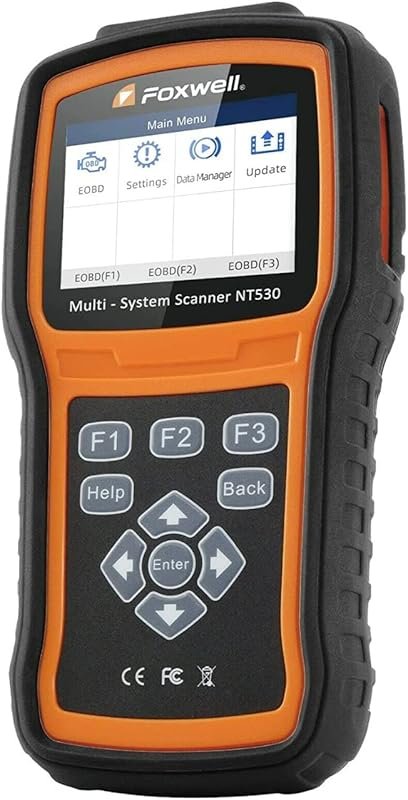 Best Overall
FOXWELL NT530 bidirectional OBD2 scanner for Volvo, full-system diagnostics, ABS bleed, SRS, EPB, SAS, TPMS.
It offers the strongest all-around mix of fit, value, and practical daily use for Volvo owners.
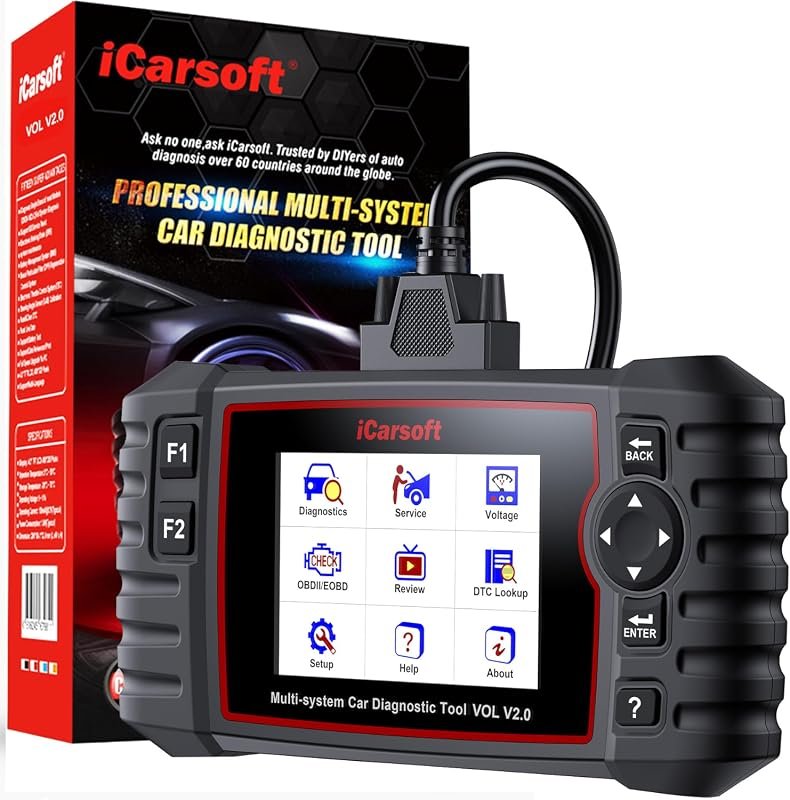 Best Value
iCarsoft VOL V2.0 OBD2 scanner for Volvo and Saab, Auto VIN, oil reset, SAS, EPB, injector coding.
It makes sense for owners who want a useful upgrade without paying more than necessary.
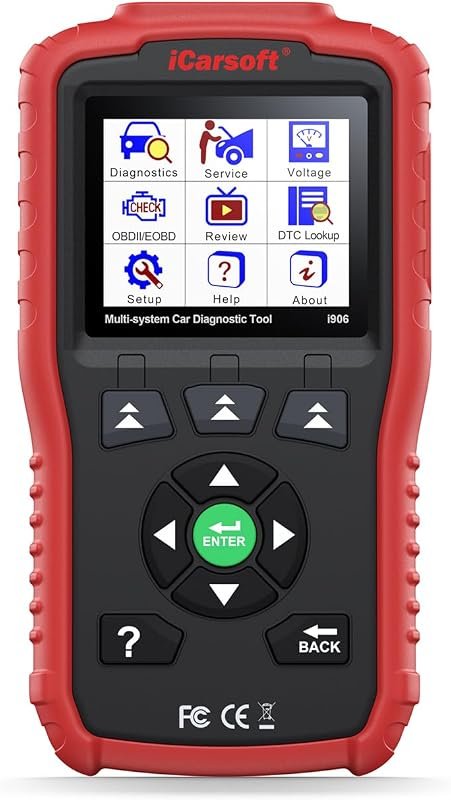 Best Premium Option
iCarsoft i906 OBD2 diagnostic scanner for Volvo and Saab, multi-system engine, ABS, SRS troubleshooting.
It is the pick I would compare first if build quality, features, and long-term ownership value matter most.
Author

Author

Evans Torres
I’m Evans Torres, an automotive engineer who loves Volvo cars. I graduated in Automotive Engineering from USC. I have worked in the car industry for years and now share my knowledge on The Volvo Life. I started this blog to connect with other Volvo fans. I offer tips, news, and advice to help you care for your car. My goal is to help you keep your Volvo in great shape and find all the best things about it. Join me as we discover everything Volvo has to offer!