



do scanner for volvo need programming? No — consumer Volvo OBD2 scanners are plug-and-play. Connect to the OBD2 port, choose your model/year, and scan. Only advanced coding or post-repair calibrations (e.g., steering angle, TPMS) need guided routines — not programming the car.
Most buyers asking this mean one of two things: do you have to “program” the car to accept the scanner, or do you have to “program” the scanner before it works. Neither is required for normal diagnostics, resets, and service scans. For related context, you may also want to read do scanner for Volvo exist.
What you will do is select your Volvo model/year in the tool and keep the scanner’s software updated. Some repairs then call for a calibration procedure, which is different from programming. Below, you’ll see what works on which models, phone compatibility, and when updates or calibrations matter. This connects closely with is scanner for Volvo XC60 if you want to compare the topic in more detail.
- Main point: No programming is needed to use a scanner on a Volvo — they’re plug-and-play for reading/clearing codes and service resets.
- Best first step: Update the scanner’s firmware/database and select the exact Volvo model/year before running a full auto-scan.
- Cost or value: Mid‑range Volvo‑capable handhelds ($120–$250) read far more modules than $30 ELM327 dongles.
- Who it suits: DIY owners who want ABS/SRS/TCM access without dealer software.
- When to get help: For ECU coding, key programming, or software downloads, use Volvo VIDA/DiCE at a dealer or specialist.
Wants to scan all Volvo modules and reset service reminders without touching dealer software.
Needs one tool for a Volvo plus basic OBD2 on other brands.
Evaluating a Volvo‑capable handheld before investing in VIDA/DiCE.
Connectivity Options: Bluetooth, WiFi, USB — and iPhone Support
Volvo scanners connect in three ways: Bluetooth dongles that pair with a phone app, WiFi dongles that create a local hotspot, or handheld units that plug in via the OBD2 cable with no phone required.
iPhone users should prefer MFi‑friendly Bluetooth dongles or stick with handheld units that don’t rely on a phone at all. Android offers wider app choices, but both platforms work well when the scanner/app is properly supported. You can also use is scanner for Volvo XC90 as a helpful next guide on the same ownership topic.
2015+ SPA/CMA Volvos and EX/EC EVs use newer UDS diagnostics. Many budget Bluetooth dongles read only engine codes. Choose a Volvo‑capable handheld or an app/scanner combo that explicitly lists SPA/CMA and UDS support. For another practical angle, see did scanner for Volvo update automatically 2.
For iPhone specifics, see our dedicated guide on Volvo scanner iPhone compatibility — it covers the app options and pairing quirks owners actually encounter.
Handheld tools (e.g., iCarsoft VOL II, Foxwell NT530) don’t depend on a phone or Bluetooth. They’re often the easiest route to reliable Volvo module access if you’ve struggled with app/dongle combos.
Volvo Model Compatibility: Which Scanners Work on Which Years
Compatibility depends on your Volvo’s generation. Older P2/P3 era cars (roughly 1999–2014) use different protocols than 2015+ SPA/CMA models, and the newest EX/EC EVs add UDS variations that not all tools cover yet.
Basic $30 readers only talk to the engine (ECM). To read ABS, SRS (airbag), transmission, CEM, and more, look for Volvo‑specific coverage by year and platform in the scanner’s listing.
For a deeper look at year/platform coverage across Volvo lines, check our focused explainer on whether scanners work with all Volvo models.
Here is a quick matrix of common scanner tiers versus Volvo generations to set expectations before you buy.
Mid‑range and advanced tools greatly improve coverage on 2015+ cars; EX/EC EV support is still evolving, so verify UDS explicitly.
| Scanner / Tier | 1999–2014 | 2015+ SPA/CMA | EX/EC EVs |
|---|---|---|---|
| Generic ELM327 Bluetooth | Engine only | Engine only | Engine only (limited) |
| Basic handheld code reader | Engine only | Engine only | Engine only (limited) |
| iCarsoft VOL II (handheld) | Good multi‑module | Good multi‑module | Partial/verify UDS |
| Foxwell NT530 (Volvo‑loaded) | Good multi‑module | Good multi‑module | Partial/verify UDS |
| Autel MK808 / similar tablet | Excellent coverage | Excellent coverage | Growing UDS support |
| Launch X431 (pro) | Excellent coverage | Excellent coverage | Good UDS (confirm model) |
| YOUCANIC app‑based | Good multi‑module | Good multi‑module | Emerging support |
Can a Volvo Scanner Be Used on Other Cars?
Yes. Nearly all Volvo‑friendly scanners read generic OBD2 engine codes on other brands. App‑based Bluetooth dongles paired with OBD Fusion (iOS) or Torque Pro (Android) also work broadly for engine data and emissions checks.
For brand‑specific modules on non‑Volvos (e.g., BMW ABS), you’ll need a scanner with those brand packages. Mid‑range Autel/Launch units often include 40+ makes with rich coverage — great for multi‑car households.
For cross‑brand usage strategies and app picks, see using a Volvo scanner on other cars.
- Update your scanner before first use — Volvo protocol files change over time.
- Select the exact Volvo model/year in the menu, then run a full auto‑scan to catch hidden module codes.
- Stabilize voltage: keep the battery above ~12.4V during long scans or calibrations.
- Save a scan report before clearing codes; it’s your roadmap for repairs and evidence for warranty discussions.
Does a Volvo Scanner Need Programming or Calibration?
No programming is required to connect or use a consumer scanner on a Volvo. Plug in, choose your model/year, and scan. That’s it. The car does not need to be “coded” to accept the tool.
Calibration is different: after certain repairs you’ll perform procedures like steering angle sensor (SAS) reset, TPMS relearn, throttle body relearn, or ride‑height calibration. These are guided routines — not ECU programming.
To understand the calibration side in more detail, read our breakdown on whether Volvo scanners need calibration and when those routines apply.
Reading codes is safe. Writing functions (coding/adaptations) carry risk if power drops mid‑process or the wrong module is targeted. Avoid clearing SRS (airbag) faults until the physical issue is fixed — an uncleared, valid SRS code is safer than a hidden fault.
What Modules Can a Volvo‑Capable Scanner Access?
Coverage varies by tool tier. Engine (ECM) access is universal. Volvo‑specific handhelds and pro tablets add TCM, ABS, SRS, CEM, BCM, SAS, TPMS, climate, and more — exactly where important Volvo faults often live.
Use this matrix to set expectations. “Budget” = engine only. “Mid‑range” = Volvo‑oriented handhelds. “Advanced” = tablet‑style pro tools. Always verify your exact model/year on the seller’s coverage list.
| Module | What it does | Budget | Mid‑range | Advanced |
|---|---|---|---|---|
| ECM (Engine) | Emissions, fuel/air, misfires | Yes | Yes | Yes |
| TCM (Transmission) | Shift logic, solenoids | No | Yes | Yes |
| ABS/BCM | Brake control, wheel sensors | No | Yes | Yes |
| SRS (Airbag) | Airbag/pretensioner faults | No | Yes | Yes |
| CEM | Central electronics gateway | No | Partial/Yes | Yes |
| SAS | Steering angle, alignment | No | Yes (reset) | Yes (reset/adapt) |
| TPMS | Tire pressure system | No | Yes (relearn) | Yes (relearn/ID write) |
| Climate (IHKA) | HVAC blend doors, sensors | No | Yes | Yes |
Clone/counterfeit scanners are common. They often connect but fail on Volvo‑specific modules or corrupt saved reports. Buy from authorized sellers and register the device for updates before relying on it.
How To Use a Volvo Scanner Without Programming
Using a consumer scanner on a Volvo is a setup task, not a programming job. The goal is correct model selection, current software on the tool, and stable battery voltage during scans or calibrations. Follow these steps to get reliable results the first time.
- Update the tool: Install the brand’s updater, register the device, and load the latest Volvo software to the scanner.
- Stabilize power: Ensure the car battery is above ~12.4V. Connect a maintainer if you’ll run long scans.
- Connect and select: Plug into the OBD2 port, turn ignition to ON (engine off), and choose the exact Volvo model/year in the menu.
- Run an auto‑scan: Scan all modules, save the report, and note freeze‑frame data. Don’t clear codes yet.
- Act and verify: Diagnose/repair, perform any guided calibrations, then clear codes and rescan to confirm a clean result.
Once you know the difference between using, updating, and calibrating, the “programming” worry disappears — you’ll get professional‑level insights without touching dealer software.
💡 Evans Torres Tip: I keep an iCarsoft VOL II in my garage and a Bluetooth dongle in my glovebox. The handheld reads Volvo modules fast with no phone pairing headaches. The dongle is my travel backup — paired to OBD Fusion on my iPhone for quick engine checks. Before any long diagnosis, I always update the tool and hook up a maintainer so voltage never sags mid‑scan.
Frequently Asked Questions
These quick answers clear up the most common confusion around “programming,” updates, and calibrations on Volvo scanners — plus how compatibility, iPhone apps, and cross‑brand use really work day to day.
Do scanners for Volvo need programming before they work?
No. Consumer Volvo scanners are plug‑and‑play. You update the tool’s software, select your exact model/year, and scan. That isn’t programming the car. Only dealer‑level tasks like ECU software downloads or key coding require Volvo VIDA/DiCE and online subscriptions.
What’s the difference between programming and calibration on a Volvo?
Programming writes new software or coding to a module — a dealer‑level action. Calibration is a guided post‑repair routine (e.g., steering angle reset, TPMS relearn) that sets baseline values. Many mid‑range handhelds can run calibrations without any ECU programming.
Will my scanner work on a 2015+ SPA/CMA Volvo without programming?
Yes, provided the tool supports Volvo’s newer UDS protocols. Mid‑range handhelds (iCarsoft VOL II, Foxwell NT530) and pro tablets (Autel/Launch) list SPA/CMA in coverage. You still don’t “program” anything — just update the scanner and choose your model/year.
Do I need special setup to use an iPhone with a Volvo scanner?
Handhelds don’t need a phone at all. For Bluetooth dongles, pick an iOS‑compatible app (e.g., OBD Fusion) and follow pairing steps. Some brand dongles use their own apps. See our iPhone guide linked above for app options and pairing fixes that Volvo owners use.
Can a Volvo scanner also diagnose other car brands?
At minimum, yes for engine/emissions via generic OBD2. For full module access on other brands (ABS, SRS, etc.), you’ll need a scanner that includes those makes. Many Autel/Launch tablets cover 40+ brands — great for multi‑car families or side‑hustle diagnostics.
How often should I update my scanner?
Update before the first use and then every few months, or before any major diagnostic session. Updates add model‑year files, bug fixes, and new routines. Keeping the tool current avoids failed connections and incomplete module lists on newer Volvos.
Is there any risk in clearing codes on a Volvo?
Clearing is safe, but poor practice if you haven’t fixed the cause — the light will come back. Never clear SRS (airbag) codes to hide a fault; verify the physical issue is resolved first. During any write/adaptation, keep battery voltage stable to reduce risk.
Final Verdict
No, you don’t “program” a Volvo to use a scanner. You update the tool, pick your model/year, and scan — that’s all most owners need. Calibrations after specific repairs are guided routines, not programming.
Buy a Volvo‑capable handheld or pro tablet if you want multi‑module access on 2015+ cars. Keep the tool updated, stabilize battery voltage, and save reports before clearing. For ECU coding or software downloads, book a Volvo dealer or specialist using VIDA/DiCE.
My Top Picks at a Glance
Here are the three do scanner programming options I would check first if you want a faster buying decision.
These picks highlight the strongest overall choice, the best value option, and the premium-style pick for practical Volvo ownership.
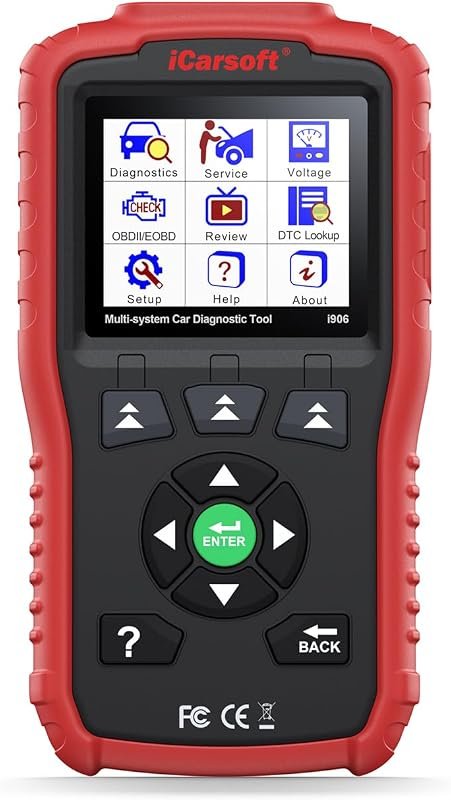 Best Overall
iCarsoft i906 OBD2 scanner for Volvo and Saab, multi-system diagnostics for engine, ABS, SRS.
It offers the strongest all-around mix of fit, value, and practical daily use for Volvo owners.
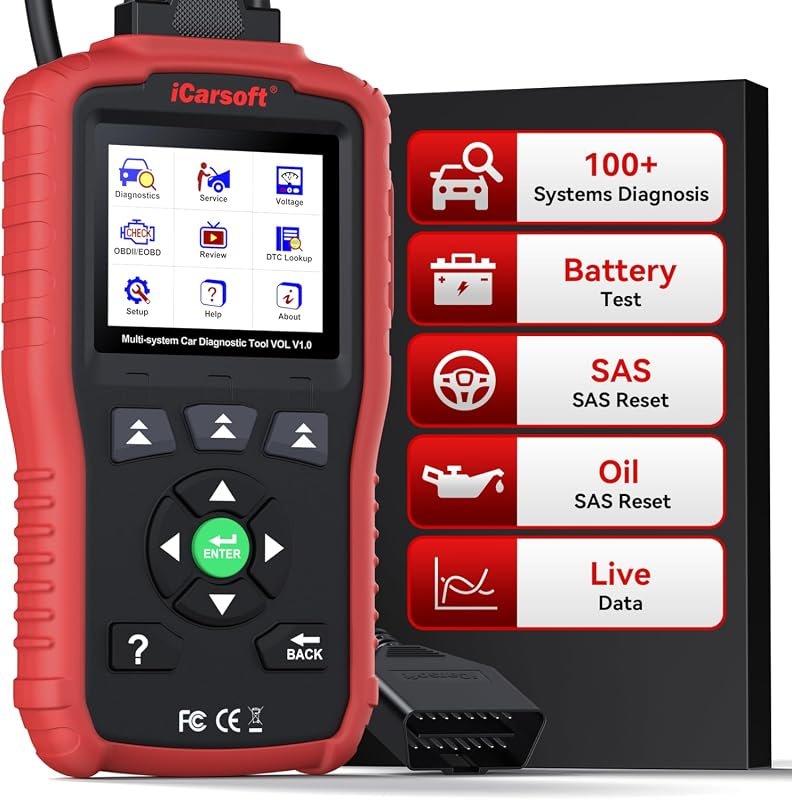 Best Value
iCarsoft VOL V1.0 OBD2 tool for Volvo/Saab, all-systems diagnostics, CAN-FD, oil/SAS resets, live data, free lifetime updates.
It makes sense for owners who want a useful upgrade without paying more than necessary.
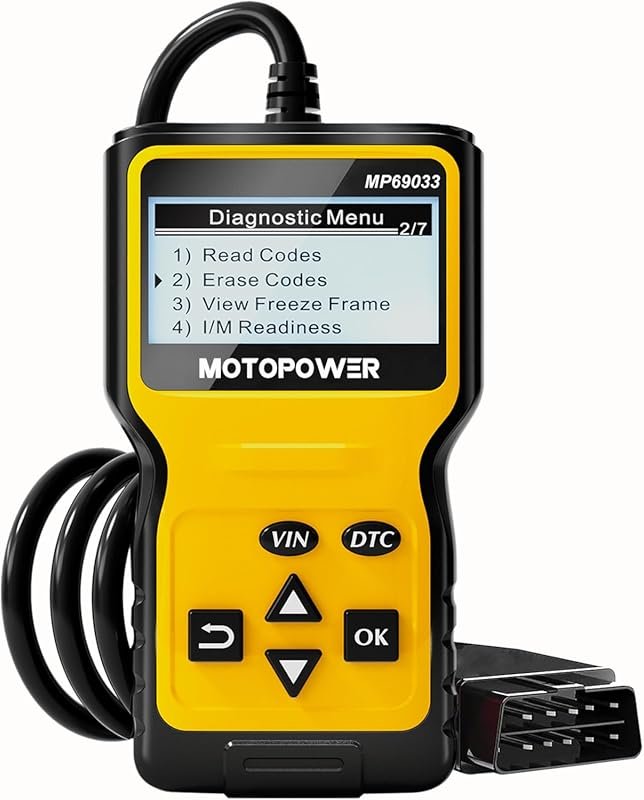 Best Premium Option
MOTOPOWER MP69033 OBD2 code reader for 1996+ cars, reads engine faults, CAN, all OBDII protocols, yellow.
It is the pick I would compare first if build quality, features, and long-term ownership value matter most.
Author

Author

Evans Torres
I’m Evans Torres, an automotive engineer who loves Volvo cars. I graduated in Automotive Engineering from USC. I have worked in the car industry for years and now share my knowledge on The Volvo Life. I started this blog to connect with other Volvo fans. I offer tips, news, and advice to help you care for your car. My goal is to help you keep your Volvo in great shape and find all the best things about it. Join me as we discover everything Volvo has to offer!