



Should scanner for Volvo be on all the time? No — unplug Bluetooth/OBD2 scanners between uses. Always-on dongles can cause parasitic battery drain and wake the CAN bus, especially on 2015+ Volvos. Use a Volvo-specific tool when needed, then remove it to protect your battery.
Many owners leave a Bluetooth OBD2 dongle connected for live data or fuel tracking. That habit seems convenient until a healthy Volvo battery goes flat after a weekend parked, or the car stays “half awake” because the dongle keeps pinging the network.
This guide answers whether constant use is safe, which brands you can trust, and how to avoid drain while still getting reliable Volvo diagnostics and app connectivity.
- Main point: Don’t keep a scanner plugged in all the time — unplug between drives to avoid battery drain and CAN-bus wakeups.
- Best first step: Use a Volvo-capable handheld or dongle with true auto-sleep; verify parasitic draw is under ~50 mA after 20–30 minutes.
- Cost or value: A quality Volvo-specific scanner ($120–$400) beats replacing a prematurely drained battery ($180–$350).
- Who it suits: Daily drivers can log trips with a low-draw, auto-sleep dongle; weekend cars should plug in only when diagnosing.
- When to get help: If the car won’t sleep or the draw stays high, have an auto-electrician test the network and battery.
Wants reliable Volvo module access without risking a dead battery from an always-on dongle.
Uses apps for live data and needs tips to keep the car sleeping normally between trips.
Prefers trusted brands that won’t cause callbacks due to parasitic drain complaints.
THE REAL QUESTION: VOLVO-SPECIFIC VS GENERIC
Most “should I leave it plugged?” issues come from generic Bluetooth ELM327 dongles that constantly poll the OBD port. That traffic can keep a Volvo’s networks awake and drain the battery while parked.

Volvo-specific handheld scanners (iCarsoft, Foxwell, Autel) are designed to be used on demand and then removed. They read ABS, SRS, CEM, and transmission modules that generic tools often miss, and they don’t sit connected 24/7.
Compatibility matters too. A tool that properly supports your model years is less likely to glitch or spam the CAN bus. If you’re checking cross-compatibility, see our explainer on whether scanners work with all Volvo models.
“Always-on” usage is different from “always-paired.” Any dongle that auto-connects when your phone is nearby can re-wake a sleeping Volvo. Disable auto-connect in the app or remove the dongle after each session.
WHICH BRANDS ARE TRUSTWORTHY
Reliable brands publish Volvo coverage lists, offer regular software updates, and provide warranties. Below is a quick look at well-known names and how they stack up for Volvo use and day-to-day practicality.
The takeaway: pick a proven Volvo-capable tool for diagnostics, and if you want trip logging, use a low-draw dongle with verified auto-sleep — then still unplug for multi-day parking.
| Brand | Volvo Coverage | Updates/Warranty | Verdict |
|---|---|---|---|
| iCarsoft (VOL II/VIDA-focused lines) | Strong on ABS/SRS/TCM/CEM (cars/SUVs) | PC-based updates; 1-year typical | Great value handheld; not for 24/7 plugging |
| Autel (e.g., MK808 series) | Broad module access, live data, resets | Frequent updates; multi-year options | Pro-grade; use on demand, remove after |
| Foxwell (NT530 w/ Volvo software) | Good module coverage, service functions | Regular updates; 1-year typical | Solid mid-tier; plug in when needed |
| Ancel (budget) | Engine-only or limited modules | Occasional updates; short warranty | Fine for CEL basics; avoid always-on use |
| YOUCANIC | Module coverage via subscription | Cloud updates; support included | Convenient app model; still unplug between uses |
REAL USER EXPERIENCES (summarized)
Positive reports focus on mid-tier and pro tools that read all modules and clear faults after real repairs — saving a dealer diagnostic fee. Owners also value accurate live data when chasing intermittent ABS, SRS, or transmission messages.

Complaints cluster around two themes: cheap clone dongles that won’t connect to Volvo modules, and “battery died after a few days parked” with always-on Bluetooth plugs. SPA/CMA Volvos (2015+) are especially sensitive to constant polling.
Many modern Volvos keep parts of the network awake for 15–30 minutes after locking. Some dongles continually ping during this window, and a few can even re-wake the car — turning a normal sleep current into a significant drain.
IS IT SAFE TO USE ON MY VOLVO
Reading codes and live data is safe. The risk isn’t “using a scanner” — it’s leaving a dongle plugged in 24/7, which can cause parasitic drain or port wear. Writing/coding functions demand caution and a stable battery charger. For related context, you may also want to read can scanner for Volvo be used on other cars.
Clearing codes without fixing the fault just hides symptoms. For safety systems, that’s unacceptable — it can disable warnings you actually need. See more on safety in our guide to whether scanners are safe to use on Volvos.
Never clear SRS (airbag) faults until the physical issue is repaired and verified. An uncleared, real SRS fault can compromise airbag deployment in a crash — this is not the place to “test and see.”
WHAT TO EXPECT REALISTICALLY
A good Volvo-capable scanner will read 8–12+ modules, display live data, run service resets, and clear stored codes after repairs. It will not replace VIDA/VOCOM for ECU programming or dealer-only adaptations. This connects closely with is scanner for Volvo XC60 if you want to compare the topic in more detail.
For continuous trip logging, choose a dongle with verified auto-sleep and low quiescent draw. Even then, unplug it for multi-day parking, airport trips, or if the car isn’t driven daily. iOS/Android apps vary — check confirmed iPhone support in our explainer on Volvo scanners that work with iPhone.
Clone/counterfeit scanners look identical to brand-name units but often fail to access Volvo modules and can spam the CAN bus. Buy from authorized sellers only — suspiciously low prices are the biggest red flag.
How To Use a Volvo Scanner Without Draining the Battery
Using a scanner smartly avoids parasitic drain and keeps diagnostics reliable. The goal is to gather data with the engine running or the battery supported, then let the Volvo sleep properly after you’re done. Follow these quick steps whenever you scan. You can also use is scanner for Volvo XC90 as a helpful next guide on the same ownership topic.
- Step 1: Plug in only when needed. For handheld tools, turn ignition to ON or start the engine before scanning. Avoid 24/7 Bluetooth dongle use.
- Step 2: Run a full scan with the engine running. This stabilizes voltage and prevents low-voltage faults during module polling.
- Step 3: Save codes and snapshots. Photograph or export results so you can unplug the tool and still keep records for repairs.
- Step 4: Unplug and confirm sleep. After locking, wait 20–30 minutes; the car’s sleep current should settle under ~50 mA. If not, remove the dongle and recheck.
- Step 5: Update tool software regularly. Keep scanner firmware/apps current to avoid connection glitches that can keep the network awake.
- Pick dongles with true auto-sleep and published sleep current specs (mA), not just “low power.”
- Disable auto-connect in your phone’s Bluetooth settings so the app doesn’t re-wake the car.
- Use a switched OBD extension or remove the dongle during any park longer than 24–48 hours.
- For deep diagnostics on 2015+ Volvos, prefer a handheld scanner you plug in only when needed.
Before we wrap up, here’s a quick personal insight from years of Volvo diagnostics.
💡 Evans Torres Tip: I keep an Autel tablet in the garage and a small Bluetooth dongle in the glovebox. On my SPA-platform XC60, the dongle only goes in for a drive when I’m logging data — it comes out when I park. After one long weekend with it left in, the battery dropped enough to trigger slow cranks. Unplugging between uses ended the issue for good.
Frequently Asked Questions
These answers focus on everyday reliability, battery health, and realistic expectations when using Volvo scanners — especially whether to leave a dongle in all the time, and how to choose and use a tool without causing drain or false confidence.
Is it OK to leave a Volvo OBD2 dongle plugged in 24/7?
Not recommended. Constantly connected dongles can keep the CAN bus awake and add parasitic draw, which flattens batteries on cars that sit. Use a true auto-sleep dongle only if you drive daily, and unplug it for multi-day parking or if you notice slow cranks.
How much battery drain can an always-on scanner cause?
Draw varies by device and app behavior. Some claim single-digit mA in sleep, while others sit 30–80 mA or re-wake modules intermittently. Anything that prevents your Volvo from settling near ~50 mA total sleep current after 20–30 minutes can cause trouble over days.
Are Volvo-specific scanners more “safe” than generic dongles?
They’re safer in practice because you use them on demand and remove them, and they talk to Volvo modules correctly. Generic ELM327s often stay plugged in, poll constantly, and miss ABS/SRS/CEM data your Volvo actually needs for a real diagnosis.
Will leaving a scanner plugged in void my warranty?
Simply reading data won’t void warranty. However, damage traced to an aftermarket device (e.g., battery drained repeatedly by an always-on dongle) may not be covered. Remove dongles when not in use and avoid writing/coding without a charger and proper procedure.
Which scanner type is best if I want trip logging?
Choose a low-draw dongle with verified auto-sleep, then unplug for multi-day parking. Confirm app support and iOS/Android compatibility first — we outline what to check in our guide to scanners that work with iPhone.
Can a scanner cause warning lights or car won’t-sleep issues?
Yes — a chatty or buggy dongle can keep modules awake, which may surface as odd behaviors or repeated low-voltage warnings. If your sleep current won’t settle or the battery keeps dropping, remove the dongle and retest before chasing other faults.
Is a mid-range handheld better than a cheap Bluetooth dongle?
For diagnostics, yes. Handhelds from iCarsoft, Foxwell, and Autel read Volvo-specific modules and are used only during testing — greatly reducing the chance of parasitic drain. For casual CEL checks only, a basic dongle is fine if you unplug it afterward.
Do Volvo scanners work across all models and years?
Coverage depends on the tool and model year. Pre-2004, 2004–2014, and 2015+ platforms use different protocols. Check the maker’s list, and see our overview on whether scanners work with all Volvo models before buying.
Final Verdict
Don’t leave a scanner plugged into a Volvo all the time. Use Volvo-capable tools for proper diagnostics, then remove them so the car can sleep and the battery stays healthy.
For trip logging, choose a low-draw, auto-sleep dongle and still unplug for multi-day parking. If sleep current won’t settle or the battery keeps dipping, remove the dongle and have an auto-electrician check for parasitic draw.
My Top Picks at a Glance
Here are the three should scanner on all the time options I would check first if you want a faster buying decision.
These picks highlight the strongest overall choice, the best value option, and the premium-style pick for practical Volvo ownership.
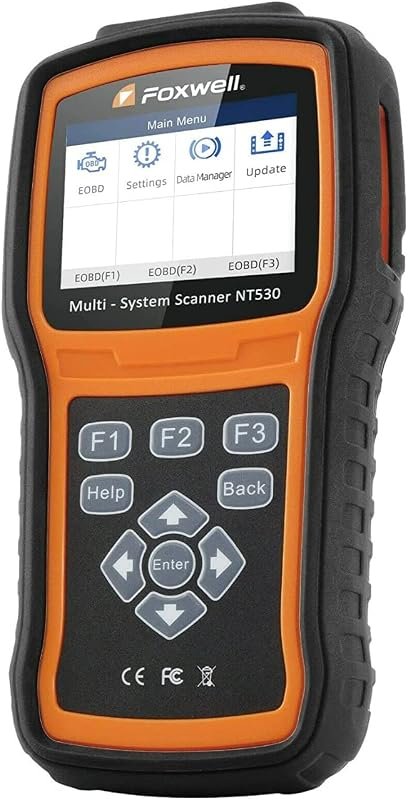 Best Overall
FOXWELL NT530 for Volvo, bidirectional OBD2 scanner with all-systems diagnostics, ABS bleed, SRS, SAS, EPB, oil reset.
It offers the strongest all-around mix of fit, value, and practical daily use for Volvo owners.
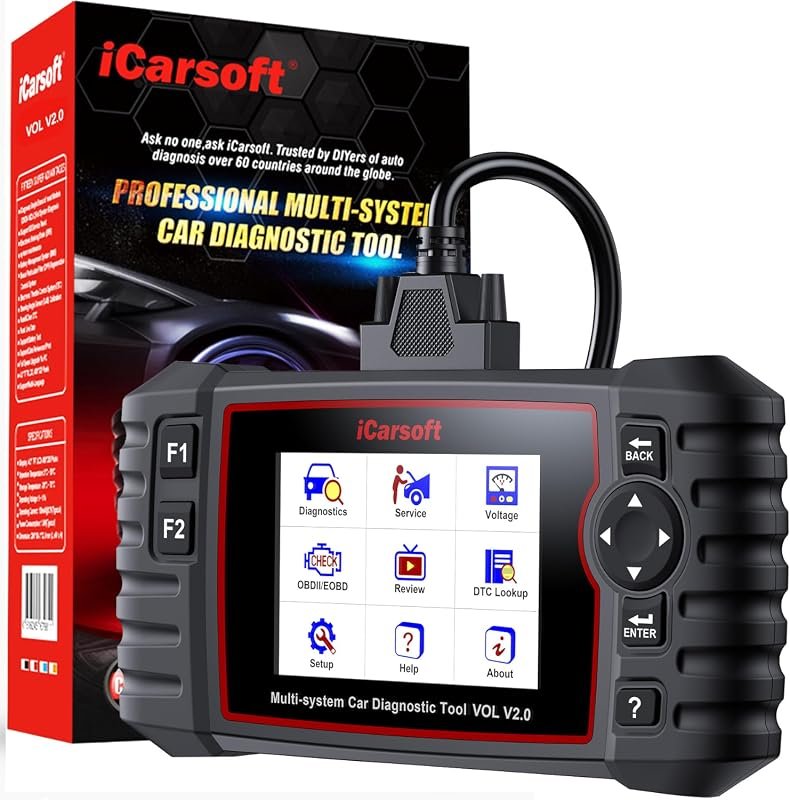 Best Value
iCarsoft VOL V2.0 2025 OBD2 scanner for Volvo/Saab with Auto VIN, injector coding, ABS bleed, DPF, TPMS.
It makes sense for owners who want a useful upgrade without paying more than necessary.
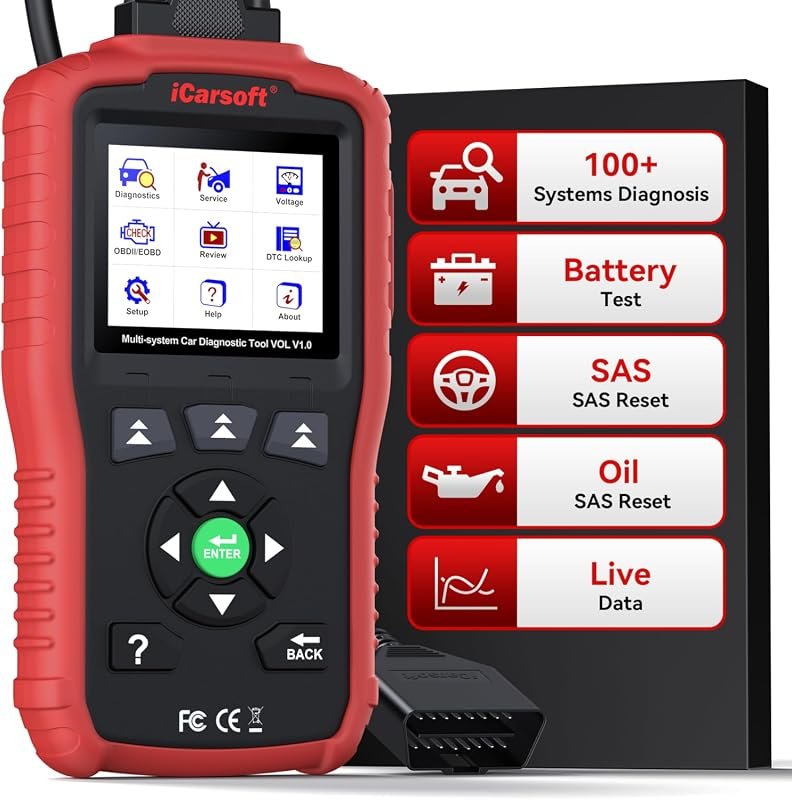 Best Premium Option
iCarsoft VOL V1.0 OBD2 scanner for Volvo/Saab, all-systems diagnostics with live data, oil/SAS resets, CAN-FD, lifetime updates.
It is the pick I would compare first if build quality, features, and long-term ownership value matter most.
Author

Author

Evans Torres
I’m Evans Torres, an automotive engineer who loves Volvo cars. I graduated in Automotive Engineering from USC. I have worked in the car industry for years and now share my knowledge on The Volvo Life. I started this blog to connect with other Volvo fans. I offer tips, news, and advice to help you care for your car. My goal is to help you keep your Volvo in great shape and find all the best things about it. Join me as we discover everything Volvo has to offer!