



have scanner for volvo not working usually comes down to connection state or compatibility. Turn ignition to ON (position II), pair the app correctly, and confirm the tool supports Volvo-specific protocols and modules. Update the scanner’s firmware before assuming it’s faulty.
A Volvo scanner that won’t connect or only reads the engine module is almost always a setup or compatibility mismatch, not a dead tool. Bluetooth pairing quirks, iPhone vs Android app support, and Volvo’s model-year protocols can all block communication. For related context, you may also want to read is scanner for Volvo XC60.
This guide shows exactly what to check first, how each connection method behaves with Volvos, which models need Volvo-specific coverage, and the simple steps to get your scanner working again without a dealer visit. This connects closely with is scanner for Volvo XC90 if you want to compare the topic in more detail.
- Main point: Connection failures are usually ignition state, app pairing, or protocol coverage — not a broken scanner.
- Best first step: Set ignition to ON (position II) and update the scanner/app; then run a full-auto scan.
- Cost or value: Mid-range Volvo-capable tools save a $150+ diagnostic fee by reading ABS/SRS/CEM modules at home.
- Who it suits: DIY owners who want to see more than just check-engine codes across XC90, XC60, S60, V60, and newer EX models.
- When to get help: If write/coding functions fail or SRS faults persist after repair, see a Volvo specialist.
Wants Bluetooth app use on iPhone or Android and full-module reads without a dealer trip.
Needs live data, service resets, and ABS/SRS access on XC90/XC60/S60/V60 generations.
Evaluating which scanners reliably talk to 2004–2014 P1/P3 and 2015+ SPA/CMA Volvos.
Connectivity Options That Affect Whether a Volvo Scanner Works
Bluetooth adapters and handhelds behave differently on Volvos. Bluetooth and WiFi dongles depend on a stable phone-app link, while USB/handheld units avoid phone issues and often prove more consistent in garages with RF noise.

iPhone users must confirm a native iOS app exists for the scanner; many ELM327-style tools are Android-first. Handheld scanners bypass mobile OS quirks entirely and can be quicker for full-module scans on older models.
Volvo modules usually wake only with ignition in ON (position II) or READY mode. Trying to connect with ignition off or in accessory often returns “no ECU found” or reads only the engine module.
- Pair in the scanner’s own app, not just in phone Bluetooth settings (brand tools often auto-handle pairing).
- Disable other OBD apps running in the background that may “steal” the connection.
- Update both scanner firmware and brand app before first use.
- Try WiFi mode if Bluetooth is unstable; some iPhones handle WiFi OBD links more reliably.
iPhone compatibility varies by brand and model. For details on iOS pairing and app support, see our guide on whether a Volvo scanner works with iPhone.
Clone/counterfeit scanners often connect to basic OBD-II but fail on Volvo-specific modules or during firmware updates. Buy from authorized sellers and avoid “too cheap to be real” listings.
Volvo Model Compatibility: Which Cars Each Scanner Tier Can Actually Read
Compatibility depends on your Volvo’s platform and protocol, not just the OBD-II plug shape. Older P80/P2 cars, the 2004–2014 P1/P3 era, and the 2015+ SPA/CMA platforms don’t expose the same modules the same way.
Basic ELM327 readers often reach engine codes only. Mid-range Volvo-capable tools add ABS/SRS/BCM/CEM, while advanced units handle newer UDS diagnostics on EX/EC electric models more reliably.
Many 2015+ SPA/CMA Volvos use UDS messaging. A tool that’s fine on a 2012 S60 may struggle on a 2022 XC60 unless it explicitly supports UDS for Volvo.
Here is a summary of how scanner tiers align with Volvo model generations and what owners typically report each tier can reach.
The key takeaway: engine-only readers “work,” but they miss the Volvo modules that trigger most warning lights. Choose a tier that matches your model year and the modules you need.
| Volvo generation | Typical protocol | Budget reader (engine-only) | Mid/Advanced Volvo-capable |
|---|---|---|---|
| Pre-2004 (P80/P2: 850, early S/V70) | KWP/ISO mix | Often limited/spotty | Better coverage; confirm exact year |
| 2004–2014 (P1/P3: S40/V50, C30, XC60 1st-gen, XC90 P2 late) | KWP2000/ISO | Engine OK | ABS/SRS/TCM/CEM typically covered |
| 2015+ SPA (XC90, XC60 2nd-gen, S/V90) | UDS/CAN | Engine only | Full-module reads with Volvo support |
| 2018+ CMA (XC40) | UDS/CAN | Engine only | Good coverage on Volvo-aware tools |
| 2024+ EX30/EX40/EC40/EX90 (EV) | UDS (EV systems) | Often fails or engine N/A | Advanced tools; coverage evolving |
| Legacy diesel (Europe) | Mix | Engine may read | Model/year-specific; verify first |
Can a Volvo-Capable Scanner Be Used on Other Cars?
Yes — most Volvo-focused handhelds still read basic OBD-II on other brands. You’ll see check-engine codes and live data on non-Volvos just like any generic reader.
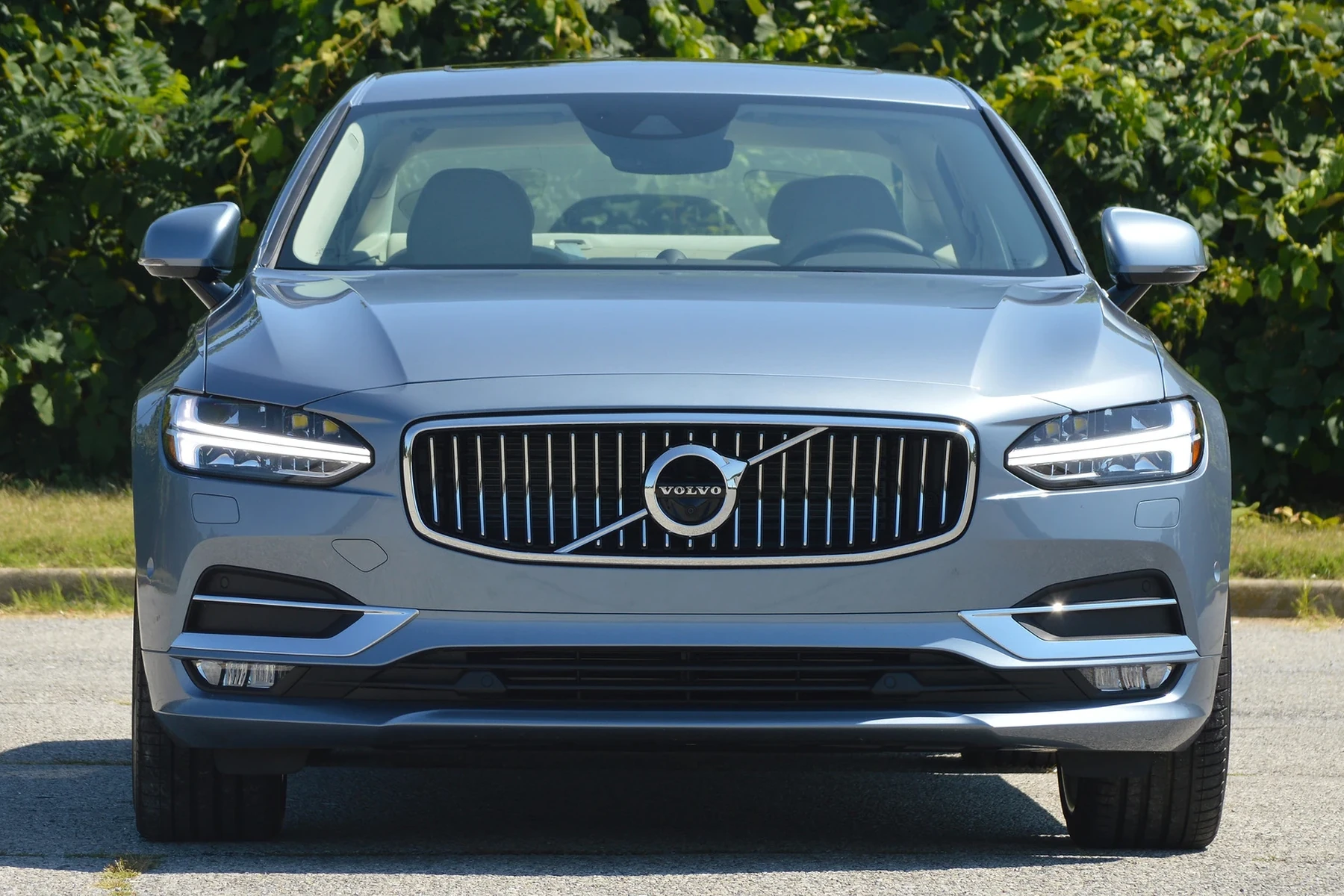
Mid-range platforms (e.g., many Autel or Launch units) often include full-brand menus for 40+ makes, so you can access modules on other cars too. Coverage varies by model and year, so verify the brand’s list first.
We break down cross-brand practicality in our guide to using a Volvo scanner on other cars.
Reading codes is safe. Clearing SRS (airbag) faults without fixing the cause is not — the system may stay disabled. Confirm repairs first, then clear.
Does a Volvo Scanner Need Programming or Calibration to Work?
No programming is needed to simply connect and read modules. Pair the adapter, select your model/year in the app or tool, and scan. That’s it.
Some special functions prompt a calibration afterward — for example, steering angle sensor (SAS) or TPMS relearn. The scanner guides you through these steps when required. Regular software updates are recommended to maintain Volvo coverage on newer models.
Curious when calibrations are required? See our explainer on whether Volvo scanners need calibration. For broad fitment expectations by model line, also check whether scanners work with all Volvo models.
What Modules Can a Volvo Scanner Access?
Module access depends on scanner tier. Engine-only readers show basic emissions data. Volvo-capable mid/advanced tools open ABS, SRS, transmission, CEM/BCM, TPMS, climate, and more — the systems that trigger most warning messages.
Use the grid below to see what’s usually accessible at each tier. “Limited” means you may read/clear but not always run advanced tests or adaptations.
| Module | What it does | Budget | Mid-range | Advanced |
|---|---|---|---|---|
| ECM (Engine) | Fuel/ignition/emissions | Yes | Yes | Yes |
| TCM (Transmission) | Shift control/adaptations | No | Yes | Yes |
| ABS/BCM | Brakes, wheel sensors | No | Yes | Yes |
| SRS (Airbag) | Airbag/pretensioners | No | Yes | Yes |
| CEM/BCM | Central electronics, lighting | No | Limited–Yes | Yes |
| SAS (Steering Angle) | Stability/steering input | No | Limited | Yes + calibration |
| TPMS | Tire pressure monitoring | No | Limited–Yes | Yes |
| Climate/IAM | HVAC, infotainment | No | Limited | Yes |
How To Get a Volvo Scanner Working Again
Most “not working” reports trace to ignition state, app pairing, or unsupported protocols. This five-step flow fixes the majority of connection problems in minutes and avoids chasing a “bad tool” that isn’t actually defective.
- Power and ignition: Charge your phone and scanner, then set the Volvo to ON (position II) or READY. Low 12V voltage or ACC mode often blocks module access.
- Pair in the right place: Open the scanner’s official app and pair there. Close other OBD apps that may auto-connect to the dongle.
- Update firmware/databases: Use the brand updater (USB/WiFi) so the tool supports your Volvo’s protocol, especially on 2015+ SPA/CMA or EX/EC models.
- Select model/year correctly: In the scanner menu, pick the exact Volvo model and year, then run a full-auto scan instead of module-by-module.
- Rule out the port/fuse: If nothing connects, test the dongle on another car. On the Volvo, inspect the OBD port and related fuse; re-seat and retry.
Need to confirm broader model fit? Our overview on whether scanners work with all Volvo models outlines year-by-year expectations.
For iOS-specific steps and pairing quirks, you can also review our iPhone-focused guide: Volvo scanner with iPhone.
Volvo’s owner support site has additional references for model features and basic diagnostics setup. See Volvo Cars Support for your specific vehicle documentation.
Avoid write/coding functions unless you fully understand the change. Interrupting a write on low battery or with unstable Bluetooth can corrupt data. Use a charger or handheld/USB connection for critical tasks.
💡 Evans Torres Tip: I keep a mid-range Volvo-capable handheld in my garage because it skips phone pairing issues entirely. On a 2018 XC60 that wouldn’t connect over Bluetooth, the handheld read ABS and SRS in one go once I set ignition to ON. Firmware updates made the difference on a newer EX40 — don’t skip them.
Frequently Asked Questions
This FAQ tackles the most common “not working” scenarios owners hit with Volvo scanners — from ignition-state mistakes to protocol gaps on newer SPA/CMA and EX/EC models. Use these as quick checks before assuming the scanner or your Volvo has a hardware fault.
Why won’t my Volvo scanner connect at all?
Ignition is the usual culprit — set it to ON/position II or READY. Close other OBD apps, update the scanner/app, and ensure the 12V battery is above 12.2V. If it still fails, test your adapter on another car and check the Volvo’s OBD fuse and port for damage.
Does a Volvo scanner work with iPhone?
Yes, if the tool’s brand provides a native iOS app and supports Bluetooth or WiFi pairing with iPhone. Many generic ELM327 dongles are Android-first and flaky on iOS. Confirm iOS support by model name and read recent App Store reviews before buying.
Which Volvo models require a Volvo-specific scanner?
Any Volvo where you want more than engine codes. 2004–2014 P1/P3 and 2015+ SPA/CMA cars place ABS/SRS/TCM/CEM behind brand-specific protocols that generic readers can’t see. EX30/EX40/EC40/EX90 add newer UDS behavior — choose a tool that lists these explicitly.
Do scanners need programming or calibration before use?
No programming is required to connect and scan. Some service tasks (like steering angle or TPMS) ask for a guided calibration afterward. Keep your scanner’s software current — updates add module coverage and fix connection bugs on newer Volvos.
Can I use my Volvo-capable scanner on other brands?
Yes. You’ll get basic OBD-II on nearly any 1996+ car. Mid-range platforms often support full-brand menus for dozens of makes, letting you access non-engine modules on those cars as well. Always check the brand-specific coverage list for your other vehicles.
Is clearing Volvo codes safe?
Reading is always safe. Clearing is fine after you fix the underlying issue. Never clear SRS (airbag) faults to “hide” the light — the system may remain disabled. For write/coding operations, use stable power and a reliable connection to avoid corruption.
How can I spot a counterfeit scanner?
Prices far below the brand’s official store, poor packaging/engraving, missing serials, and failed firmware updates are red flags. Clones may read engine codes but fail on Volvo modules. Buy from authorized sellers and register/activate the device immediately to verify.
Live data works but I can’t clear a fault — why?
Permanent DTCs won’t clear until the fault no longer appears during a drive cycle. Some modules require ignition cycles or a brief road test. Make sure you selected the correct Volvo model/year and that repairs are complete before retrying the clear command.
Final Verdict
Most “not working” Volvo scanner issues aren’t failures — they’re ignition state, pairing, or unsupported protocols on newer platforms. Set ignition to ON, update firmware, and pick the exact model/year before rescanning.
For full-module reads on 2004–2014 and 2015+ cars, use a Volvo-capable tool rather than an engine-only reader. If SRS or write/coding tasks remain stubborn after a proper repair, hand it to a Volvo specialist to avoid data corruption or a disabled safety system.
My Top Picks at a Glance
Here are the three have scanner working options I would check first if you want a faster buying decision.
These picks highlight the strongest overall choice, the best value option, and the premium-style pick for practical Volvo ownership.
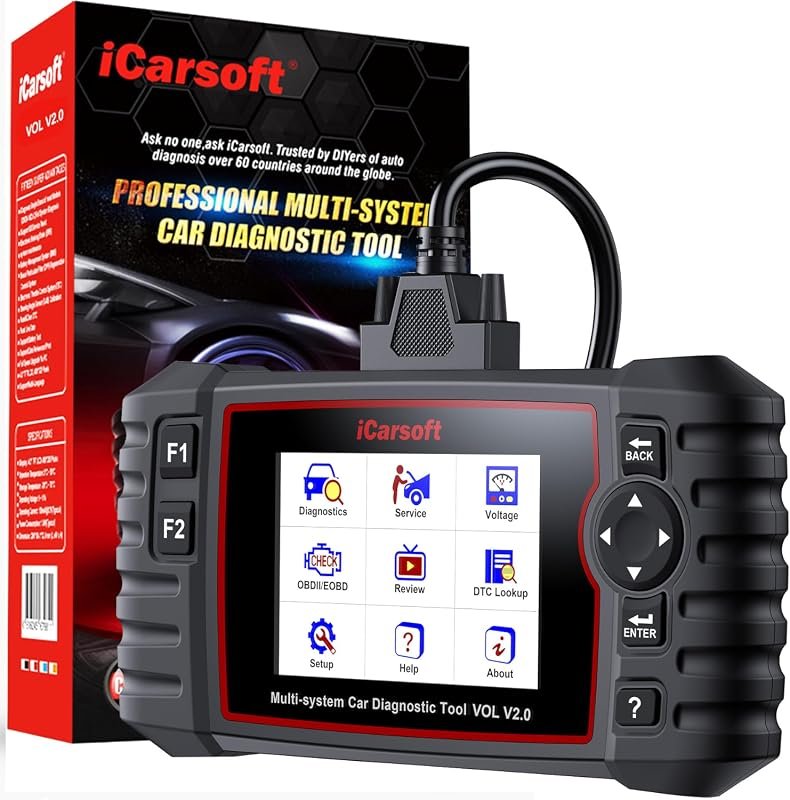 Best Overall
iCarsoft VOL V2.0 OBD2 Scanner for Volvo/Saab, Oil Reset, ABS Bleed, EPB, Injector Coding, Auto VIN
It offers the strongest all-around mix of fit, value, and practical daily use for Volvo owners.
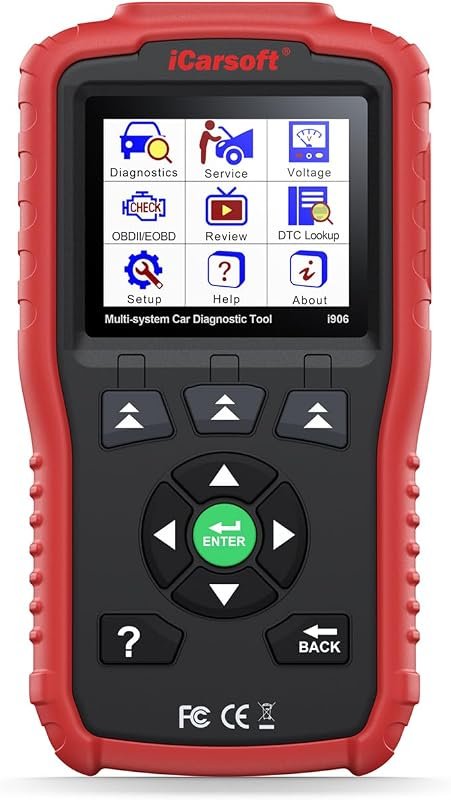 Best Value
iCarsoft i906 OBD2 Scanner for Volvo/Saab, Multi-System Diagnostics for Engine, ABS, and SRS
It makes sense for owners who want a useful upgrade without paying more than necessary.
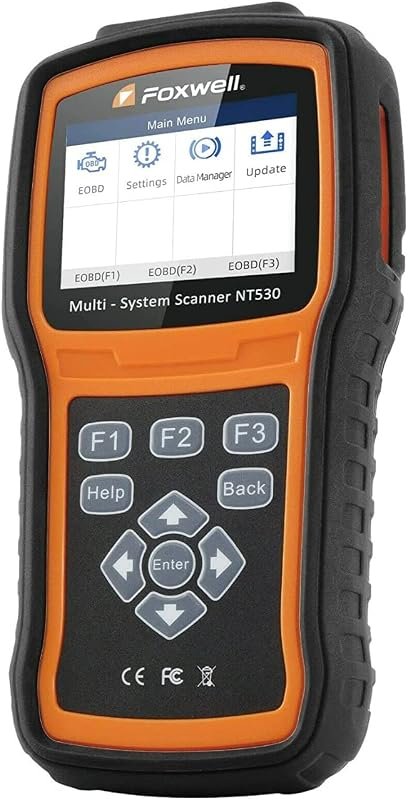 Best Premium Option
FOXWELL NT530 Bidirectional OBD2 Scanner for Volvo, All Systems, Oil Reset, ABS Bleed, SRS, EPB, TPMS
It is the pick I would compare first if build quality, features, and long-term ownership value matter most.
Author

Author

Evans Torres
I’m Evans Torres, an automotive engineer who loves Volvo cars. I graduated in Automotive Engineering from USC. I have worked in the car industry for years and now share my knowledge on The Volvo Life. I started this blog to connect with other Volvo fans. I offer tips, news, and advice to help you care for your car. My goal is to help you keep your Volvo in great shape and find all the best things about it. Join me as we discover everything Volvo has to offer!