



Updating the software in your Volvo XC60 is an essential task that enhances performance and functionality. By following the steps outlined in this guide, and ensuring you take necessary precautions, you can keep your vehicle running smoothly.
Updating software in your Volvo XC60 is essential for optimal performance and new features. This guide outlines everything you need to know about how to update software in a Volvo XC60, including tools, step-by-step instructions, and safety tips.
- What You Need to Update: Before you begin the software update process, gather the necessary tools and materials to.
- How to Update Software in: Follow these detailed steps to update the software in your Volvo XC60 effectively..
- Common Mistakes to Avoid When: Updating software can sometimes lead to errors if certain practices are not followed..
- How to Confirm the Software: After completing the software update, it’s essential to confirm that it was successful..
- When to Consult a Technician: If you encounter issues during or after the software update, it may be necessary.
What You Need to Update Software in Your Volvo XC60
Before you begin the software update process, gather the necessary tools and materials to ensure a smooth experience. For related context, read how to update software on a car diagnostic scanner for specific brands.
Essential Tools and Materials
- USB drive: A USB drive with at least 8GB of free space is required to download and transfer the software update files.
- Computer: A PC or Mac to download the software update files from the official Volvo website.
- Internet connection: A stable internet connection is necessary to access the software updates.
- Software update files: Ensure you have the correct update files specific to your XC60 model year. These can be found on the official Volvo support page.
💡 Evans Torres Tip: Regularly check for software updates to maximize your Volvo XC60’s features and safety. Staying updated can prevent potential issues down the road.
How to Update Software in a Volvo XC60: Step-by-Step Guide
Follow these detailed steps to update the software in your Volvo XC60 effectively. It’s crucial to reference your owner’s manual for specific model year instructions.
- Download the Update Files:
Visit the official Volvo support site and locate the software update section. Download the appropriate software files for your model year.
- Prepare the USB Drive:
Format the USB drive to FAT32 (if necessary) and copy the downloaded software files onto the drive. For official guidance on this, see NHTSA recall lookup by VIN.
- Connect to Your Vehicle:
Start your Volvo XC60 and insert the USB drive into the USB port.
- Access the Update Menu:
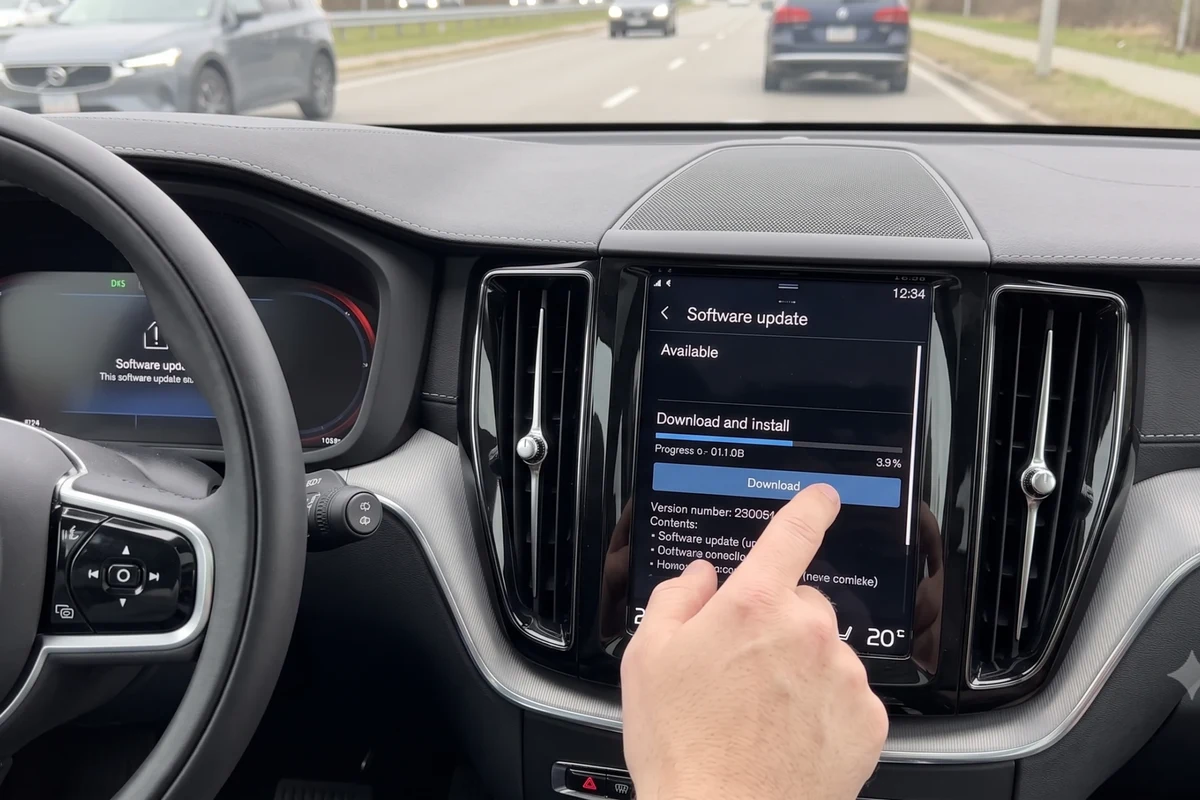
Navigate to the settings menu on your vehicle’s infotainment system and select “Software Updates.”
- Install the Update:
Follow the on-screen instructions to initiate the installation process. Ensure your vehicle remains in a safe location during this time.
- Complete the Process:
Once the update is complete, remove the USB drive and verify that the software version has changed in the settings menu.
Always consult your owner’s manual for specific instructions as processes may vary between model years. Also, take safety precautions when handling your vehicle’s electrical systems. You can also use how to check tire pressure in volvo xc60 as the next practical guide.
Always verify your vehicle’s software version and check for any ongoing recalls or safety notices specific to your model year.
Common Mistakes to Avoid When Updating Software
Updating software can sometimes lead to errors if certain practices are not followed. Here are common mistakes to watch out for:
Using the wrong update files: Ensure the files match your XC60’s model year. Interrupting the installation: Do not turn off the vehicle or remove the USB drive during the update. Neglecting to back up data: Always save important data before starting the update process. For related risk checks, compare this with how to adjust front headrest in volvo xc60.
How to Confirm the Software Update Was Successful
After completing the software update, it’s essential to confirm that it was successful. Follow these steps: You can also use how to adjust headrest in volvo xc60 as the next practical guide.
- Check the software version: Go to the settings menu and check the current software version against the update notes.
- Test vehicle functions: Ensure all features, especially infotainment and navigation, function as expected.
- Look for error messages: If any warning or error messages appear, consult the owner’s manual.
Consider the potential costs associated with software updates, including technician fees if professional installation is required.
When to Consult a Technician for Software Issues
If you encounter issues during or after the software update, it may be necessary to seek professional help. Consider consulting a technician if you experience:

Persistent error messages: If the vehicle displays warning lights or error codes. Incomplete updates: If the installation fails or the software does not appear to update. Unusual vehicle behavior: If there are changes in performance or features post-update. For related context, read how to change battery in 2016 volvo xc60 key fob.
- Ensure all vehicle systems are operational after the update.
- Test the infotainment system for functionality.
- Check for any unusual noises or behavior during a short drive.
Maintaining Your Volvo XC60: The Importance of Regular Software Updates
Regular software updates are crucial for maintaining your Volvo XC60’s performance and security. Here’s why: You can also use how to change battery in 2017 volvo xc60 key fob as the next practical guide.
- Enhanced functionality: Updates often include new features and improvements to existing systems.
- Bug fixes: Software updates can resolve known issues and enhance overall vehicle stability.
- Security enhancements: Keeping your software up to date helps protect against potential cybersecurity threats.
- Keep your USB drive dedicated for vehicle updates.
- Regularly review the official Volvo site for new updates.
- Document the update process for future reference.
Safety Precautions During the Update Process
Safety should always be a priority when updating software. Here are some precautions to consider:
Ensure the vehicle is stationary: Perform updates while parked in a safe location. Avoid distractions: Focus on the update process without interruptions. Follow the manual: Always adhere to the owner’s manual guidelines for your specific model year. For related risk checks, compare this with how to change battery in 2020 volvo xc60 key fob.
This guide on how to update software in a volvo xc60 is general information. Rules, fees, rents, salaries, service coverage, product details, and procedures can change, so confirm important points with the manufacturer, retailer, or official app documentation before acting.
A Few More Questions
To update the software in your Volvo XC60, you will need a USB drive with at least 8GB of free space, a computer to download the software files, and a stable internet connection. Also, ensure you have the correct software update files specific to your XC60 model year from the official Volvo support page.
First, format the USB drive to FAT32 if necessary, and then copy the downloaded software update files onto the drive. This preparation is crucial for ensuring that the update process runs smoothly when you connect the USB to your vehicle.
Start your Volvo XC60 and insert the prepared USB drive into the USB port, then navigate to the settings menu on the infotainment system and select “Software Updates.” Follow the on-screen instructions to initiate and complete the installation process.
Avoid using the wrong update files that do not match your XC60’s model year, as this can lead to installation errors. Also, do not interrupt the installation by turning off the vehicle or removing the USB drive during the update process.
To confirm a successful software update, check the current software version in the settings menu against the update notes, and test all vehicle functions, especially the infotainment and navigation systems. Look out for any warning or error messages that could indicate an issue.
Consult a technician if you encounter persistent error messages, incomplete updates, or unusual vehicle behavior after the software update. These signs may indicate that professional assistance is needed to resolve potential issues or ensure proper functionality.
Final Words
Updating the software in your Volvo XC60 is an essential task that enhances performance and functionality. By following the steps outlined in this guide, and ensuring you take necessary precautions, you can keep your vehicle running smoothly.
