



To turn off auto stop on a Volvo XC60, press the auto stop/start button located near the gear shifter. This action disables the feature temporarily until the next ignition cycle.
Many Volvo XC60 owners appreciate the convenience of the auto stop feature, which helps improve fuel efficiency. However, some drivers prefer to turn it off for various reasons, such as personal comfort or driving style.
For related context, you may also want to read how to turn off start stop on Volvo XC60.
This guide will walk you through the steps to turn off auto stop on your Volvo XC60, ensuring you have a clear understanding of the process.
- Auto stop can be easily turned off using a button near the gear shifter.
- The feature is temporarily disabled and will reactivate at the next ignition cycle.
- Model year variations may influence the location of the auto stop button.
- Disabling auto stop may affect fuel efficiency and emissions.
- Consult your owner’s manual for specific instructions related to your model year.
Prerequisites for Turning Off Auto Stop
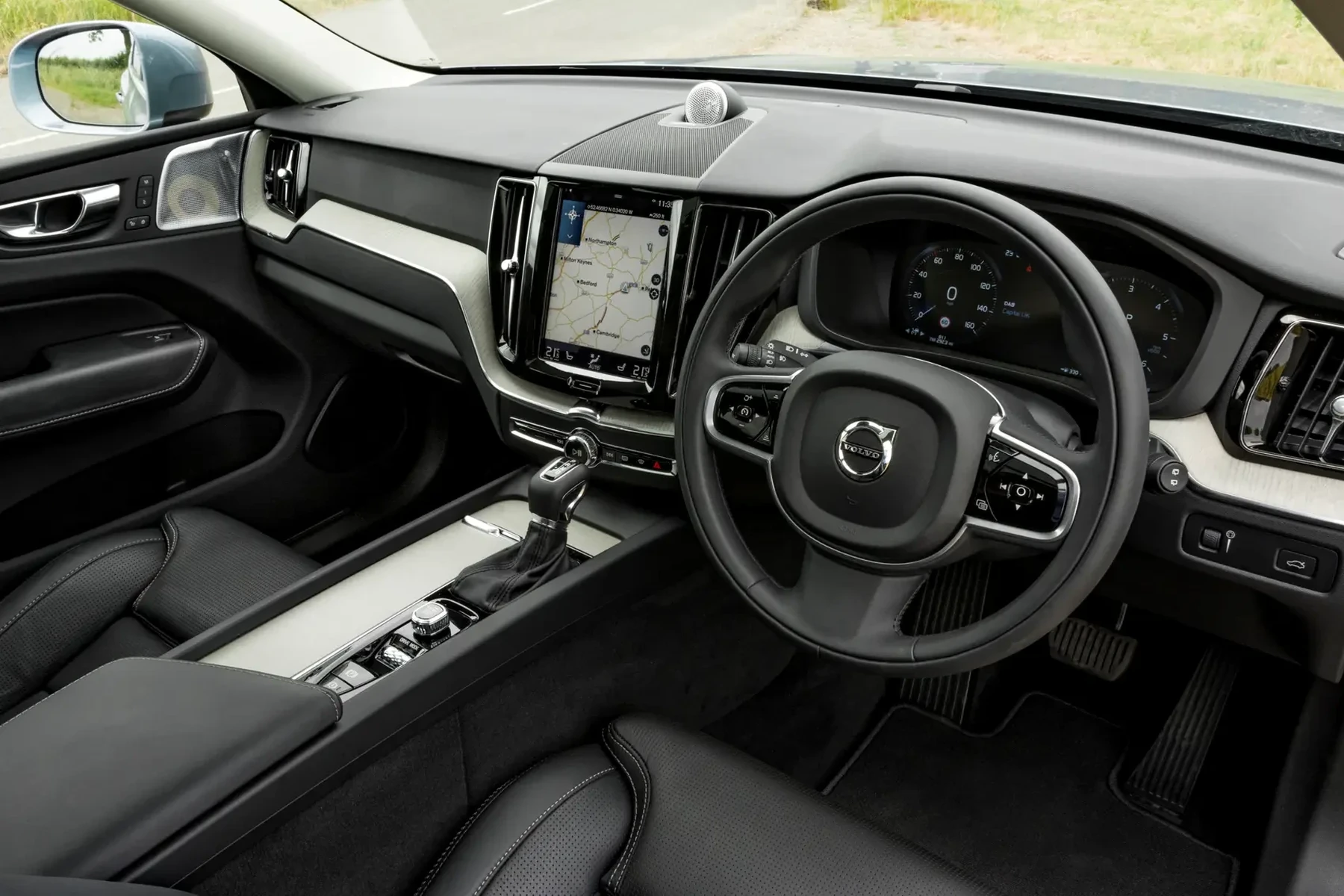
Before proceeding, ensure your vehicle is parked safely and the engine is running. Familiarize yourself with the location of the auto stop button, typically found near the gear shifter. Check your owner’s manual if you have trouble locating it, as the design may vary slightly depending on the model year.
Step-by-Step Procedure to Turn Off Auto Stop on Volvo XC60
- Start Your Vehicle: Insert the key fob into the ignition or press the start button to turn on the engine.
- Locate the Auto Stop Button: Find the button labeled “A” with a circular arrow icon, generally positioned near the gear shifter.
- Press the Auto Stop Button: Press the button once to disable the auto stop feature. A light should illuminate on the button, indicating that auto stop is turned off.
- Confirm the Setting: Monitor your dashboard for any notifications regarding the auto stop feature. If the button is illuminated, the feature is disabled.
- Drive Normally: You can now drive without the interruptions caused by the auto stop feature.
Expected Results After Turning Off Auto Stop
Upon successfully turning off the auto stop feature, your Volvo XC60 will no longer shut off the engine when idling at stop signals or during prolonged stops. This will offer a smoother driving experience, particularly in heavy traffic or during short stops.
This connects closely with how to turn off start stop in Volvo XC90 if you want to compare the topic in more detail.
Common Mistakes When Disabling Auto Stop
Not Pressing the Button Correctly
Sometimes, drivers may forget to press the auto stop button or may not press it firmly. Ensure you see the indicator light activate.
Assuming It’s Permanently Off
Auto stop will automatically reactivate the next time the vehicle is started. Be prepared to repeat the process each time you start your engine.
Ignoring Model Year Variations
The location and labeling of the auto stop button can vary by model year. Always refer to your owner’s manual for guidance specific to your XC60. You can also use how do you remote start a Volvo XC60 as a helpful next guide on the same ownership topic.
Model-Year Variations in Auto Stop Settings
The Volvo XC60 has undergone several updates since its introduction in 2008. Depending on the year, the auto stop button’s location and functionality may differ slightly:
- 2018 – Present: The auto stop button is typically located near the gear shifter and features a clear “A” symbol.
- 2015 – 2017: Similar button placement, but the icon may have a different design.
- Older Models: Earlier XC60 models may not have an auto stop feature, or it may be integrated into different vehicle systems.
When Not to Disable Auto Stop
While turning off the auto stop feature can enhance driving comfort, there are situations where keeping it on is advisable:
- In heavy traffic, where frequent stops are common, auto stop can significantly save fuel.
- During longer idling periods, such as waiting in a drive-thru, the feature helps reduce emissions.
- For eco-conscious drivers, keeping auto stop on aligns with environmentally friendly practices.
💡 Evans Torres Tip: Always check your car’s settings after a service. Some updates could reset features like auto stop, and you may need to reconfigure your preferences.
Frequently Asked Questions
Can I Disable Auto Stop Permanently?
No, the auto stop feature cannot be permanently disabled. It will reactivate each time you turn on the engine.
Will Turning Off Auto Stop Affect My Fuel Efficiency?
Yes, turning off auto stop may lead to decreased fuel efficiency, especially in stop-and-go traffic.
Is It Safe to Drive with Auto Stop Turned Off?
Yes, it is safe to drive with auto stop turned off. It is a personal preference based on comfort during driving.
What If the Auto Stop Button Doesn’t Work?
If the button is unresponsive, check for any dashboard warnings or consult a mechanic, as there may be an underlying issue.
Where Can I Find My Volvo XC60 Owner’s Manual?
Your owner’s manual can usually be found in the glove compartment or accessed online through Volvo’s official website.
What to Do Next
Now that you know how to turn off auto stop on your Volvo XC60, make adjustments based on your driving preference. If you prefer not to have the feature interrupt your drive, simply follow the steps outlined above each time you start your vehicle.
Enjoy a smoother driving experience while being mindful of your vehicle’s fuel consumption and emissions.
Author

Author

Evans Torres
I’m Evans Torres, an automotive engineer who loves Volvo cars. I graduated in Automotive Engineering from USC. I have worked in the car industry for years and now share my knowledge on The Volvo Life. I started this blog to connect with other Volvo fans. I offer tips, news, and advice to help you care for your car. My goal is to help you keep your Volvo in great shape and find all the best things about it. Join me as we discover everything Volvo has to offer!