



Was scanner for Volvo a good investment? Yes — a Volvo-specific scanner (iCarsoft, Autel, Foxwell) typically pays for itself after 1–3 dealer diagnostics at $120–$200 each. Avoid $30 generic readers; they miss Volvo modules like SRS, ABS, and CEM, killing ROI.
Sticker shock from a single dealer diagnostic visit makes most DIY Volvo owners ask the same thing: will a scanner actually save money? It does — but only if it talks to Volvo-specific modules across your model year. That’s where brand, protocol coverage, and updates separate winners from paperweights. For related context, you may also want to read is scanner for Volvo XC60.
Below I break down real-world ROI, which brands Volvo owners trust, what these tools can and can’t do, and how to calculate your personal payback before you buy.
- Main point: A Volvo-specific scanner is a solid investment; generic OBD2 readers miss critical modules and rarely deliver ROI.
- Best first step: Verify coverage for your exact Volvo year/platform (pre-2004, 2004–2014, 2015+ SPA/CMA, or EX/EC EVs) before buying.
- Cost or value: Expect $120–$400 purchase price; breakeven often comes after two avoided diagnostic fees.
- Who it suits: DIY owners, out-of-warranty cars, and anyone maintaining a family fleet of Volvos.
- When to get help: Module programming, key coding, and persistent SRS faults still warrant a Volvo-experienced specialist.
The Real Question: Volvo‑Specific Scanner vs Generic OBD2
Most “bad scanner” stories trace to using a generic ELM327 or $30 code reader that only talks to the engine (ECM). Volvo spreads faults across many modules — SRS (airbags), ABS, TCM, CEM, BCM, SAS, climate, and more — which generic tools can’t see. You can also use do scanner for Volvo exist as a helpful next guide on the same ownership topic.

A Volvo-capable scanner queries these modules using manufacturer protocols (including UDS on newer platforms). That single difference turns a scanner from “toy” to “tool” — and it’s why the investment pays off.
ROI hinges on module coverage. Check that the scanner explicitly supports your Volvo’s model and year range (e.g., 2015+ SPA XC90/XC60, or EX/EC electric) — not just “Volvo compatible.”
Wants honest ROI, safe operation, and brands that actually read Volvo modules — not just engine codes.
Does basic repairs at home and wants to avoid $120–$200 diagnostic visits several times a year.
Needs a dependable tool to triage faults before booking a specialist, saving time and money.
Which Scanner Brands Are Trustworthy for Real ROI
Yes, brand matters — but “trustworthy” here really means proven Volvo module coverage, stable updates, and non-clone hardware. iCarsoft (VOL II / VOL V3.0), Autel (MK808/MP808), and Foxwell (NT530) have the strongest track record among DIY owners and independent shops.
Ancel and YOUCANIC can be useful in the right use case, but be clear about coverage depth and update models. Beware listings priced too low to be legitimate — that’s how clones sneak in.
Clone scanners look identical but fail to connect to Volvo-specific modules or refuse updates later. Buy from the brand’s official store or an authorized Amazon seller only.
Here is a summary of how major brands stack up for Volvo owners focused on ROI. Coverage depth and a clean update path matter far more than minor price gaps.
Pick the brand whose confirmed coverage matches your exact year/platform; that’s what turns a $150 tool into hundreds saved within a few months.
| Brand | Volvo Coverage Depth | Updates/Warranty | Trust Verdict |
|---|---|---|---|
| iCarsoft (VOL II/V3) | Strong on Volvo/Saab; most modules incl. ABS/SRS/CEM | PC/Wi‑Fi updates; 1‑2 yr warranty typical | Best value DIY pick |
| Autel (MK808/MP808) | Broad multi‑brand; deep Volvo support | Regular firmware; paid renewals on some models | Pro‑grade reliability |
| Foxwell (NT530) | Solid Volvo coverage with service resets | PC updates; good support | Reliable mid‑tier |
| YOUCANIC | Wide brand list; Volvo depth improving | Subscription/app model | Consider if you want app support |
| Ancel (budget) | Often engine + limited Volvo modules | Basic updates; variable | OK as secondary/basic tool |
Real User Experiences From Volvo Owners
Positive feedback centers on full-module access and actionable data. Owners routinely report saving $150–$400 by pinpointing a failed wheel speed sensor, clearing SRS after a fixed connector, or resetting service reminders after DIY work.

- Wins: “Read all modules,” “cleared ABS fault post-repair,” “saved a dealer trip,” “great live data for misfire diagnosis.”
- Pain points: “App stopped updating,” “no support for new EX/EC models yet,” “turns out it was a clone,” “confusing menus until I learned them.”
2015+ SPA/CMA Volvos use UDS-based communications in many modules. Not every mid-tier scanner supports all UDS functions yet — verify your exact year and trim on the brand’s compatibility list. For another practical angle, see do scanner for Volvo work with all models.
For deeper context on long-term owner feedback, see our analysis on whether scanners for Volvo are reliable and our take on whether scanners are worth it for different ownership scenarios.
Is It Safe to Use a Scanner on a Volvo?
Reading and saving fault codes is safe. Live data viewing is safe. Clearing codes is usually safe after a verified repair — but do not clear SRS/airbag codes until the physical fault is fixed, and avoid writing/coding functions unless you know exactly what they change.
Most consumer Volvo-capable scanners are read/clear tools first; they won’t brick modules during normal reading. Problems generally arise from clone hardware or misused advanced functions.
Never clear SRS/airbag faults to “hide” a warning. If the system is disabled, airbags may not deploy in a crash. Diagnose the root cause, repair it, then clear the code.
What Return to Expect — and Where Scanners Fall Short
Expect a good scanner to read 8–12 modules, show live data, reset the service reminder, and clear codes after repair. That alone can save two or three shop visits a year on an older or higher-mileage Volvo.
What it won’t do: complete ECU programming, key coding, or major adaptations that require VIDA/DiCE or PTT-level tools. For those tasks, book a Volvo-experienced independent or dealer.
- Typical savings: $120–$200 per avoided diagnostic visit; $20–$60 per DIY reset/service item.
- Big wins: ABS/SRS diagnosis after DIY sensor/connector fixes; misfire pinpointing; TPMS and SAS resets (model-dependent).
- Limits: Software updates, immobilizer/key programming, and some advanced adaptations.
If you plan to push beyond read/clear into guided testing, see our walkthrough on how to use a professional car scanner for Volvo vehicles to set expectations before you buy.
- Confirm coverage by entering your exact VIN/year on the brand’s site before purchase.
- Register the tool and run all firmware/database updates before first use.
- Save a full system scan to PDF before clearing anything — it preserves history.
- Buy from authorized sellers only; verify serials with the manufacturer to avoid clones.
How To Calculate Your Volvo Scanner ROI
ROI depends on what you actually use the tool for. A quick calculation before buying prevents disappointment and helps you pick the right tier. Add your likely diagnostic visits and DIY resets for the next 12 months, compare to the scanner’s purchase price, and factor any paid update plans.
- List expected events: Count probable diagnostics (check-engine, ABS/SRS, service resets) over 12 months.
- Assign shop costs: Use $120–$200 per diagnostic visit and $20–$60 per reset at local shops.
- Sum avoided spend: Add those costs to get your “savings potential.”
- Subtract scanner cost: Compare against a $120–$400 tool and any annual update fees.
- Decide tier: If savings exceed cost within 1–3 uses, buy; if not, consider a mid-tier or share a tool within the family.
Before we wrap with FAQs, a quick personal note on how I approach scanner ROI in my own Volvo garage.
💡 Evans Torres Tip: I bought an iCarsoft VOL II years ago and it paid for itself fast. A rear wheel speed sensor failed on my XC90; the scanner nailed the corner in two minutes. I replaced the sensor at home and cleared the ABS light — that alone saved the $180 diagnostic I would’ve paid at a shop. This connects closely with is scanner for Volvo XC90 if you want to compare the topic in more detail.
Frequently Asked Questions
These answers address the most common trust and ROI questions I hear from DIY Volvo owners — coverage gaps, safety, updates, and buying sources. If you’re comparing multiple tools, use this to sanity-check your short list before pulling the trigger.
Are Volvo-specific scanners really worth it compared to a $30 reader?
Yes. A $30 reader sees engine codes only; Volvos store critical faults in modules like SRS, ABS, and CEM. A Volvo-capable scanner uncovers those issues and lets you confirm a repair, reset the service reminder, and clear module codes — savings that usually cover the tool after 1–3 uses.
Which brand is most reliable for DIY Volvo owners?
For value and Volvo depth, iCarsoft VOL II/V3 is a strong DIY pick. Autel MK808/MP808 offers broader professional features and stability at a higher price. Foxwell NT530 is a dependable mid-tier. Budget brands can work, but verify Volvo coverage carefully and expect fewer advanced functions.
Will it work on 2015+ SPA models and the newer EX/EC electric Volvos?
Most mid-tier and pro tools support 2015+ SPA/CMA (XC90, XC60, S60, V60, etc.) with UDS coverage, but always confirm your exact year/trim. EX30/EX40/EC40/EX90 EVs use newer protocols; support is catching up and varies by brand and firmware version. Check the manufacturer’s compatibility list before purchase.
Is Bluetooth/app-based scanning as reliable as a handheld unit?
For basic reading/clearing, Bluetooth dongles with reputable apps can be fine. Handheld units tend to be more consistent on module access, especially with Volvos, and avoid phone/app pairing issues. If you prefer app-based tools, confirm iOS/Android support and check recent owner feedback for your model year.
Can a consumer scanner reset my Volvo’s service reminder and ABS/SRS lights?
Service reminder resets are widely supported. Clearing ABS/SRS is usually possible after you fix the underlying issue; some models require specific reset procedures. Never clear SRS to hide a real fault — airbags may remain disabled. If a cleared code returns quickly, investigate the hardware problem first.
How often do scanner updates matter for Volvos?
Updates matter a lot for 2015+ and EV models as manufacturers expand UDS coverage and add functions. Run initial updates before first use, then check quarterly. Some pro tools require annual subscriptions for new data — include that cost in your ROI math.
Where should I buy to avoid clones?
Buy directly from the brand’s website or an authorized Amazon seller. Avoid listings with unusually low prices, missing serial numbers, or poor packaging. If in doubt, email the manufacturer with the seller’s link or serial; reputable brands will verify authenticity quickly.
Is there a deep-dive guide to whether scanners are generally good for Volvos?
Yes — start with our balanced take on are scanners for Volvo good for a broader overview before you decide on features and budget.
Final Verdict
For DIY Volvo owners, a Volvo-capable scanner is a smart buy. The key is verified coverage for your exact model year and avoiding clones. That alone turns the tool into real savings and faster fixes.
Start by confirming compatibility, updating firmware on day one, and saving a full scan before clearing anything. Use the ROI steps above — if two shop visits are likely this year, the math already points to yes.
My Top Picks at a Glance
Here are the three was scanner good investment options I would check first if you want a faster buying decision.
These picks highlight the strongest overall choice, the best value option, and the premium-style pick for practical Volvo ownership.
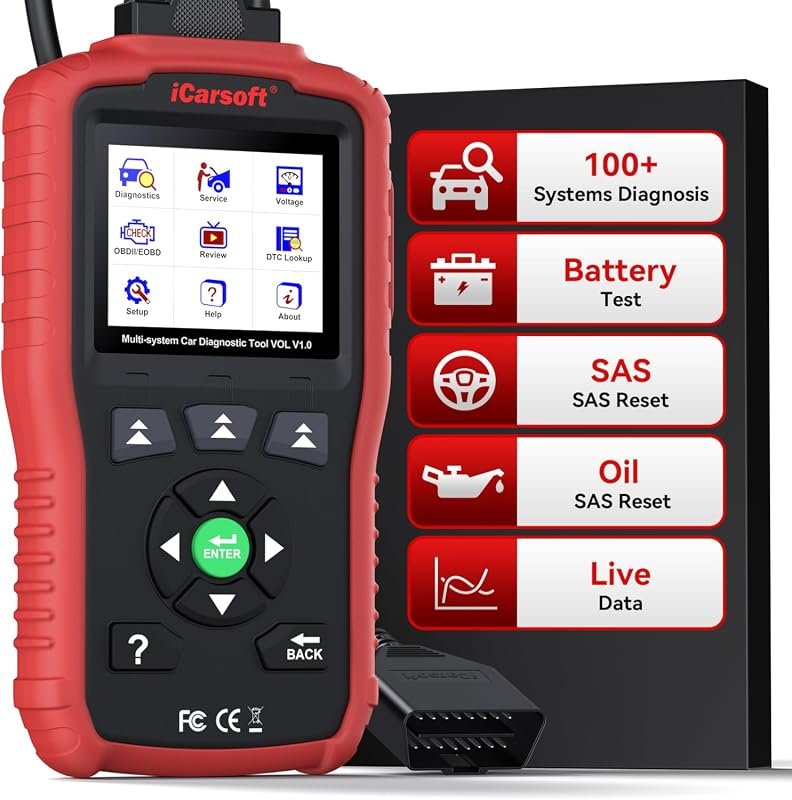 Best Overall
iCarsoft VOL V1.0 OBD2 Scanner for Volvo/Saab, all-systems diagnostics, oil/SAS reset, live data, CAN-FD, lifetime updates.
It offers the strongest all-around mix of fit, value, and practical daily use for Volvo owners.
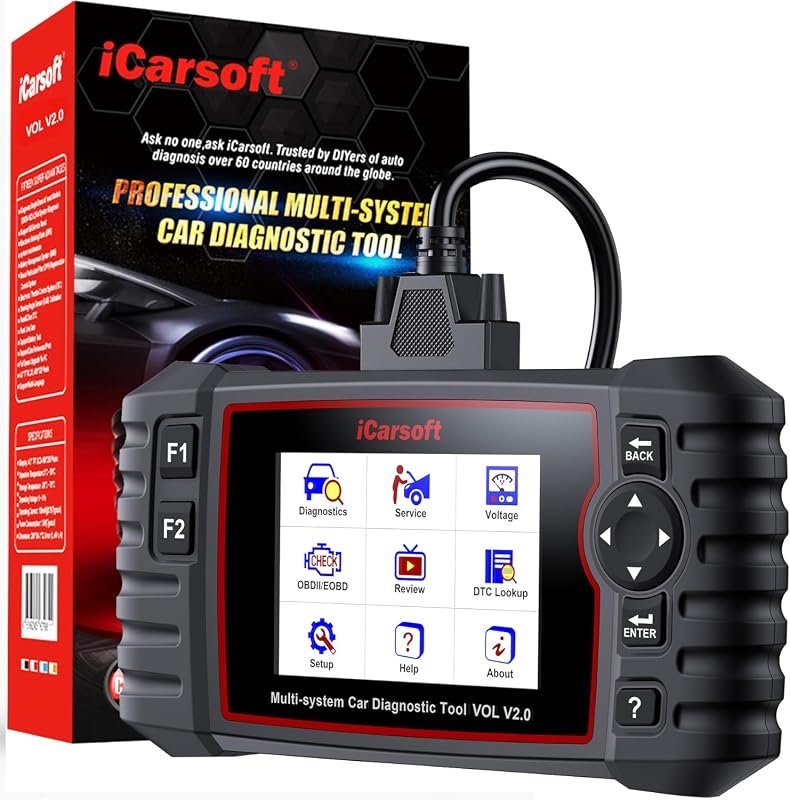 Best Value
iCarsoft VOL V2.0 OBD2 Scanner for Volvo/Saab, Auto VIN diagnostics, oil/SAS/EPB/BMS/DPF, ABS bleed, injector coding, TPMS.
It makes sense for owners who want a useful upgrade without paying more than necessary.
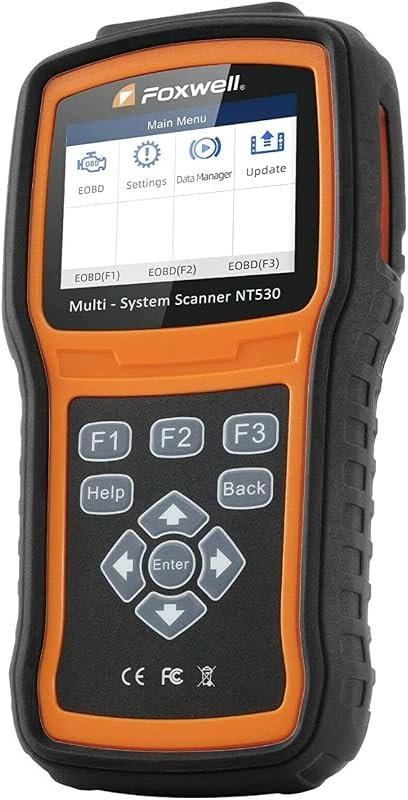 Best Premium Option
FOXWELL NT530 OBD2 Scanner for Volvo, bidirectional all-systems diagnostics, ABS bleed, SRS, SAS, EPB, oil reset.
It is the pick I would compare first if build quality, features, and long-term ownership value matter most.
Author

Author

Evans Torres
I’m Evans Torres, an automotive engineer who loves Volvo cars. I graduated in Automotive Engineering from USC. I have worked in the car industry for years and now share my knowledge on The Volvo Life. I started this blog to connect with other Volvo fans. I offer tips, news, and advice to help you care for your car. My goal is to help you keep your Volvo in great shape and find all the best things about it. Join me as we discover everything Volvo has to offer!