



was scanner for volvo discontinued? No — consumer Volvo-specific scanners were not discontinued. Some SKUs were renamed or superseded (e.g., Foxwell NT520 → NT530), but iCarsoft, Autel, Foxwell, and others still sell and update tools that work on modern and older Volvos.
Product confusion usually comes from model refreshes and counterfeits, not an industry-wide shutdown. A tool you knew by one name last year may now be sold as its successor with broader Volvo coverage or a new app.
Below, see which brands are trustworthy, what actually changed, how safe these tools are to use on Volvos, and a simple checklist to verify real availability and authenticity before you buy.
- Main point: Volvo scanners aren’t discontinued — several models were replaced by newer versions with ongoing updates.
- Best first step: Check the brand’s official site for current model names and supported Volvo years before purchasing.
- Cost or value: Reliable Volvo-capable tools typically run $120–$500; avoid too-cheap “deals.”
- Who it suits: Owners who want to read ABS/SRS/TCM/CEM modules beyond basic engine codes.
- When to get help: For coding or programming, use a Volvo specialist or dealer-level software.
You want one tool that actually talks to Volvo modules without dealer visits.
You bought a $30 dongle and it missed ABS/SRS codes — you need real Volvo coverage.
You’re deciding between iCarsoft, Autel, Foxwell, or others and want a reliable choice.
The Real Question: Volvo-Specific vs Generic OBD2
Most “it doesn’t work” stories trace back to generic readers that only see engine (ECM) OBD2 emissions codes. Volvos hide a lot of useful data in other modules — SRS/airbag, ABS, TCM, CEM, BCM, SAS, TPMS and more.

A Volvo-capable scanner adds those proprietary protocols so you can read and clear faults across the car, view live data, and reset service reminders. That’s why reputable brands cost more than a basic ELM327 dongle. For related context, you may also want to read do scanner for Volvo exist.
A “universal OBD2” claim only guarantees engine/emissions access. Look for explicit Volvo module lists (ABS, SRS, CEM, etc.) and confirmed support for your exact model year before buying.
Which Brands Are Trustworthy (and Still Available)
Brands weren’t discontinued — their lineups evolved. Some older handhelds were replaced by successors with better Volvo protocol coverage or refreshed hardware. The names may change, but support continues through updates and new models.
Use the table below to compare reputation, Volvo coverage depth, update policy, and typical warranty terms from brands that Volvo owners consistently trust.
The bottom line: buy from a recognized brand with ongoing updates and a clear Volvo module list; avoid “too good to be true” prices that often signal counterfeits.
| Brand | Reputation | Volvo coverage | Update policy | Warranty | Verdict |
|---|---|---|---|---|---|
| iCarsoft (VOL II/V2 series) | Widely used by Volvo DIY | ECM/TCM/ABS/SRS/CEM, service resets | PC/Wi‑Fi updates; periodic | Typically 1 year | Best value dedicated Volvo tool |
| Autel (MK808/MX808 etc.) | Professional-grade | Broad module access + bi‑directional on some | Frequent; some subscriptions | 1 year typical | Great if you service multiple brands |
| Foxwell (NT530) | Solid mid‑tier | Strong Volvo modules; replaced NT520 | Regular firmware updates | 1 year typical | Dependable mid-price pick |
| YOUCANIC | Growing, software‑centric | Good module coverage via app | Subscription/app updates | Varies | Consider if you prefer app workflow |
| Topdon | Improving coverage | Decent multi-brand support | Regular OTA on newer units | 1–2 years | Good all-rounder; verify Volvo list |
| Ancel (budget tier) | Entry-level | Often engine-only; some Volvo functions | Occasional | Varies | OK for basic codes; not full Volvo |
Real User Experiences: What Owners Report
Positive feedback centers on full-module reads, clearing ABS/SRS faults after repairs, and saving a $150–$250 dealer diagnostic visit. Many DIYers keep a mid-tier scanner in the glovebox for quick checks.

Complaints almost always trace to three things: buying a clone device, using a generic engine-only tool, or expecting dealer-level coding/programming from a consumer scanner.
Pre‑2004 Volvos use older protocols, while 2015+ SPA/CMA cars and new EX/EC EVs rely on newer UDS messaging. A scanner can be great on 2009–2014 yet need a firmware update for a 2024 EX30 — always check the brand’s coverage chart. This connects closely with did scanner for Volvo need calibration if you want to compare the topic in more detail.
For model-specific expectations and coverage realities, see our deeper dives on compatibility across years in whether scanners work with all Volvo models.
Is It Safe to Use a Scanner on a Volvo?
Reading codes and viewing live data is safe — you’re not changing anything. Clearing codes after a proper repair is fine too. Risk appears only when attempting advanced writes (coding/adaptations) without the right procedure or tool.
Avoid clearing SRS/airbag faults until the physical issue is fixed; otherwise you could hide a live safety problem. For programming or key coding, use a Volvo-specialist or dealer tools.
Never clear an SRS/airbag light to “see if it comes back.” Confirm the cause (e.g., seatbelt buckle switch, clock spring) and repair first. An unresolved SRS fault can prevent airbags from deploying in a crash.
If you’re exploring phone connectivity and app-based tools, confirm support for your platform — our guide on scanners that work with iPhone explains what to check.
What to Expect Realistically from a Reliable Volvo Scanner
A good consumer scanner reads faults in 8–12 modules, shows key live data, resets oil/service reminders, and performs basic calibrations (e.g., steering angle) on many models. It will not replace VIDA/DiCE or PTT/VOCOM for ECU software updates or full programming.
Think of it as your first-line diagnostic tool: identify the system, confirm the sensor or circuit, fix the fault, then clear the code. For deep coding or software downloads, book a Volvo-savvy shop.
Clone/counterfeit scanners look identical but often fail to connect to Volvo-specific modules or brick during updates. Red flags: price far below MSRP, no serial registration, poor packaging, and unknown marketplace sellers.
If you want a confidence check on everyday reliability by model, skim our perspective on whether scanners for Volvo are reliable before you decide.
How To Verify a Volvo Scanner’s Availability and Authenticity
Before buying, confirm the tool isn’t a discontinued SKU and that it’s a genuine unit. This five-minute check prevents connection headaches and protects you from counterfeits posing as “warehouse deals.”
- Step 1: Visit the brand’s official website and find the current model page; note supported Volvo years/modules.
- Step 2: Check the model’s firmware/update date to ensure ongoing support.
- Step 3: Verify the seller is authorized (brand’s “Where to Buy” list or official Amazon storefront).
- Step 4: Match photos/packaging contents with the official site; beware mismatched labels or typos.
- Step 5: After delivery, register the serial and update firmware before first use.
- Screenshot the brand’s Volvo coverage chart for your year/trim before purchase.
- Update the scanner on Wi‑Fi/PC the day it arrives; many add UDS/EV support via updates.
- Keep a PDF of your fault scan — it speeds up parts ordering and shop quotes.
- Engine-only readers are fine for emissions checks; use a Volvo-capable tool for ABS/SRS.
Curious about platform compatibility beyond Volvo? Our overview on whether scanners work with all Volvo models explains year splits and what to check when you own multiple Volvos.
💡 Evans Torres Tip: I keep an iCarsoft VOL-series scanner in my XC60. It paid for itself the first time I chased an ABS light — one full-module scan pointed to a rear wheel speed sensor. I replaced it, cleared the code, and skipped a $180 dealer diagnostic. Always update the tool before first use — coverage gets better every quarter.
Frequently Asked Questions
These FAQs address availability changes, safe usage, brand choices, updates, and model coverage so you can pick a scanner with confidence and avoid the pitfalls that trip up many first-time buyers.
Was “Scanner for Volvo” actually discontinued?
No. Consumer Volvo-capable scanners remain widely available. What changed are model names and successors (e.g., Foxwell NT520 → NT530) plus firmware updates that broaden coverage. If a SKU vanished, check the brand’s site for the current replacement model.
Which brands still support full Volvo module access today?
iCarsoft, Autel, and Foxwell continue to support Volvo with new firmware and refreshed hardware. Topdon is improving quickly; YOUCANIC offers an app-driven route. Verify Volvo module lists and your exact model year on each brand’s coverage page before you buy.
How can I spot a counterfeit or cloned scanner?
Clones usually have prices far below MSRP, generic listings, inconsistent packaging, no serial registration, and spotty update tools. Buy from the brand’s official store or authorized sellers only. If in doubt, contact the manufacturer with the seller name and serial.
Are these scanners safe to use on my Volvo?
Reading faults and live data is safe. Clearing codes after fixing the issue is fine. Avoid clearing SRS/airbag faults until repairs are confirmed. For programming or coding keys/modules, visit a Volvo specialist — consumer tools aren’t a substitute for VIDA/PTT.
Will a trusted scanner work on my XC60 or XC90?
Yes, when the tool supports your generation’s protocols. Always match your model year and platform; 2015+ SPA/CMA cars and newer EX/EC EVs require updated firmware. For model-focused advice, see our guides for XC60 scanners and XC90 scanners.
Do scanners work with iPhone and get automatic updates?
Many modern tools support iOS via a companion app; confirm iPhone compatibility on the product page. Updates are delivered via Wi‑Fi or PC software and may require a login/subscription. Keep firmware current to maintain coverage for late-model Volvos and EVs.
Where should I buy to avoid discontinued or fake stock?
Purchase from the brand’s official website, their verified Amazon storefront, or an authorized retailer listed on the manufacturer’s site. Avoid marketplace listings without brand authorization. Check return policies and confirm the serial registers successfully on arrival.
Final Verdict
Volvo-capable scanners were not discontinued — model lines evolved. Choose a brand with proven Volvo module access, active updates, and an authorized sales channel.
Confirm coverage for your exact model year, register the serial, and update firmware on day one. Use the tool for diagnosis and service resets; leave programming to a Volvo-experienced shop when needed.
My Top Picks at a Glance
Here are the three was scanner options I would check first if you want a faster buying decision.
These picks highlight the strongest overall choice, the best value option, and the premium-style pick for practical Volvo ownership.
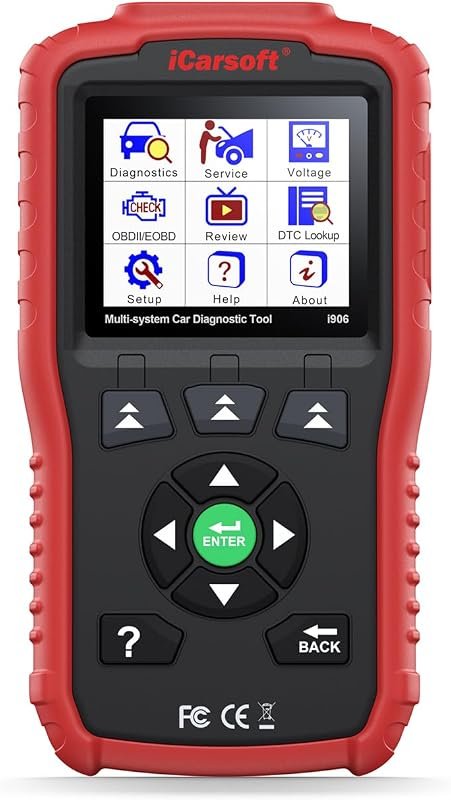 Best Overall
iCarsoft i906 OBD2 Scanner for Volvo and Saab, Multi-System Diagnostics with Engine, ABS, SRS
It offers the strongest all-around mix of fit, value, and practical daily use for Volvo owners.
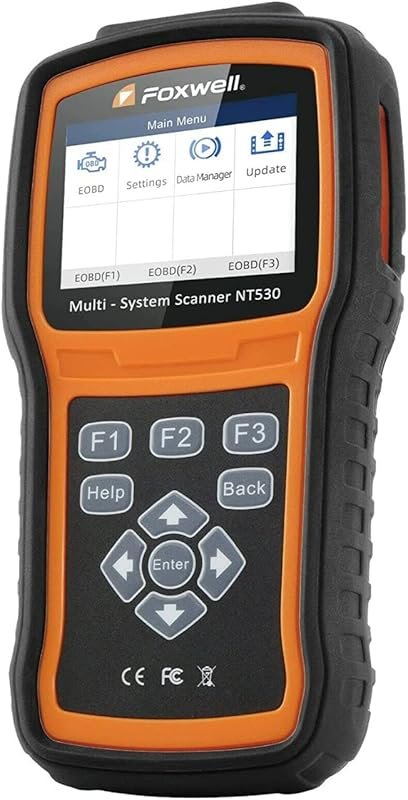 Best Value
FOXWELL NT530 for Volvo, Bidirectional OBD2 Scanner Covering All Systems with ABS Bleed, SRS, EPB, Oil Reset
It makes sense for owners who want a useful upgrade without paying more than necessary.
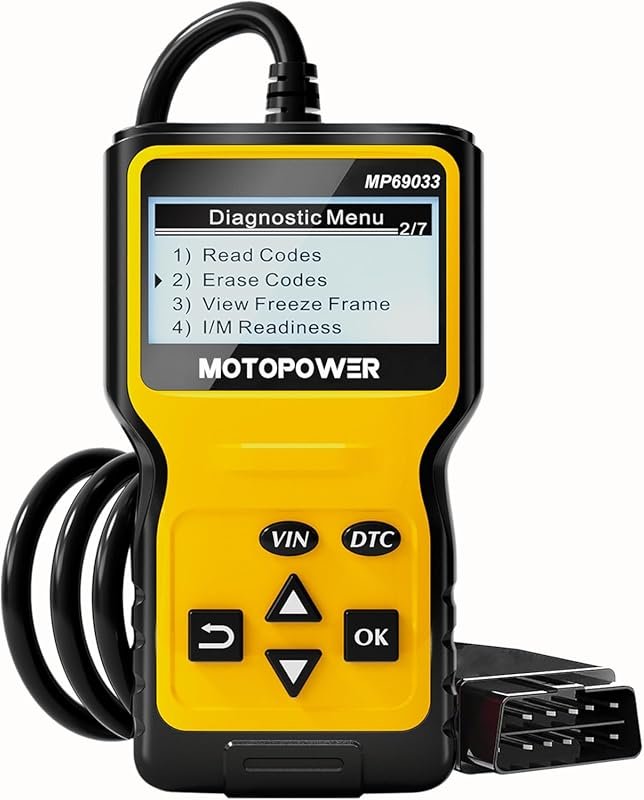 Best Premium Option
MOTOPOWER MP69033 OBD2 Code Reader, CAN Diagnostic Scanner for 1996+ Cars, Reads and Clears Check Engine Codes
It is the pick I would compare first if build quality, features, and long-term ownership value matter most.
Author

Author

Evans Torres
I’m Evans Torres, an automotive engineer who loves Volvo cars. I graduated in Automotive Engineering from USC. I have worked in the car industry for years and now share my knowledge on The Volvo Life. I started this blog to connect with other Volvo fans. I offer tips, news, and advice to help you care for your car. My goal is to help you keep your Volvo in great shape and find all the best things about it. Join me as we discover everything Volvo has to offer!