


The Volvo XC90 has been a popular choice among families and drivers since its introduction in 2002. With various model years and features, the AUX connection allows you to enjoy your favorite music directly from your device.
To use the AUX cord in a Volvo XC90, connect a compatible device via the AUX port, typically found in the center console or dashboard. Follow these steps for an optimal audio experience while driving your XC90.
- How to Use the AUX: The Volvo XC90 has been a popular choice among families and drivers since its.
- Understanding the AUX Connection in: The AUX connection is a simple way to bring audio from external devices into.
- Connecting Your Device: Step-by-Step Instructions: Connecting your device to the AUX port is straightforward..
- Adjusting Audio Settings After Connection: Once connected, adjusting audio settings can enhance your listening experience..
- Troubleshooting Common AUX Issues: Sometimes, you may encounter issues while using the AUX connection..
How to Use the AUX Cord in a Volvo XC90 for Ultimate Sound
The Volvo XC90 has been a popular choice among families and drivers since its introduction in 2002. With various model years and features, the AUX connection allows you to enjoy your favorite music directly from your device. For related context, read how to use a professional car scanner for volvo vehicles.
This guide will walk you through using the AUX cord effectively in your XC90.
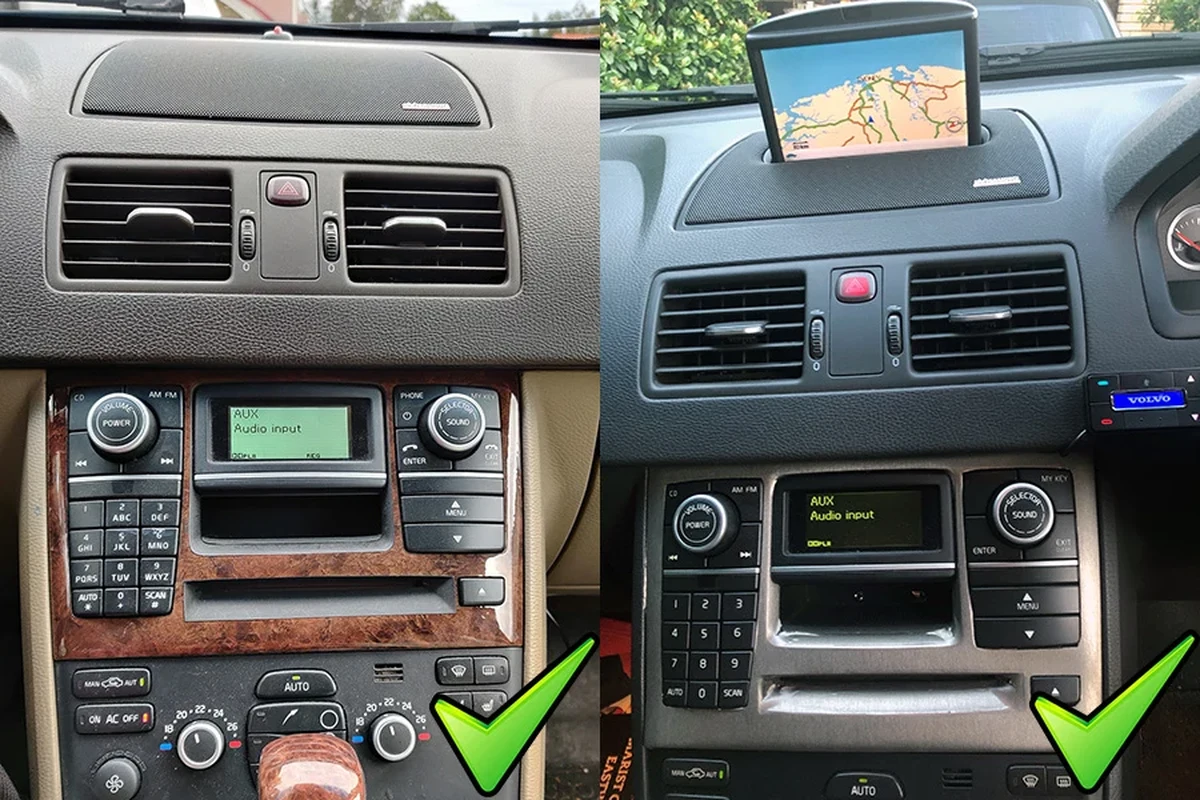
Understanding the AUX Connection in Your Volvo XC90
The AUX connection is a simple way to bring audio from external devices into your Volvo XC90’s sound system. Understanding where to find the AUX port and how it functions helps enhance your in-car entertainment experience.
Where to Find the AUX Port in Different XC90 Model Years
The location of the AUX port can vary slightly based on the model year:
- 2003-2014: Typically located in the center console, near the gear shifter.
- 2015-2022: Found in the center console storage compartment or near the infotainment system.
- 2023 and newer: Often integrated into the dashboard area, check the owner’s manual for specifics.
Always refer to the owner’s manual for precise locations based on your specific trim and model year. You can also use how to use a volvo to jump start another car safely as the next practical guide.
Ensure your AUX cable and devices are in good condition. Check for any updates or recalls related to your XC90’s audio system.
Connecting Your Device: Step-by-Step Instructions
Connecting your device to the AUX port is straightforward. Follow these simple steps to ensure a smooth connection.
Required Equipment for AUX Connection
To connect your device, you will need:
AUX cable with 3.5mm male connectors on both ends. A smartphone, tablet, or any compatible audio device. Ensure your device has a headphone jack or appropriate adapter. For related context, read how to put volvo xc90 in neutral with dead battery.
- Locate the AUX port: Find the AUX port in your XC90 based on the model year.
- Plug in the AUX cable: Insert one end into your device’s headphone jack and the other into the AUX port.
- Select the AUX input: On your XC90’s audio system, choose the AUX option to switch to the external audio source.
- Play your audio: Start playing music or audio from your device, and it should stream through the vehicle’s speakers.
- Always use a high-quality AUX cable to prevent audio issues.
- Regularly clean the AUX port to ensure a good connection.
- Keep your audio device charged to avoid interruptions.
Adjusting Audio Settings After Connection
Once connected, adjusting audio settings can enhance your listening experience. Here’s how to optimize sound quality in your XC90. You can also use how to replace battery in volvo xc90 key fob as the next practical guide.
Optimizing Sound Quality in Your XC90
To ensure the best audio experience:
- Adjust the volume on both your device and the car’s audio system for balance.
- Use the equalizer settings in your XC90 to tailor the sound to your preference.
- Check for any sound enhancements or surround sound options available in your XC90.
Experiment with different settings to find what works best for your music genre.
Troubleshooting Common AUX Issues
Sometimes, you may encounter issues while using the AUX connection. Here’s how to troubleshoot common problems. For official guidance on this, see Volvo Cars official website.

What to Do When Sound Doesn’t Play
If you’re not hearing sound through the AUX connection, try these troubleshooting steps:
Check that both ends of the AUX cable are securely plugged in. Ensure your device is playing audio and is not muted. Try using a different AUX cable to rule out cable issues. Test the audio with another device to isolate the problem. For related context, read how to turn off time for regular maintenance volvo xc90.
Check your audio system’s warranty status and service history to avoid unexpected costs related to repairs or replacements.
Alternatives to Using the AUX Cord
If you’re looking for different ways to connect your audio devices, consider these alternatives.
Bluetooth vs AUX: Which Is Better for Your XC90?
Both AUX and Bluetooth have their advantages:
- AUX: Offers a direct connection with minimal audio loss, but requires a cable.
- Bluetooth: Provides wireless convenience and allows for hands-free calls, but may introduce slight audio latency.
Consider your needs—if you prioritize sound quality, AUX is preferred. For convenience, Bluetooth is ideal. This area decision also connects with how much is an oil change for a volvo xc90.
Drivers who enjoy high-quality audio while commuting or traveling.
2003-present Volvo XC90 models.
You prefer wireless audio streaming over using cables.
Comparing AUX Functionality Across XC90 Generations
Each generation of the XC90 has seen updates and changes in technology. Here’s how AUX functionality varies.
Model-Specific Features and Variations
The AUX port functionality has generally been consistent, but consider these points:
2003-2014 models primarily rely on analog connections. 2015 and newer models may offer additional features, including USB ports and Bluetooth functionality. Always consult the owner’s manual for model-specific details about audio connections and settings. For related context, read how to change battery in 2017 volvo xc90 key fob.
How to Use the Aux Cord in a Volvo XC90
To use the AUX cord in your Volvo XC90, connect a suitable device to the AUX port located in the center console or dashboard, depending on the model year. For official guidance on this, see NHTSA recall lookup by VIN.
Ensure that your audio device is playing and that the car’s audio system is set to the AUX input for smooth sound streaming from your device. You can also use how to change battery in 2019 volvo xc90 key fob as the next practical guide.
- Locate the AUX port specific to your XC90 model year.
- Connect a high-quality AUX cable from your device to the AUX port.
- Adjust audio settings on both your device and the XC90 for optimal sound quality.
This guide on how to use the aux cord in a volvo xc90 is general information. Rules, fees, rents, salaries, service coverage, product details, and procedures can change, so confirm important points with the manufacturer, retailer, or official app documentation before acting.
Quick Questions, Answered
The AUX port’s location varies by model year: for 2003-2014 models, it’s typically in the center console near the gear shifter; for 2015-2022 models, it’s found in the center console storage compartment or near the infotainment system. In 2023 and newer models, it is often integrated into the dashboard area, so always refer to the owner’s manual for specifics.
To connect your device to the AUX port, you will need an AUX cable with 3.5mm male connectors on both ends and a compatible audio device, such as a smartphone or tablet. Ensure that your audio device has a headphone jack or the appropriate adapter for connection.
After connecting the device via the AUX cable, you need to select the AUX input option on your XC90’s audio system to switch to the external audio source. This step is crucial for the audio from your device to stream through the vehicle’s speakers.
If sound isn’t playing, first check that both ends of the AUX cable are securely plugged in and ensure your device is playing audio and not muted. If the issue persists, try using a different AUX cable or test the audio with another device to isolate the problem.
To enhance sound quality, adjust the volume on both your device and the XC90’s audio system for balance and use the equalizer settings in your XC90 to tailor the sound to your preference. Experimenting with different settings can help optimize your listening experience based on the music genre.
Using AUX provides a direct connection with minimal audio loss, making it ideal for sound quality. In contrast, Bluetooth offers the convenience of wireless connectivity, but it may introduce slight audio latency, so consider your needs when choosing between the two options.
Final Words
Using the AUX cord in your Volvo XC90 is a simple process that enhances your driving experience with your favorite tunes.
By understanding where to find the AUX port, how to connect your devices, and troubleshooting potential issues, you can enjoy high-quality sound on the road. Always refer to your owner’s manual for model-specific details and updates.
Author

💡 Evans Torres Tip: On every Volvo I have owned, I always keep a full digital service record from day one. When something goes wrong — and eventually something always does — having that history makes diagnosis faster and often saves money at the mechanic. Start your records today, even if the car is not new.