


Park Assist is a driver assistance feature in the Volvo XC90 designed to simplify parking maneuvers. It employs ultrasonic sensors to detect available parking spaces and aids drivers in both parallel and perpendicular parking.
Using Park Assist in the Volvo XC90 makes parking easier and safer for drivers. This guide covers how to use park assist in Volvo XC90 models from 2016 to 2023, detailing activation steps, maneuvers, limitations, and troubleshooting tips.
- Understanding Park Assist in the: Park Assist is a driver assistance feature in the Volvo XC90 designed to simplify.
- How to Activate Park Assist: Activating Park Assist is straightforward, but the process can vary slightly depending on the.
- Using Park Assist for Different: The Park Assist feature in the XC90 supports various parking maneuvers, including.
- Limitations and Considerations When Using: While Park Assist enhances parking ease, it has limitations..
- Model Year Variations in Park: The Park Assist system has evolved across different model years of the Volvo XC90..
Understanding Park Assist in the Volvo XC90
Park Assist is a driver assistance feature in the Volvo XC90 designed to simplify parking maneuvers. It employs ultrasonic sensors to detect available parking spaces and aids drivers in both parallel and perpendicular parking.
This technology is particularly beneficial for those who find parking in tight spaces challenging, enhancing safety and convenience.

An Overview of Park Assist Technology
The Park Assist system uses sensors located in the front and rear of the vehicle to measure available parking spaces. When activated, the system provides visual and audio cues to guide the driver through the parking process.
Park Assist can significantly reduce the stress associated with parking in crowded areas, making it a valuable feature for daily drivers and families. For related context, read volvo park assist service required reset.
How to Activate Park Assist in Your Volvo XC90
Activating Park Assist is straightforward, but the process can vary slightly depending on the model year and trim. Here’s a general step-by-step guide to help you get started: You can also use how to put volvo xc90 in neutral with dead battery as the next practical guide.
- Ensure the Vehicle is Stationary: Make sure your XC90 is at a complete stop before activating Park Assist.
- Select the Park Assist Feature: Locate the Park Assist button on the center console or touch screen. It typically has a parking symbol.
- Engage the Gear: Shift the vehicle into reverse or drive, depending on the type of parking you wish to perform.
- Follow On-Screen Instructions: The display will provide instructions and indicate whether a parking space is detected. Follow the prompts.
- Monitor the Process: While Park Assist takes control, be prepared to intervene if necessary.
Drivers who frequently park in urban settings or tight spaces.
2016-2023 Volvo XC90.
You prefer manual parking or drive in rural areas with less traffic.
Using Park Assist for Different Parking Maneuvers
The Park Assist feature in the XC90 supports various parking maneuvers, including:
- Parallel Parking: The system helps guide the vehicle into parallel parking spaces.
- Perpendicular Parking: Park Assist can also assist with perpendicular parking, making it easier to park in spaces next to other vehicles.
When using Park Assist, always stay attentive and prepared to intervene, especially in tight spaces or during complex maneuvers. For related context, read how to replace battery in volvo xc90 key fob.
Check the sensors for any obstructions and ensure the system is functioning correctly before relying on Park Assist.
Limitations and Considerations When Using Park Assist
While Park Assist enhances parking ease, it has limitations. The system may not function optimally in certain conditions, such as:
Obstructed Sensors: Dirt or snow covering the sensors can hinder performance. Narrow Spaces: The system may struggle with particularly tight spaces or unconventional parking layouts. Weather Conditions: Heavy rain or snow can affect sensor accuracy. For official guidance on this, see Volvo Cars official website.
Drivers should always remain vigilant and ready to take control during parking. Park Assist is a tool to assist, not a substitute for driver awareness. You can also use how to turn off time for regular maintenance volvo xc90 as the next practical guide.
Consider the maintenance history of the Park Assist system, including any repairs or sensor replacements that may be needed.
Model Year Variations in Park Assist Features
The Park Assist system has evolved across different model years of the Volvo XC90. Here’s a comparison focusing on models from 2016 to 2023:
- 2016-2019: Early models featured basic Park Assist capabilities, primarily focusing on parallel parking.
- 2020-2022: Enhanced features were introduced, including improved sensor technology for perpendicular parking and advanced parking algorithms.
- 2023: The latest models incorporate over-the-air updates, allowing for continuous enhancements to Park Assist functionality.
Always consult your owner’s manual for specific features and updates applicable to your model year. For related context, read how to change battery in 2017 volvo xc90 key fob.
Troubleshooting Common Park Assist Issues
Users may encounter various issues while operating Park Assist. Here are some common problems and their solutions:
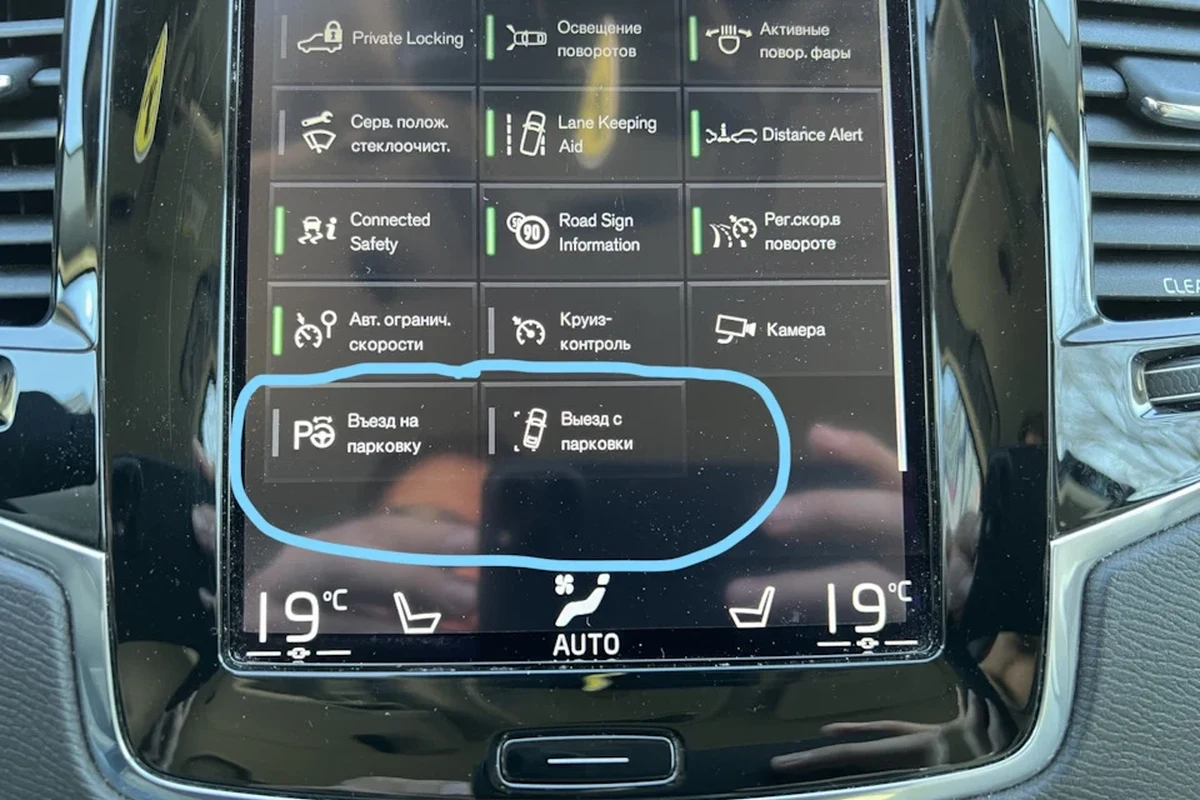
Park Assist Not Activating: Check if the system is turned on and whether the vehicle’s speed is appropriate for activation. Sensor Obstruction: Inspect the sensors for dirt or damage and clean them if necessary. Poor Performance: If Park Assist fails to detect spaces, verify that no obstructions are surrounding the vehicle. You can also use how to change battery in 2019 volvo xc90 key fob as the next practical guide.
- Listen for any unusual sounds from the sensors.
- Check if the Park Assist activates smoothly without error messages.
- Test both parallel and perpendicular parking features.
Customizing Park Assist Settings
Volvo XC90 owners can adjust Park Assist settings to fit their preferences better. Access the settings via the infotainment system:
- Open Settings: Navigate to the settings menu on the touchscreen.
- Select Driver Assistance: Find the Park Assist option within the driver assistance settings.
- Adjust Preferences: Modify the preferences for audio alerts, visual cues, and activation settings.
Customizing these settings can enhance your experience and ensure the system functions according to your parking habits. For related context, read how to turn off start stop in volvo xc90.
Safety Features Integrated with Park Assist
Park Assist works alongside several safety technologies to enhance overall safety during parking. Some of these features include:
- Blind Spot Information System (BLIS): Alerts you to vehicles in your blind spots while parking.
- Cross Traffic Alert: Warns of approaching traffic from the sides when reversing.
- Rear Collision Mitigation: Automatically applies brakes if a potential rear collision is detected.
These integrated systems work together to provide a comprehensive safety net, making parking safer for XC90 drivers. This also connects with how to use a professional car scanner for volvo vehicles before you pay, sign, or book.
- Regularly clean the sensors to ensure optimal performance.
- Familiarize yourself with the settings and alerts of Park Assist.
- Practice in a safe environment before relying on it in busy areas.
How to Use Park Assist in Volvo XC90
To use Park Assist in your Volvo XC90, ensure the vehicle is stationary and activate the feature via the center console or touchscreen. For official guidance on this, see US Department of Energy Alternative Fuels Data Center.
Shift into reverse or drive and follow the on-screen instructions as the system detects available parking spaces, providing visual and audio cues to guide you. Always remain attentive during the process to intervene if necessary.
Check that the vehicle is at a complete stop before activation. Inspect the sensors for dirt or obstruction before using Park Assist. Familiarize yourself with the system’s settings for optimal performance.
This guide on how to use park assist in volvo xc90 is general information. Rules, fees, rents, salaries, service coverage, product details, and procedures can change, so confirm important points with the manufacturer, retailer, or official app documentation before acting.
Quick Questions, Answered
To activate Park Assist, ensure your vehicle is stationary and locate the Park Assist button on the center console or touchscreen. Then, shift the vehicle into reverse or drive and follow the on-screen instructions provided by the system.
Park Assist in the Volvo XC90 supports both parallel and perpendicular parking maneuvers. This feature is particularly beneficial for parking in tight spaces or crowded areas.
Park Assist may not function optimally in conditions such as obstructed sensors, narrow spaces, or adverse weather conditions like heavy rain or snow. Drivers should remain vigilant and ready to take control during parking situations.
From 2016-2019, Park Assist focused primarily on basic parallel parking capabilities. By 2023, models incorporated advanced features like improved sensor technology and over-the-air updates for continuous enhancements.
If Park Assist is not activating, check if the system is turned on and ensure the vehicle’s speed is appropriate for activation. Also, inspect the sensors for any obstructions or damage that may hinder performance.
To customize Park Assist settings, access the settings menu on the touchscreen and select the Driver Assistance option. From there, you can modify preferences for audio alerts, visual cues, and activation settings to suit your needs.
Closing Thoughts
Using Park Assist in the Volvo XC90 can significantly ease the stress of parking in tight spaces. By understanding how to activate and use this technology, along with being aware of its limitations and features, drivers can enjoy a smoother parking experience.
Practice using Park Assist to become familiar with its capabilities and enhance your overall driving experience.
Author

💡 Evans Torres Tip: On every Volvo I have owned, I always keep a full digital service record from day one. When something goes wrong — and eventually something always does — having that history makes diagnosis faster and often saves money at the mechanic. Start your records today, even if the car is not new.