



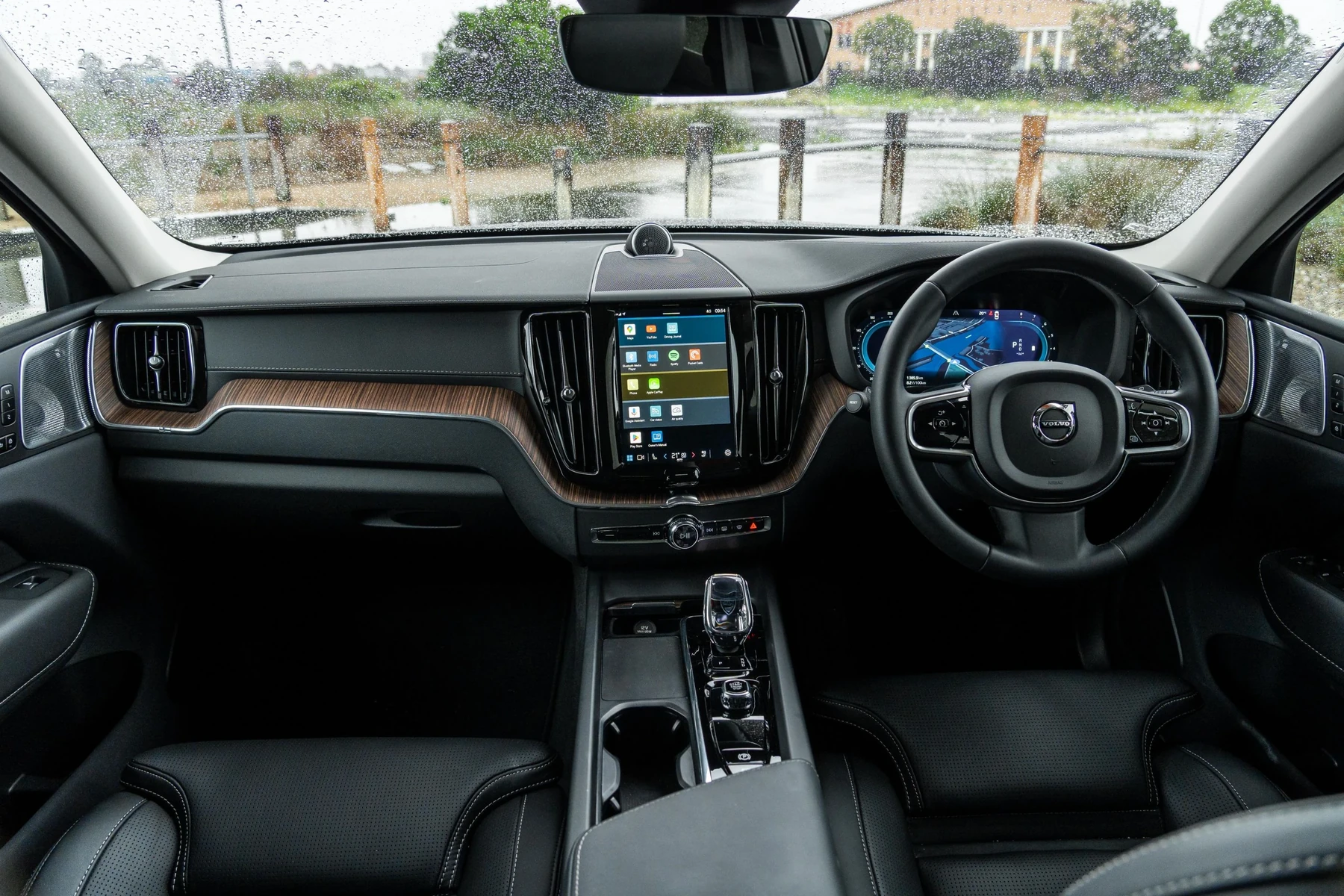
To change the display on a Volvo XC60, access the settings through the infotainment system. Navigate to ‘Display’ settings and adjust as needed for brightness, color themes, and other options.
Changing the display settings on your Volvo XC60 can enhance your driving experience significantly. Whether you want a brighter screen, different color schemes, or simply need to adjust the font size for better readability, knowing how to navigate these settings is essential.
This guide provides step-by-step instructions on how to change the display, ensuring you can customize your vehicle’s infotainment system to your liking.
- Access display settings via the infotainment screen.
- Adjust brightness, themes, and font size for optimal visibility.
- Model-year variations may affect specific features and settings.
- Common mistakes include skipping system updates that can enhance display options.
- Take care when making adjustments to avoid distractions while driving.
Prerequisites for Changing Display Settings
Before diving into the steps for changing the display on your Volvo XC60, ensure you have the following prerequisites: For related context, you may also want to read how to use headlight washers on 2024 Volvo XC60.
- Your vehicle is in park mode.
- The ignition is on, allowing the infotainment system to be operational.
- Your vehicle’s software is updated to the latest version for the best features.
Step-by-Step Procedure to Change Display on Volvo XC60
Follow these steps to successfully change the display settings on your Volvo XC60:
- Turn on the Ignition: Ensure your Volvo XC60 is in the park and turn on the ignition.
- Access the Infotainment System: Press the home button on the center console to access the main menu.
- Navigate to Settings: Use the touchscreen or controller to scroll down and select ‘Settings.’
- Select Display: In the settings menu, find and tap on ‘Display’ to access display-related options.
- Adjust Brightness: You can adjust the brightness level by sliding the brightness bar or selecting ‘Auto’ for automatic adjustment based on ambient light.
- Change Themes: Select the desired theme or color scheme by navigating through the available options.
- Font Size Settings: If available, adjust the font size for better readability by selecting ‘Font Size’ and choosing your preference.
- Save Settings: Once you have made your adjustments, ensure you save the changes by confirming the settings.
Expected Results After Changing Display Settings
After completing the steps outlined above, you should notice a significant improvement in the visibility and aesthetic appeal of your infotainment display. Brightness adjustments will allow for better visibility in various lighting conditions, while theme changes can personalize your driving experience.
If you adjusted the font size, you should find it easier to read navigation and other important information.
Common Mistakes to Avoid
While changing the display settings on your Volvo XC60, be cautious of these common mistakes: This connects closely with how to reset scheduled maintenance on a 2013 Volvo XC60 if you want to compare the topic in more detail.
- Forgetting to Save Changes: Always ensure you confirm and save any changes made to avoid reverting back to default settings.
- Neglecting System Updates: Ensure your vehicle’s software is up to date, as newer updates may enhance display functions.
- Adjusting Settings While Driving: Avoid changing display settings while driving, as this can lead to distractions.
Model-Year Variations in Display Settings
Display settings may vary between different model years of the Volvo XC60. For example:
- 2018-2020 Models: These models typically have more limited display customization options.
- 2021 and Later Models: Newer models feature enhanced display settings, including multiple themes and advanced brightness options.
Check your owner’s manual or the Volvo website for specifics related to your model year.
When Not to Continue Making Changes
If you encounter issues with your infotainment system or if the display settings do not respond as expected, consider the following: You can also use how to turn off start stop on Volvo XC60 as a helpful next guide on the same ownership topic.
- System Malfunction: If the display settings are unresponsive, there may be a software issue requiring a reset or update.
- Distraction While Driving: Avoid making changes while driving, as this can compromise safety.
- Unfamiliar with System: If you’re unsure about a particular setting, consult the owner’s manual or a professional.
💡 Evans Torres Tip: Regularly check for software updates to ensure your Volvo XC60’s infotainment system has the latest features and improvements.
Frequently Asked Questions
Can I Change the Display Brightness While Driving?
It’s not recommended to change display settings while driving. Adjustments should be made when the vehicle is stationary to maintain safety.
What Should I Do If My Display Settings Are Not Saving?
If your display settings are not saving, ensure your vehicle’s software is up to date. A system reset may also help resolve this issue.
Are There Different Themes Available for the Display?
Yes, many newer models of the Volvo XC60 offer various themes and color schemes that you can select from the display settings menu.
How Often Should I Check for Software Updates?
Check for software updates every few months or whenever you notice issues with the infotainment system. Keeping the software updated ensures optimal performance.
Can I Change the Font Size on the Display?
Font size adjustment options are available in the display settings for compatible models. Refer to your owner’s manual for specific instructions.
What to Do Next
Now that you know how to change the display on your Volvo XC60, take a moment to explore the various settings available. Personalizing your infotainment system can make every drive more enjoyable.
If you encounter any issues or need further assistance, refer to your owner’s manual or consult a Volvo dealer for support.
Author

Author

Evans Torres
I’m Evans Torres, an automotive engineer who loves Volvo cars. I graduated in Automotive Engineering from USC. I have worked in the car industry for years and now share my knowledge on The Volvo Life. I started this blog to connect with other Volvo fans. I offer tips, news, and advice to help you care for your car. My goal is to help you keep your Volvo in great shape and find all the best things about it. Join me as we discover everything Volvo has to offer!